
Insurance agents lose client history because it’s scattered across calls, texts, emails, and whichever teammate happened to answer last time, and most CRM notes fields are a scroll of unstructured timestamped text nobody re-reads before the next conversation. The fix isn’t a better CRM — it’s a five-field logging habit you can start today, plus knowing exactly what Ambrose’s lead-memory feature does and does not do about it. This article gives you the full manual system first, then the automated version.
Key takeaways
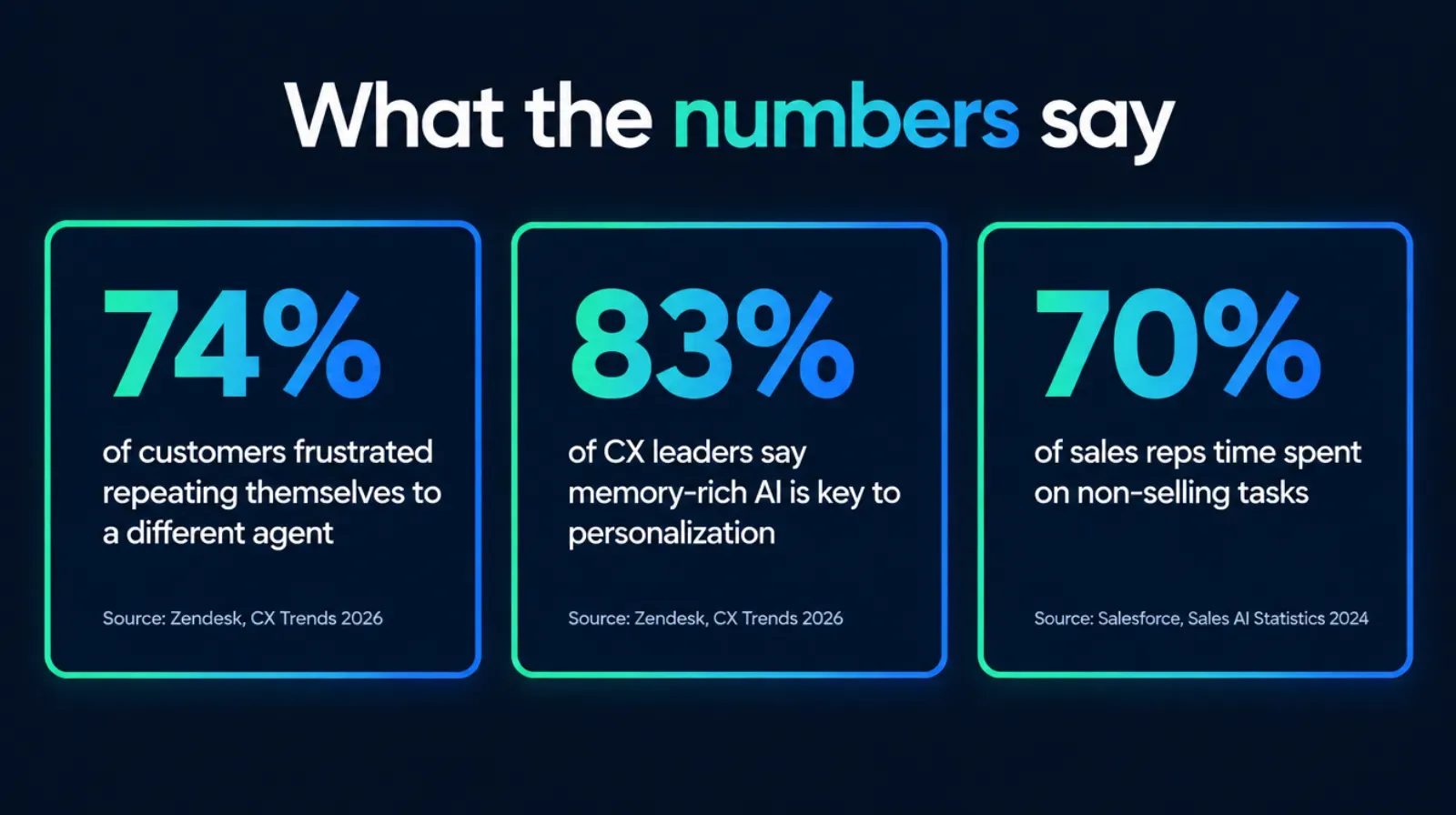
- 74% of customers find it frustrating to repeat their situation to a different agent, and 83% of CX leaders say memory-rich AI is key to personalized customer journeys (Zendesk, CX Trends 2026).
- Sales professionals report spending 70% of their time on non-selling tasks including manual data entry, based on Salesforce's own State of Sales research (survey of 5,500 professionals across 27 countries, conducted Mar. to Apr. 2024) — the admin drag that makes note-taking the first habit to slip.
- A lead history system needs five fields logged the same way every time: date, channel, topic, outcome, next action. It works in any CRM, a spreadsheet, or nothing at all.
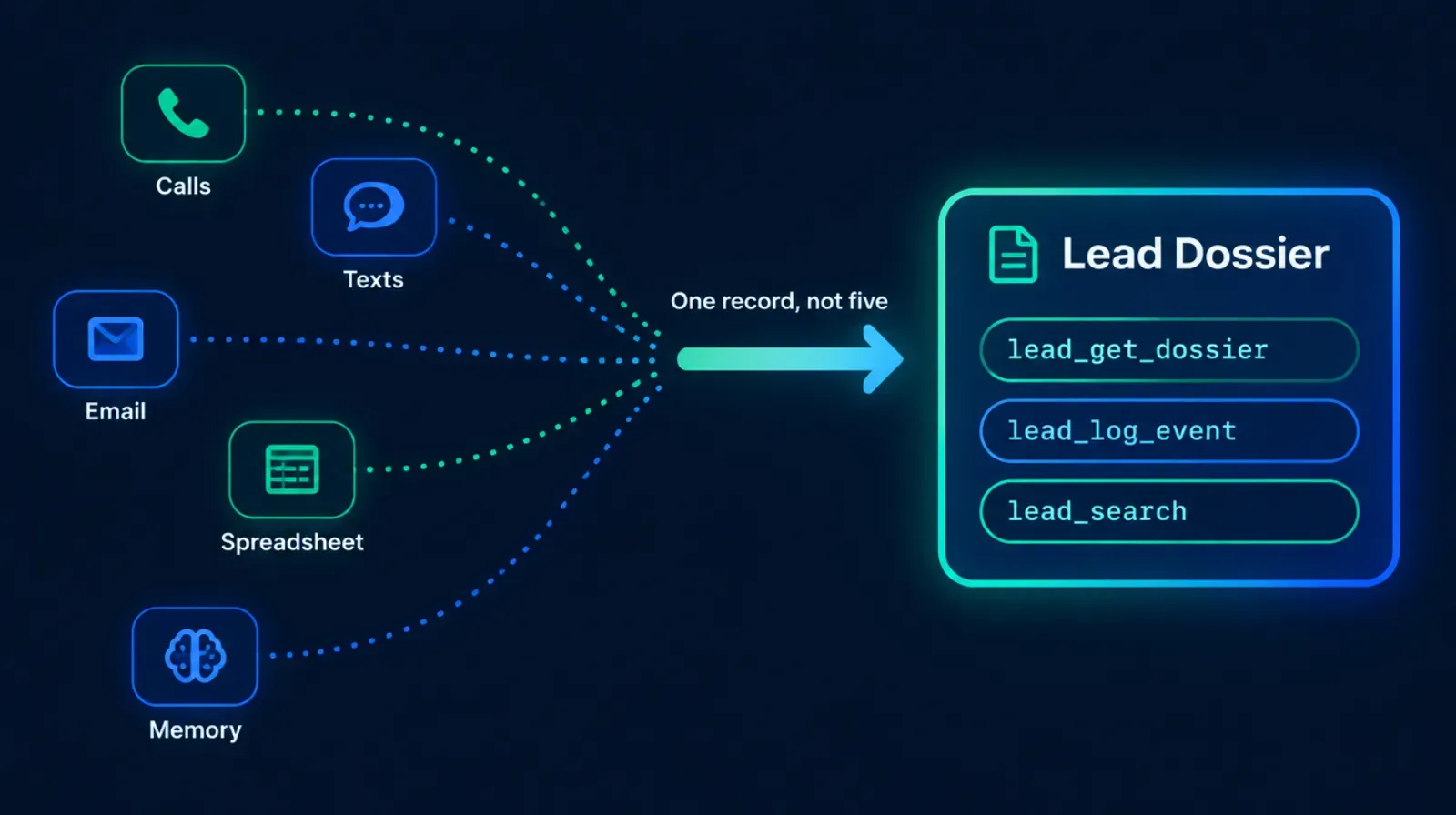
- Ambrose's lead-memory spoke is a per-lead dossier store with three tools — lead_get_dossier, lead_log_event, lead_search — that hold history across campaigns and conversations (Ambrose docs, spoke-lead-memory, fetched September 2026).
- Ambrose's separate Call Intelligence feature records, transcribes, and scores calls from GHL, VAPI, Retell, or JustCall, but as documented this session it does not write those transcripts back into a CRM or lead-memory automatically (Ambrose docs, call-intelligence-overview, fetched September 2026) — this article says so directly instead of blurring the two features together.
The pain: the client remembers the conversation better than your CRM does
A prospect calls in March asking about switching off her employer plan onto the Marketplace. You talk through subsidy eligibility, she mentions her daughter is about to age off her plan, you tell her to call back once she has updated income numbers. She calls back in August. Not you — your teammate, because you’re on another line. Your teammate opens the account and finds three lines in the notes field: “spoke 3/14, interested,” “called back, VM,” and “follow up.” Nothing about the daughter. Nothing about the subsidy conversation. Your teammate starts over, and the client has to explain, again, something she already explained once.
That’s the pain, and it isn’t really a technology problem at the root — it’s a discipline problem that technology can make better or worse depending on how you use it. The information existed. It just lived in your head, not in a place your teammate could find it. Multiply that one prospect by every lead who calls back three months later, gets referred to someone else on the team, or reaches out on a different channel than the one you originally used, and you get a book of business where nobody — including you, six months from now — can reliably answer “what have we already told this person?”
This is uncomfortable to admit, so most agents don’t talk about it directly. It shows up instead as “our CRM notes are a mess” or “onboarding a new agent takes forever” or “I feel like I’m starting from zero with returning leads.” Those are all the same underlying problem wearing different clothes.
Why it happens: insurance conversations are scattered by design, not by accident
Three things stack on top of each other to make this almost inevitable if nobody actively fights it.
First, the channels multiply faster than the discipline to track them does. A single lead relationship today might touch a phone call, a text thread, an email, a form submission, and a walk-in visit, each living in its own system by default: the phone system logs calls, the email client keeps a separate thread, the CRM’s notes field is wherever a human manually typed something after the fact — if they typed anything at all. Zendesk’s 2026 CX Trends research found 74% of customers find it frustrating to have to tell their story over and over to different agents (Zendesk, CX Trends 2026) — that’s the customer-facing symptom of the exact channel-fragmentation problem described here.
Second, note-taking is the first task an agent skips when the day gets busy. Salesforce’s own summary of its State of Sales research (survey of 5,500 sales professionals across 27 countries, fielded March through April 2024) reports that sales professionals spend 70% of their time on non-selling tasks, including manual data entry (Salesforce, Sales AI Statistics 2024, published Jul. 25, 2024). That figure covers sales broadly, not insurance specifically, so treat it as directional context rather than an insurance-specific number — but the mechanism it points to is exactly what agents describe: admin work already eats most of the day, and typing a structured note after a call is the item that gets compressed into “spoke, interested” when the next call is already ringing.
Third, insurance conversations are unusually detail-dense and unusually consequential to get wrong. A single call can cover subsidy eligibility, a family member’s coverage gap, a medication that isn’t on a plan’s formulary, and a timeline tied to a specific enrollment period. None of that is a single fact you can capture in three words — and because getting it wrong has real consequences for the client (a missed deadline, a plan that doesn’t cover a needed drug), the temptation is to either write an essay every time (which nobody has time for and nobody re-reads) or write nothing useful at all (which is what actually happens under time pressure).
What losing the thread actually costs
None of the numbers below say a specific missed detail will cost a specific dollar amount. They establish why the problem is bigger than “sloppy notes” — it’s a customer-experience and time-allocation problem with real, sourced weight behind it.
Where a sales professional's time actually goes
Selling time versus non-selling tasks, including manual data entry and admin work
Source: Salesforce, Sales AI Statistics 2024, State of Sales 6th edition, survey of 5,500 sales professionals across 27 countries, fielded March–April 2024. General sales data, not insurance-specific, fetched September 2026.
The compounding cost is what actually bites: a client who has to repeat herself once is annoyed. A client who has to repeat herself every time she calls in, across three different plan years, starts to wonder why she’s paying an agent instead of shopping the exchange herself. Agent turnover makes this worse in a specific way — an agency’s most experienced producer leaving doesn’t just cost a headcount, it costs every piece of client context that lived only in that person’s head, because nothing forced it into a shared, structured place.
The client remembers the conversation. The question is whether anyone on your side does too.
Victoria CabreraThe manual fix: a lead history system you can build today, in any CRM
This works whether you’re on a $20-a-month CRM with one freeform notes field or a full agency management system. It doesn’t require new software. It requires a template and the discipline to use it every single time, including the times you’re in a hurry — especially the times you’re in a hurry, because that’s when the habit either holds or doesn’t.
Step 1: Pick the one place history lives, and make it survive staff turnover
Before anything else, decide where the record lives, and make sure it isn’t a personal notebook, a personal phone’s notes app, or an individual agent’s private inbox. It needs to be somewhere the agency controls and any authorized person can open: the CRM’s contact record, a shared spreadsheet linked from that record, or an agency management system’s activity log. If the only honest answer today is “in my head” or “in my personal notes app,” that’s the single highest-leverage thing to fix before touching anything else in this article.
Step 2: Log every touch with the same five fields, every time
Skip the essay. Use five fields, in this order, for every call, text, email, or in-person conversation:
| Field | What goes here | Example |
|---|---|---|
| Date | The date of this specific touch, not when you got around to logging it | 2026-09-14 |
| Channel | Call, text, email, in-person, or portal message | Call |
| Topic | One line, the actual subject, not "check-in" | Subsidy eligibility after daughter ages off plan |
| Outcome | What was decided, said, or promised — including "no decision yet" | Client will get updated household income figure |
| Next action | The specific next step, with a date attached, or "none" | Follow up 8/1 once daughter's coverage gap starts |
The discipline here is resisting the urge to write more. “Subsidy eligibility after daughter ages off plan / client will get updated household income figure / follow up 8/1” takes fifteen seconds to type and is more useful six months later than a three-paragraph summary nobody has time to read when the client calls back unexpectedly. Consistency beats detail. A CRM with ten years of five-field entries is more useful than one with two years of detailed paragraphs that stopped the day things got busy.
Step 3: Build a two-minute “before you call” ritual
Before calling back any returning lead, read the full history — every entry, not just the most recent one — before you dial. This sounds obvious and is the step almost everyone skips under time pressure. Two minutes of reading avoids the exact moment that erodes trust fastest: asking a client something she already told you, or worse, contradicting something a teammate already promised her.
Step 4: Handle handoffs on purpose, not by accident
Any time a lead moves from one agent to another — coverage while someone’s out, a formal reassignment, a team-based structure where whoever’s available takes the next call — the outgoing agent’s job isn’t done until the history is legible to the incoming one. That means: no touch goes unlogged, and if there’s context too sensitive or too nuanced for the five-field template (a client going through a difficult family situation, a complaint that needs careful handling), that gets flagged explicitly rather than left as an assumption the next agent is supposed to intuit.
A test you can run this week
Pick five leads who called back after a gap of three months or more. Open each record and time how long it takes you to answer, from the notes alone, "what does this person already know, and what did we promise them?" If the honest answer for any of the five is "I'd have to guess," the five-field system above is the fix, starting today, not next quarter.
Everything above works whether you ever touch Ambrose or join anything. It’s a discipline, not a purchase.
Isn’t the real fix just buying a better CRM?
It’s tempting to treat this as a shopping problem — “our CRM is the issue, we need a better one” — and sometimes that’s partly true. But a $20-a-month CRM with the five-field discipline above, used consistently, beats a $200-a-month CRM with a beautiful activity timeline that nobody fills in. The tool determines how easy structured logging is to do; it doesn’t determine whether anyone does it. Before spending a migration project’s worth of time moving to new software, run the five-lead test from the tip box above on your current system. If the honest answer is “we’d have the same problem in the new CRM,” the CRM isn’t the bottleneck.
That said, some CRM limitations are real and worth naming. A single freeform notes field with no date-stamping, no tagging, and no way to filter by topic makes even a disciplined agent’s history hard to search later — that’s a legitimate reason to look at what your CRM’s contact-record structure actually supports (custom fields, tags, activity types) before assuming the fix has to be a whole new platform. Most CRMs built for insurance agencies already have more structure available than agents actually use; the gap is usually adoption, not capability.
Tag consistently, even if lead_search isn’t available to you yet
Ambrose’s lead_search tool filters a whole book of leads by tag, channel, and status in one query (Ambrose docs, spoke-lead-memory, fetched September 2026). You can approximate the same thing manually, today, with a simple rule: pick a short, fixed list of topic tags — “Medicare Advantage,” “Part D,” “ACA Marketplace,” “Life — Term,” “Life — Final Expense,” “Referral” — and add one to every logged touch alongside the five fields from Step 2. A spreadsheet with a tag column is filterable with Ctrl+F or a basic filter view; a CRM with a tags field is filterable the same way. The habit of tagging consistently is what makes “who haven’t we followed up with on ACA renewals” answerable in a minute instead of an afternoon of scrolling, whether or not you ever automate it.
What to do about the history you already lost
Most agencies reading this already have years of inconsistent notes, not a blank slate. You don’t need to reconstruct all of it — that’s not a realistic ask, and it isn’t the highest-value use of your time. Instead: start the five-field habit today, going forward, on every active lead and client. For your highest-value active relationships — clients up for renewal in the next 90 days, or leads currently mid-conversation — spend fifteen minutes each reading whatever scattered history exists (old emails, call logs, memory) and writing one clean five-field summary entry as a starting point. That single entry becomes the anchor everything from today forward attaches to. You’re not rebuilding the past; you’re giving the future a clean place to start from.
What Ambrose’s lead-memory spoke actually does, and what it doesn’t
Ambrose’s lead-memory spoke is documented as a “per-lead dossier store” that holds “historical context across campaigns and conversations,” and it’s classified as a “safe” spoke — meaning it’s built to handle this kind of data by design rather than needing extra scrubbing at the edge (Ambrose docs, spoke-lead-memory, fetched September 2026). It exposes three tools: lead_get_dossier, which pulls a lead’s complete history, timeline, and any associated campaign or brand context in one call; lead_log_event, which adds a new event to that lead’s timeline; and lead_search, which queries across every lead using filters like tag, channel, and status (Ambrose docs, spoke-lead-memory, fetched September 2026). In practice, that’s the five-field template from Step 2 above, turned into something a team can query instead of scroll through — “show me every lead tagged Medicare Advantage with no contact in 60 days” is a lead_search query, not a manual spreadsheet filter.
The five-field template from this article
- You decide where it lives and enforce the habit yourself
- Reading history before a call is a ritual you have to remember
- Searching across leads means filtering a spreadsheet or CRM report by hand
- Works today, in any CRM, at zero cost
The same discipline, queryable
- lead_get_dossier pulls the full timeline and context in one call
- lead_log_event writes a structured entry instead of a freeform note
- lead_search filters across the whole book by tag, channel, or status
- Comes with one Ambrose seat included in the Tech Savvy membership
Here’s the part worth being direct about, because glossing over it is exactly the kind of overclaim that erodes trust: lead-memory is not the same feature as Call Intelligence, and the two do not currently connect automatically. Call Intelligence is Ambrose’s separate call-recording and scoring pipeline. It runs a four-step process — Sweep locates new calls from connected sources (GHL, VAPI, Retell, or JustCall), Intake archives the recording and gets a transcript (the provider’s own transcript when available, AWS Transcribe as a fallback when there’s no usable English transcript), Junk Filter screens out voicemails and misdials, and Score analyzes the real conversations against the agency’s scorecard and objection taxonomy (Ambrose docs, call-intelligence-overview, fetched September 2026). The results — the audio file, the transcript, and the scoring analysis — are stored in the agency’s vault at documented paths under call-intelligence/, and as of this session the documentation does not describe those transcripts or summaries being written back into a lead’s CRM record or into lead-memory automatically (Ambrose docs, call-intelligence-overview, fetched September 2026).
The honest version of this section
Call Intelligence answers "how did this call go, and what objection came up" for coaching purposes. Lead-memory answers "what do we already know about this specific lead" for the next conversation. Today, connecting the two — turning a call's outcome into a lead-memory event — is a workflow an agency builds with an agent or team calling lead_log_event, not something that happens by default out of the box. If a future update changes that, treat this paragraph as describing what was confirmed in the docs this session, not a permanent limit.
That distinction matters because it’s the difference between a real product and a marketing claim. The manual five-field habit from Step 2 doesn’t go away once you have Ambrose — if anything, it becomes the exact shape of what gets logged into lead-memory via lead_log_event, whether a human types it or a configured workflow does.
A day this actually changes
Picture the March-to-August scenario from the opening of this article, run through the system above. In March, the call ends and the agent — or, with Ambrose, a workflow calling lead_log_event — logs: date, channel (call), topic (subsidy eligibility, daughter aging off plan), outcome (client will get updated income figure), next action (follow up once daughter’s coverage gap starts). In August, a different team member takes the inbound call. Before picking up, or in the first ten seconds of the call, a lead_get_dossier query (or, manually, reading the five-field history) surfaces exactly what was discussed in March. The client doesn’t repeat herself. The agent doesn’t guess. The only thing that changed between the manual version and the Ambrose version is how fast the history surfaces and how easily it’s searched across an entire book of leads — the underlying discipline is identical.
The compliance angle: a structured history is also a documentation habit
Beyond the customer-experience case, there’s a compliance reason to take this seriously. If you sell Medicare Advantage or Part D, CMS already requires TPMOs to document specific disclosures and scope-of-appointment details for beneficiary conversations — our companion guides on the 48-hour SOA rule change and Medicare landing page compliance cover those specifics in full. A structured, searchable history is exactly the kind of record that makes answering “what did we tell this beneficiary, and when” straightforward instead of a scramble. Beyond Medicare specifically, the NAIC’s Model Bulletin on the Use of Artificial Intelligence Systems by Insurers, adopted in December 2023, sets a general expectation that decisions or actions made or supported by AI still have to comply with applicable insurance laws and regulations, and that insurers and agencies should be able to document their own governance around how AI tools get used (NAIC, Insurance Topics: Artificial Intelligence, Model Bulletin). If any part of your lead-history workflow touches an AI tool — including a general-purpose chatbot you might be tempted to paste call details into — that’s a written-policy-and-oversight question, not a “figure it out later” one.
What not to paste into a general AI tool
A client's health condition, Medicare Beneficiary Identifier, Social Security number, or specific plan and premium details are exactly the kind of protected health and personal information that shouldn't go into a general-purpose AI chat tool with no Business Associate Agreement in place. This is precisely the gap Ambrose's PHI Rail is built to close, aliasing identifiers before any non-BAA destination sees them. Our companion guide on what not to paste into ChatGPT covers this in full.
What if you’re a solo agent instead of a team?
The temptation as a solo agent is to skip all of this — “it’s all in my head, and it’s just me, so why write it down?” Two reasons. First, your own memory of a lead from ten months ago is less reliable than you think, especially across a busy AEP; the five-field system is as much a tool for future-you as it is for a teammate. Second, most solo agents don’t stay solo forever, and the agents who eventually bring on a virtual assistant, a licensed producer, or a part-time team member during AEP are the ones who already have a system for someone else to step into, instead of trying to build one during the busiest six weeks of the year.
Does this change anything about cross-selling?
A clean lead history is also where cross-sell opportunities actually surface, instead of getting missed. If the March call notes had captured “daughter aging off plan, household also mentioned wanting term life now that they’re a two-income family,” that’s a life insurance conversation sitting in plain sight by August — not because anyone was pushing a sale, but because the detail was written down instead of forgotten. Agents who cross-sell life insurance into an existing Medicare or ACA book successfully are almost always working from some version of this discipline, even if they’ve never called it a “lead history system.” The five-field template doesn’t need a sixth field for this — “topic” and “outcome” naturally capture it if you’re actually listening and actually writing it down.
What you get by joining
One Ambrose seat comes with a Tech Savvy Insurance membership: $97 a month, billed monthly, cancel anytime, founding rate locked in while the membership stays active. That includes weekly Zoom calls with open Q&A and build-with-you sessions, 30-plus hours of recorded training, pre-built AI templates and bot deployments, Meta Ads and marketing training built for this industry specifically, and a free annual in-person member workshop — plus an explicit no-recruiting rule, so a question about setting up lead-memory doesn’t turn into someone else’s downline pitch.
Ambrose usage is separate from the $97 seat
The membership includes one Ambrose seat; usage inside Ambrose runs through its own credit ledger with spend caps, so cost stays visible instead of showing up as a surprise. See the full Spokes catalog for what lead-memory and Call Intelligence sit alongside.
Pick one place history lives
Not a personal notebook — a shared, agency-controlled record that survives staff turnover.
Log five fields, every time
Date, channel, topic, outcome, next action. Fifteen seconds, every touch.
Read before you dial
Two minutes with the full history avoids re-asking what's already answered.
Handle handoffs on purpose
The outgoing agent's job isn't done until the next person can read the record.
Know what Ambrose actually connects
Lead-memory and Call Intelligence are separate features today — plan around the real seams, not a marketing claim.
Make it queryable
lead_search turns "who haven't we followed up with" into one question instead of a manual filter.
Stop starting over with returning leads
The five-field system above works whether you ever join anything or not. If you'd rather see lead_get_dossier and lead_log_event set up on your own account, with someone watching your screen, one Ambrose seat comes with the Tech Savvy membership.
Join Tech Savvy — $97/monthThe close
The client in the opening story doesn’t care whether her history lives in a spreadsheet, a CRM field, or an Ambrose dossier. She cares whether she has to explain herself again. Fix that with the five-field habit this week, whether or not you ever touch Ambrose — and if you want the queryable version with a room of people who’ve already built it, that’s what a Tuesday call in the Tech Savvy community looks like. $97 a month, cancel anytime, and nobody will pitch you a downline: https://techsavvyinsurance.com/.
Before you build a client history system
Tech Savvy Insurance is a training and software community, not an insurance company, agency, or law firm, and does not provide insurance, legal, tax, or compliance advice. You are responsible for your own licensure and for complying with all applicable CMS, HIPAA, state, and carrier record-keeping requirements. AI outputs, including any AI-assisted call summary or logged note, may contain errors — always verify before relying on it, and never paste a client's protected health information into a general-purpose AI tool without a Business Associate Agreement in place. Results may vary.
Frequently asked questions
Sources
- Salesforce — Sales AI Statistics 2024 (State of Sales, 6th edition, published Jul. 25, 2024) — salesforce.com
- Zendesk — CX Trends 2026 Report — cxtrends.zendesk.com
- Ambrose docs — spoke-lead-memory — app.hiambrose.com
- Ambrose docs — Call Intelligence overview — app.hiambrose.com
- Ambrose docs — Spokes catalog — app.hiambrose.com
- NAIC — Insurance Topics: Artificial Intelligence (Model Bulletin, adopted Dec. 2023) — content.naic.org
Ready to put this into practice?
Join a private community of Health & Life insurance professionals using AI, Meta Ads, and automation to grow — without draining their bank account.
Join Tech Savvy — $97/month