
If you’re running an ad to a Medicare landing page right now, there’s a real chance that page is missing something CMS requires and something Meta or Google requires — and you’d have no way to know until an ad gets disapproved or a carrier compliance audit flags it. The short answer: under 42 CFR 422.2267(e), the TPMO disclaimer has to be “prominently displayed on TPMO websites,” which covers your landing page whether it’s your whole site or one page built for a single campaign, and both Meta and Google layer their own ad-platform rules on top of that federal requirement. This article walks through exactly what’s required, what it costs to get wrong, and how to build a compliant page yourself — by hand, for free, today.
Key takeaways
- 42 CFR 422.2260 defines a TPMO as anyone "compensated to perform lead generation, marketing, sales, and enrollment related functions" — that's most independent Medicare agents, and it makes your landing page a TPMO website.
- 42 CFR 422.2267(e) requires the TPMO disclaimer to be "prominently displayed on TPMO websites," with no carve-out for a single-purpose campaign landing page.
- Marketing materials that draw attention to a specific plan's benefits or premiums have to go through CMS review under 42 CFR 422.2261 — deemed approved after 45 days, 10 days for CMS model materials, or live in 5 days under File and Use.
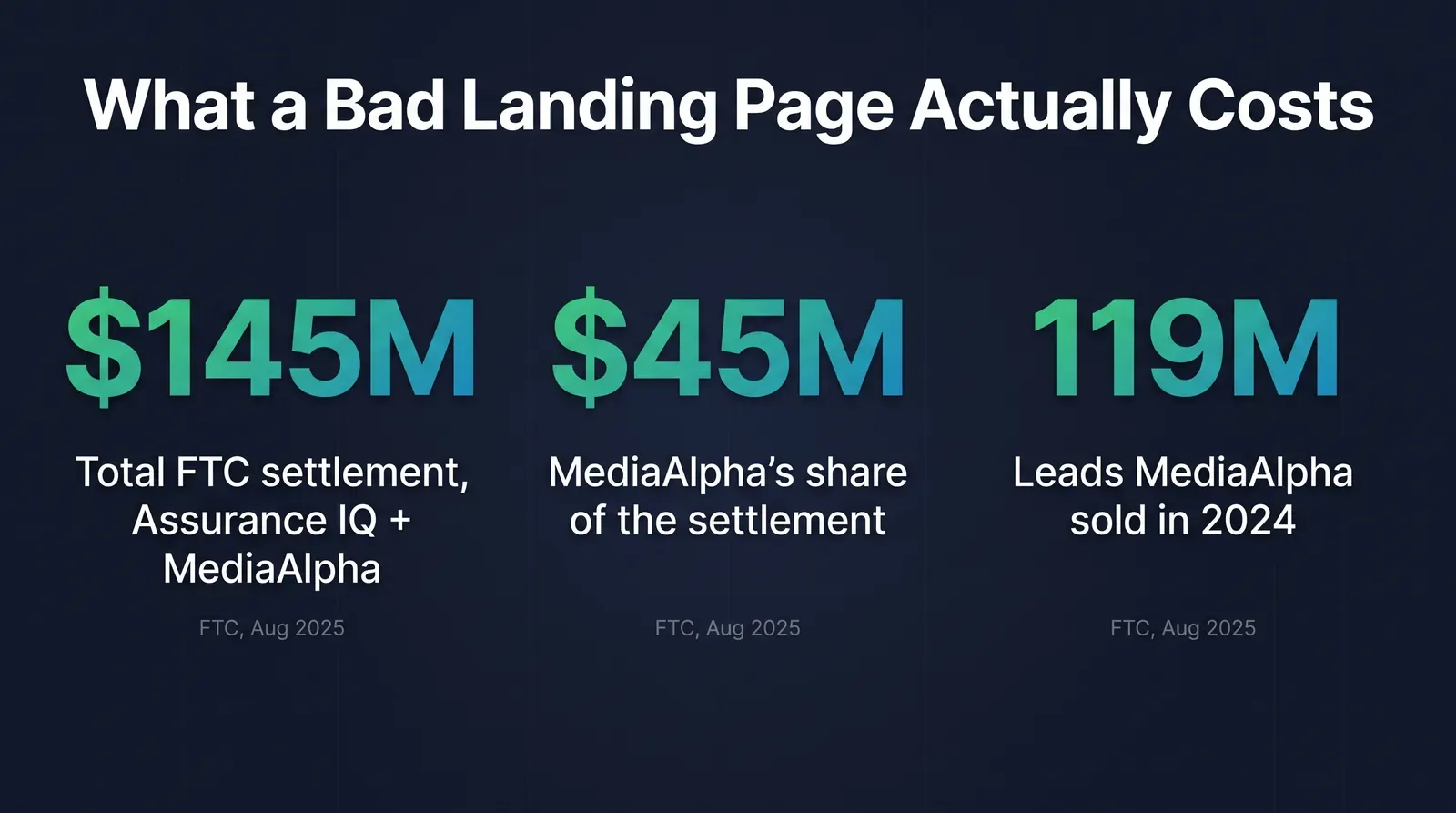
- The FTC's August 2025 settlement with Assurance IQ and MediaAlpha totaled $145 million over deceptive lead-generation landing pages that faked government affiliation — a real, recent example of what a bad landing page can cost.
- Meta requires ad content to match the landing page exactly, and Google requires U.S. health insurance advertisers to hold G2RS certification before they can run ads at all.
- Ambrose's demo-forge spoke builds branded demo sites with schema generation built in, at no extra cost beyond the seat — one seat comes with a Tech Savvy membership.
What actually makes your landing page “marketing material” CMS cares about
Start with the definition, because most of the confusion here traces back to agents assuming a landing page is just “info,” not a regulated communication. 42 CFR 422.2260 defines marketing with a two-part test: the material has to be “intended… to draw a beneficiary’s attention to a MA plan or plans,” and it has to “include or address content regarding the plan’s benefits, benefits structure, premiums, or cost sharing” (42 CFR 422.2260). Both parts have to be true. A page that just says “Medicare open enrollment is coming, talk to a licensed agent” is closer to a general communication. A page that says “See if you qualify for a $0 premium Medicare Advantage plan with dental and vision” is marketing, full stop, because it names a benefit and implies a premium.
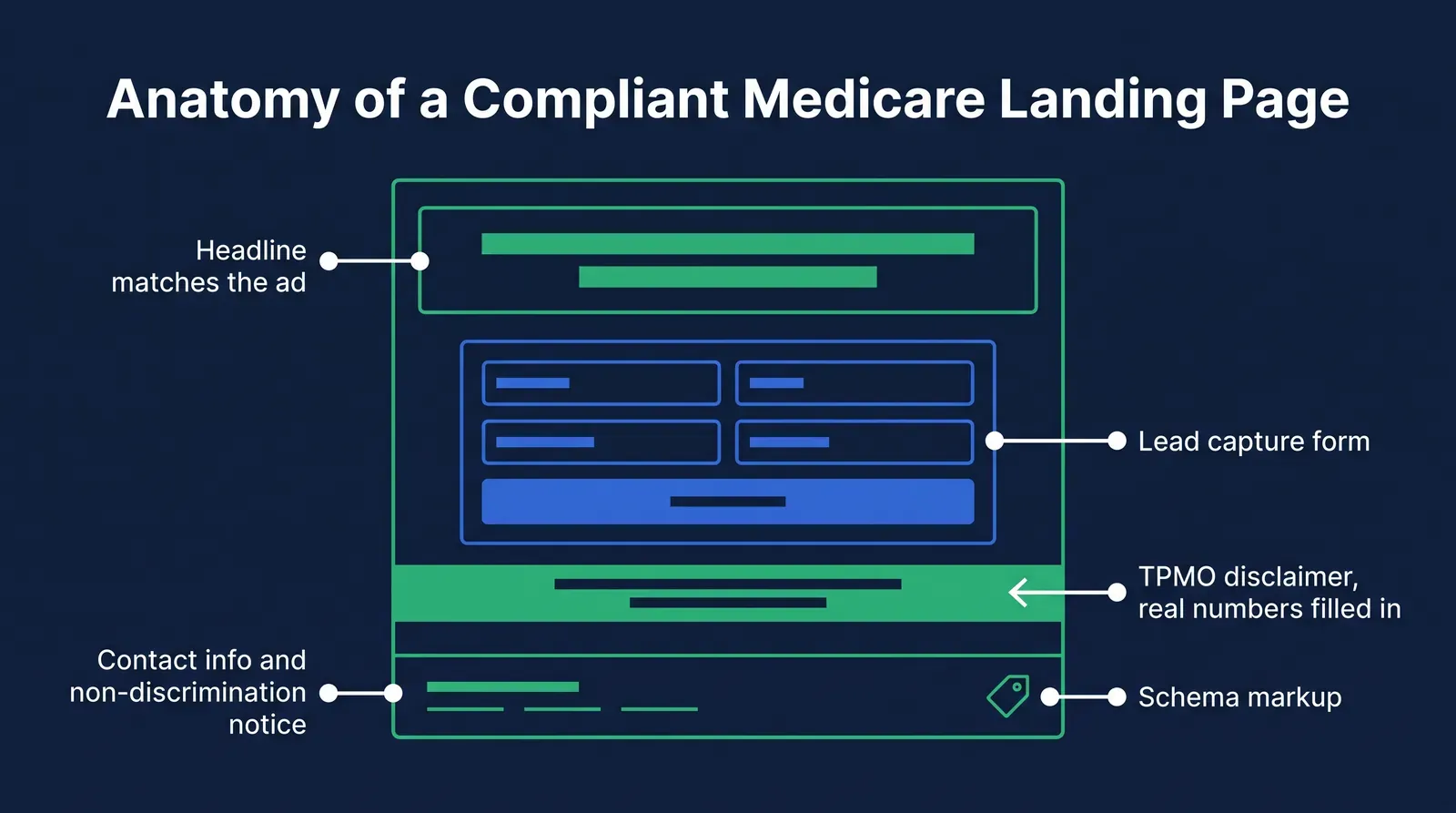
That same section also defines who this applies to. A third-party marketing organization, or TPMO, is any organization or individual — “including independent agents and brokers” — who is “compensated to perform lead generation, marketing, sales, and enrollment related functions as a part of the chain of enrollment” (42 CFR 422.2260). If you get paid commission on Medicare Advantage business and your landing page generates leads or drives calls toward that business, you’re a TPMO under this definition, and your landing page is a TPMO website. There’s no separate, lighter category for “just a campaign page” versus “my main site.” The regulation doesn’t distinguish between them.
| What the page says | Draws attention to a plan? | Addresses benefits/premium/cost-sharing? | Marketing material? |
|---|---|---|---|
| "Compare Medicare plans in your area with a licensed agent" | Yes, generally | No | Borderline — verify with your carrier |
| "See $0 premium Medicare Advantage plans with dental, vision, and OTC benefits" | Yes | Yes | Yes |
| "Get a free Medicare guide, no obligation" (generic educational lead magnet) | No specific plan named | No | Likely a general communication — confirm with your carrier |
| "[Plan Name] 2026: everything included, see if you qualify" | Yes | Yes (named plan) | Yes |
The TPMO disclaimer, and why “prominently displayed” is doing the real work
Once your page counts as a TPMO website, the disclaimer requirement is specific about content and non-specific about placement, and that gap is where most agents get it wrong. 42 CFR 422.2267(e) sets out two versions of the required language depending on whether you represent every plan available in the service area. If you don’t represent every plan, the required text is: “We do not offer every plan available in your area. Currently we represent [insert number of organizations] organizations which offer [insert number of plans] products in your area. Please contact Medicare.gov or 1-800-MEDICARE to get information on all of your options.” If you do represent every plan, it’s: “Currently we represent [insert number of organizations] organizations which offer [insert number of plans] products in your area. You can always contact Medicare.gov or 1-800-MEDICARE for help with plan choices” (42 CFR 422.2267(e)).
The same subsection lists exactly where this has to show up: “verbally conveyed during sales calls prior to the discussion of any benefits,” “electronically conveyed when communicating with a beneficiary through email, online chat, or other electronic means,” “prominently displayed on TPMO websites,” and “included in any marketing materials, including print materials and television advertisements” (42 CFR 422.2267(e)). Notice what’s missing: a font size, a pixel count, a “must appear above the fold” rule. “Prominently displayed” is a standard, not a spec, and that ambiguity is exactly why agents guess wrong — a disclaimer in 8-point gray text in the footer technically exists on the page, and it’s also the first thing a compliance reviewer flags as not actually prominent.
Fill in the brackets — CMS means the actual numbers
Both versions of the disclaimer contain literal placeholders — "[insert number of organizations]" and "[insert number of plans]" — and a real disclaimer replaces those with your actual, current, accurate counts for the service area the page targets. A disclaimer that still reads "[insert number of organizations]" because a template never got filled in isn't a smaller violation than having no disclaimer at all. Update these numbers when your contracted carrier list changes, not just once when the page was built.
Why agents miss this on a landing page specifically
Most agents who’d never dream of skipping the disclaimer on a printed flyer still skip it on a landing page, and the reason isn’t carelessness — it’s how these pages usually get built. A landing page for a single Facebook or Google campaign is often assembled fast, outside the agency’s normal marketing-material review process, sometimes by whoever’s fastest with a page builder that week. It doesn’t go through the same “did we check this against our compliance checklist” step a printed piece or a scripted phone call does, because it doesn’t feel like the same category of thing — it feels like a website, and websites feel like they live outside the marketing-review workflow most agents have internalized for calls and mailers.
That’s the actual mechanism: the rule doesn’t care what medium the marketing material is in, but the agent’s mental checklist usually does. A landing page also compounds this because it’s often reused and edited repeatedly — a headline gets A/B tested, an offer gets swapped for a new promotion, a new plan year’s numbers replace last year’s — and each edit is a chance for the disclaimer to get deleted, covered by a new element, or left with last year’s organization count. A printed flyer gets reviewed once and stays fixed. A landing page changes constantly and rarely gets re-reviewed each time it does.
A flyer gets one compliance check and then it's done. A landing page gets edited fifteen times over a campaign and checked zero of those times — that's the actual gap, not that anyone decided to skip the rule.
Mike MooreWhat it actually costs to get a landing page wrong
This isn’t hypothetical. On August 7, 2025, the FTC announced that Assurance IQ, LLC and MediaAlpha, Inc. agreed to pay a combined $145 million — $100 million from Assurance IQ, $45 million from MediaAlpha — to settle charges that they misled consumers shopping for health insurance (FTC press release, August 7, 2025). The FTC’s complaint against MediaAlpha specifically named landing pages: the company operated domains like “ObamacarePlans.com” and “GovernmentHealthInsurance.com” that “falsely suggested government affiliation,” and it “hired actors and celebrities to promote a non-existent government ‘Health Insurance Give Back Program’” along with a doctor appearing in scripted segments making false health plan claims (same source). In 2024 alone, MediaAlpha sold approximately 119 million leads generated this way (same source).
Read that carefully: this wasn’t a case about a missing disclaimer on an otherwise honest page. It’s the far end of the same spectrum — a landing page’s job is to accurately represent what it’s offering, and the FTC’s enforcement priority is exactly that gap between what a page implies and what it actually delivers. Neither company involved was selling Medicare Advantage; this was general health insurance and short-term/limited-benefit plans. That matters for scope, because it means this exposure isn’t confined to Medicare agents — it’s a landing page problem that follows the product, not the carrier type.
At the platform level, the smaller but far more common cost is an ad account suspension. Meta’s Transparency Center states that “the products and services promoted in an ad must match those promoted on the landing page,” and its ad review process examines “an ad’s associated landing page or other destinations, among other information” (Meta Transparency Center, Ad Standards). Google requires that “in the United States, you must be certified by Google in order to advertise health and medical insurance coverage,” through G2RS certification, before an insurance ad can run at all — with a separate, additional certificate required for anyone advertising Affordable Care Act-compliant plans specifically (Google Ads Health Insurance Policy). A landing page that drifts from what your certified ad says it offers is exactly the kind of mismatch both platforms are built to catch, and a suspended ad account mid-campaign costs you every lead you would have gotten for the rest of that campaign, not just the one flagged ad.
How fast a submitted landing page can actually go live
Three review paths under 42 CFR 422.2261(b) — the clock only starts once you submit.
Source: 42 CFR 422.2261(b), current text, eCFR.
The accessibility rule buried in the same guidance
One more requirement rides along with the disclaimer rule and gets missed even more often, because it isn’t framed as a “Medicare marketing” rule at all — it’s an accessibility rule. CMS’s Medicare Communications and Marketing Guidelines state that plan websites “must comply with anti-discrimination provisions, such as Section 508 of the Rehabilitation Act, with regard to providing access to websites and other materials,” pointing also to 45 CFR § 92.104 (CMS, Medicare Communications and Marketing Guidelines, issued 2/9/2022). In practice, that means a landing page built with low-contrast text, a lead form that can’t be navigated with a keyboard, or images carrying information with no alt text isn’t just a UX miss — it’s a documented compliance gap sitting right next to the disclaimer requirement in the same guidance. Most page builders have an accessibility checker built in; run it before launch the same way you’d check the disclaimer numbers.
The manual method: build a compliant landing page yourself
None of this requires software or a developer. Here’s the complete method, the way you’d build it with a page builder you already have — Carrd, WordPress, GoHighLevel’s funnel builder, whatever your agency uses.
Decide if the page is "marketing" before you write a word of copy
Run it through the 42 CFR 422.2260 test: does the page draw attention to a specific plan, and does it address benefits, premiums, or cost-sharing? If yes to both, treat it as marketing material from the first draft — that decision changes what you write and whether it needs carrier review before it goes live.
Write the disclaimer with your real, current numbers
Pull your actual count of contracted organizations and plans for the service area this specific page targets. Use the exact required language from 42 CFR 422.2267(e) — don't paraphrase it, don't shorten it. If you represent every plan in the area, use the shorter version; if you don't, use the longer one that names Medicare.gov and 1-800-MEDICARE.
Place it where it's actually seen, not just present
Directly under the headline, directly under the lead-capture form, or in a persistent footer that isn't below a long scroll — not inside a collapsed "legal" accordion, not in 8-point gray-on-gray text. "Prominently displayed" is the standard a reviewer applies with their own eyes; build for that reviewer, not for a checkbox that says the text technically exists somewhere on the page.
Match the page to the ad, word for word on the claims
If your Meta or Google ad says "compare Medicare Advantage plans," the landing page headline should say the same thing — not "the #1 rated Medicare secret insurers don't want you to know." Meta's own standard is that the products and services promoted in the ad have to match the landing page; build the page from the ad copy, not the other way around.
Route it to your carrier's marketing review if it names plan specifics
A page that meets the marketing-material test gets submitted through your MA organization's HPMS process, same as a printed flyer would. Under 42 CFR 422.2261(b), expect a decision within 45 days by default, 10 days if you used a CMS model or standardized template unmodified, or as fast as 5 days if the material qualifies for File and Use and you certify compliance. Ask your upline or carrier compliance contact which path applies before you launch the campaign, not after.
Re-check the page every time you edit it
Before you push any change — a new headline, a swapped offer, an updated plan year — reload the live page and confirm the disclaimer is still visible with current numbers and the claims still match the ad. Keep a dated screenshot each time you edit, the same five-minute habit that makes an audit trail out of a page that otherwise has no paper record of what it said on any given day.
Worked example: two versions of the same page
Non-compliant version: hero headline "See if you qualify for $0 premium coverage," a lead form, and a footer link labeled "Legal" that opens a modal with the disclaimer in small text nobody clicks. Compliant version: the same headline and form, with a visible line directly beneath the form reading "We represent 6 organizations which offer 41 Medicare Advantage products in your area. Contact Medicare.gov or 1-800-MEDICARE for help with plan choices." Same page, same conversion goal — the second version took about fifteen minutes longer to build and it's the one that survives a carrier compliance review.
- Disclaimer hidden inside a "Legal" modal nobody opens
- Disclaimer still reads "[insert number of organizations]"
- Headline promises something the ad never said
- No record of what the page said last month
- Disclaimer directly under the lead form, plain text
- Real, current organization and plan counts filled in
- Headline matches the ad's claim word for word
- Dated screenshot saved every time the page is edited
The platform layer: Meta and Google add their own rules on top
Passing CMS review doesn’t automatically mean an ad platform will run your ad, because Meta and Google apply their own separate standards to insurance advertising, and both treat the landing page as part of what’s being reviewed, not just the ad creative.
| Requirement | Meta | Google Ads |
|---|---|---|
| Advertiser certification before running ads | Special Ad Category self-identification for financial products & services, including insurance | G2RS certification required for U.S. health insurance advertisers before Google Ads certification |
| Landing page must match the ad | "The products and services promoted in an ad must match those promoted on the landing page" | Landing page must meet healthcare advertising policy; a disapproved ad can be fixed with a compliant new landing page |
| Geographic scope of the certification requirement | Applies to U.S. advertisers and advertisers targeting the U.S., Canada, or certain parts of Europe | U.S.-specific certification; separate additional certificate for ACA-compliant plan advertisers |
| Exemptions | Not specific to insurance sub-types | Dental, vision, and travel health insurance coverage are not restricted under this policy |
CMS-filed and platform-approved are two separate boxes
Getting a landing page through your carrier's HPMS review process doesn't automatically satisfy Meta's Special Ad Category rules or Google's G2RS certification, and passing those platform checks doesn't satisfy CMS. Treat them as two independent requirements that both apply to the same page, not a single combined checklist — a page can pass one and fail the other.
If you’re not selling Medicare Advantage, don’t skip this
Everything above about the TPMO disclaimer is specific to Part 422 — Medicare Advantage. If your book is ACA marketplace, life insurance, or final expense, that specific disclaimer requirement doesn’t apply to you directly, and it’s worth being precise about that instead of stretching a Medicare rule to cover products it doesn’t govern. What does apply to every insurance landing page, regardless of product line, is the FTC’s general authority over deceptive advertising — the same authority behind the $145 million Assurance IQ and MediaAlpha settlement, and neither of those companies was selling Medicare Advantage. A life insurance landing page that implies a guaranteed payout, or an ACA page that implies a subsidy amount without qualification, sits under that same enforcement umbrella.
The platform rules cut across product lines too. Meta’s Special Ad Category self-identification requirement applies to “financial products and services” broadly, which includes life insurance and ACA-related advertising, not just Medicare (Meta Transparency Center, Ad Standards). Google’s health insurance certification specifically calls out “individual health insurance” and ACA-compliant plans as requiring their own certificates, separate from the Medicare-specific categories (Google Ads Health Insurance Policy). If you sell across multiple product lines, build a landing page checklist per product rather than assuming whatever satisfies your Medicare pages automatically satisfies the rest of your book.
Where the manual process breaks down at scale
The method above works cleanly for one page, one campaign, one carrier’s plan year. It gets genuinely hard the moment you’re running more than a handful of campaigns — a separate landing page per plan type, per county, per ad platform, each one needing its own disclaimer numbers, its own submission status tracked, and its own re-check every time a headline changes. Multiply that by AEP season, when most agents are launching new pages the fastest and reviewing them the least, and the gap between “I know the rule” and “every live page follows it right now” gets wide fast.
Building each page also takes real time even when you know exactly what it needs — writing the copy, getting the disclaimer numbers right for that specific county’s plan count, structuring the page’s schema markup so it’s actually findable, and testing it on mobile before launch. None of that is hard individually. All of it, repeated across a dozen live campaigns, is where the manual process actually breaks.
Where Ambrose’s demo-forge spoke does this in minutes
This is exactly the kind of repeatable, structured build that Ambrose’s demo-forge spoke is documented to handle. The live spoke catalog describes demo-forge as building “branded demo sites + schema generation,” and it’s listed on the free tier — meaning using it doesn’t draw against your agency’s usage budget beyond the seat itself (Ambrose docs, Spokes). In practice, that means you can ask for a landing page for a specific county’s Medicare Advantage plans, and demo-forge produces a branded page with the structural schema markup already in place — the same kind of technical foundation this article’s own publishing checklist requires — instead of you hand-coding it or waiting on whoever on the team knows the page builder.
It doesn’t replace the compliance judgment call from the sections above — you still decide whether the page’s content clears the marketing-material test, and your carrier still runs its own HPMS review if it does. What it removes is the hours of manual build time per page, which is the part that actually breaks down when you’re running several campaigns at once during AEP.
Don't paste a real client's information into any AI check
If you're using any AI tool, including Ambrose, to draft or review landing page copy that references a real prospect's name, phone number, or specific plan details, you're handling information that needs a Business Associate Agreement with the destination. Ambrose's PHI Rail is documented as aliasing identifiers "before any non-BAA destination sees them," which is specifically built for this kind of check ([Ambrose docs, What is Ambrose](https://app.hiambrose.com/docs/what-is-ambrose)). With a general-purpose AI tool that has no BAA with your agency, keep the check generic — no real names, no real phone numbers.
What you get by joining
One Ambrose seat, including demo-forge and every other spoke documented in this article, comes with a Tech Savvy Insurance membership: $97 a month, billed monthly, cancel anytime, founding rate locked in while the membership stays active. Alongside the seat: weekly Zoom calls with open Q&A and build-with-you sessions, 30+ hours of recorded training, Meta Ads and Google Ads training built for this industry specifically, pre-built AI templates and bot deployments, and a free annual in-person member workshop — plus an explicit no-recruiting rule, so asking a real compliance question about your own landing page doesn’t turn into a downline pitch.
The manual method above works whether you join or not
Everything in this article — the disclaimer language, the review timelines, the platform requirements — is public information you can act on for free, today, with whatever page builder you already have. Ambrose and the community make it faster to build and easier to keep current across a lot of pages at once; they're not the only way to get a compliant page live.
Compliance: what this touches, and what to check with your own carrier
Everything above describes the federal floor. Individual carriers frequently layer their own, stricter marketing-material requirements on top of what 42 CFR requires, and your specific contracts govern which review process your landing pages actually go through — confirm the exact submission path with your upline or carrier compliance contact before launching a new page, not after. If you’re using AI to help draft or review landing page copy, the NAIC’s Model Bulletin on the Use of Artificial Intelligence Systems by Insurers, adopted December 2023, expects insurers to govern that use with written policies, human oversight, and documentation, and states that “decisions or actions made or supported by AI must comply with all applicable insurance laws and regulations” (NAIC, Insurance Topics: Artificial Intelligence). Ambrose is HIPAA-aware by default, not HIPAA certified — no software platform can be “HIPAA certified,” and any vendor claiming otherwise is worth a second look.
The close
Your landing page isn’t exempt from the rules that apply to every other piece of Medicare marketing — it’s just the piece that’s easiest to build fast and forget to re-check. Run the manual method above: decide if the page is marketing material, write the disclaimer with real numbers, place it where it’s actually seen, match it to your ad, and re-check it every time you edit it. If you’d rather have a branded, schema-ready page built in minutes instead of an evening, one Ambrose seat comes with a Tech Savvy membership, and the weekly build-with-you calls are where agents actually get their first page set up: https://techsavvyinsurance.com/.
Before you rely on any figure in this article
Tech Savvy Insurance is a training and software community, not an insurance company, agency, or law firm, and does not provide insurance, legal, tax, or compliance advice. You are responsible for your own licensure and for complying with all applicable CMS, HIPAA, state, and carrier regulations, including any requirements your specific carrier contracts add on top of the federal rules described here. Regulations and enforcement priorities can change — confirm current requirements directly with CMS, your carrier's marketing compliance team, or qualified legal counsel before relying on any figure here. AI-generated outputs may contain errors — always verify. Results may vary.
Frequently asked questions
Sources
- Cornell Law School, Legal Information Institute — 42 CFR 422.2267, Required Materials and Content — law.cornell.edu
- Cornell Law School, Legal Information Institute — 42 CFR 422.2261, Submission, Review, and Distribution of Materials — law.cornell.edu
- Cornell Law School, Legal Information Institute — 42 CFR 422.2260, Definitions — law.cornell.edu
- eCFR — 42 CFR 422.2267, current text — ecfr.gov
- CMS — Medicare Communications and Marketing Guidelines (MCMG), issued 2/9/2022 — cms.gov
- Federal Trade Commission — Assurance IQ and MediaAlpha to Pay a Total of $145 Million to Settle FTC Charges (August 7, 2025) — ftc.gov
- Federal Trade Commission — If You're Deceiving Consumers, the FTC Means Business (business guidance blog, August 2025) — ftc.gov
- Google Ads — Health Insurance Advertising Policy — support.google.com
- Meta Transparency Center — Introduction to the Advertising Standards — transparency.meta.com
- NAIC — Insurance Topics: Artificial Intelligence (Model Bulletin) — content.naic.org
- Ambrose docs — Spokes — app.hiambrose.com
- Ambrose docs — What is Ambrose — app.hiambrose.com
Ready to put this into practice?
Join a private community of Health & Life insurance professionals using AI, Meta Ads, and automation to grow — without draining their bank account.
Join Tech Savvy — $97/month