
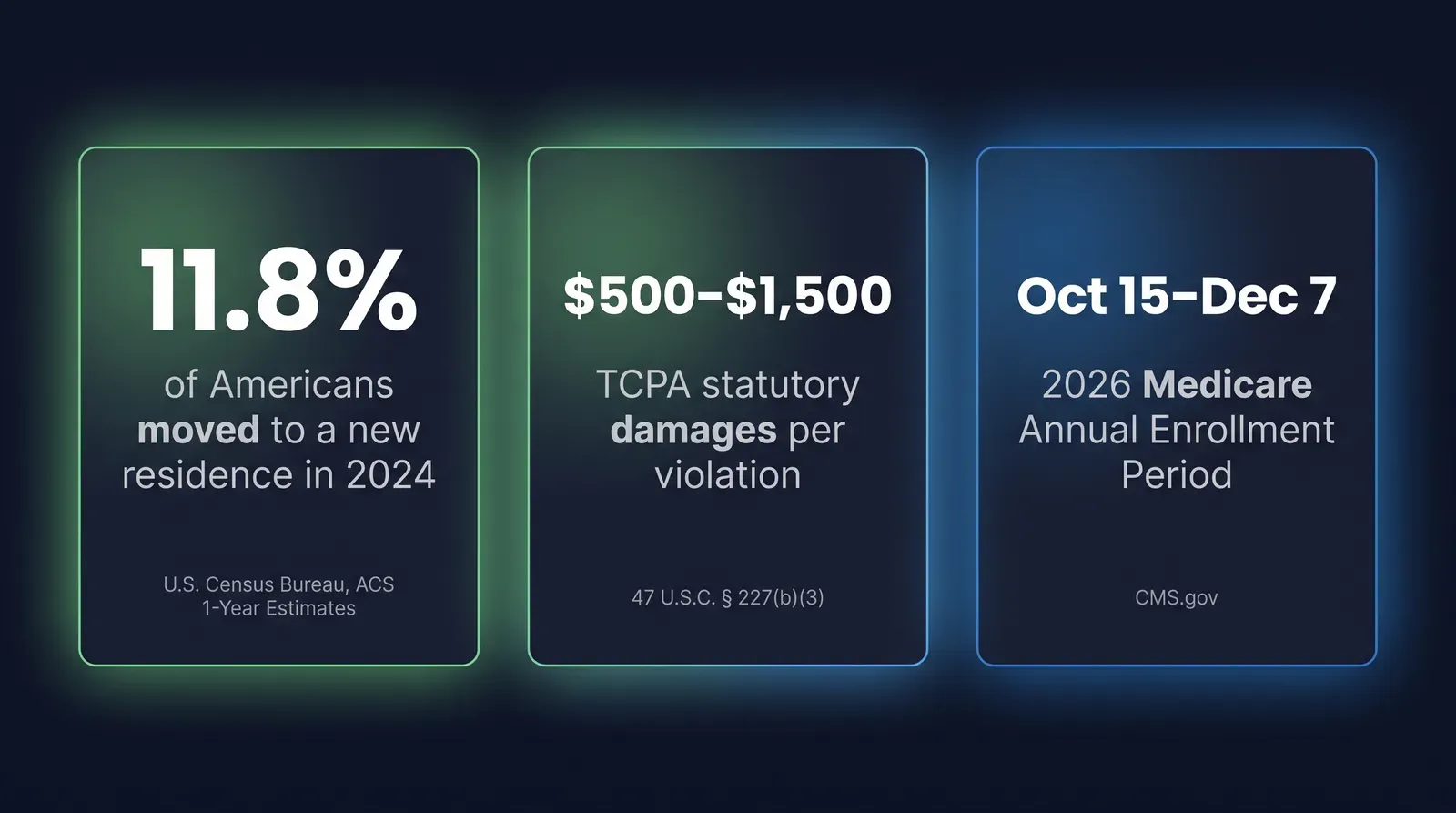
Your CRM has been collecting contacts since the last AEP, and probably since well before it: Meta leads, vendor batches, referrals, a book you inherited, maybe a few hundred names nobody’s touched since March. Some of those records have a signed Scope of Appointment or documented TCPA consent that’s still good. A meaningful chunk don’t, or the consent behind them is old enough that you’d have a hard time calling it “reasonable” if a regulator or a plaintiff’s attorney ever asked. Nothing in a standard CRM flags which is which. A pre-AEP CRM audit is the process of finding out, before the highest-call-volume eight weeks of the year (Annual Enrollment Period, October 15 through December 7, 2026) turn a guess into a dial.
Key takeaways
- Neither TCPA (47 CFR 64.1200) nor CMS's Scope of Appointment rule (42 CFR 422.2274) states a fixed expiration for consent or an SOA — which means there's no single number to hide behind, and most agencies have no process at all for tracking how old their consent actually is.
- 11.8% of Americans moved to a different residence in 2024, the lowest rate on record but still more than one in nine people whose phone number, address, or household situation may no longer match what's in your CRM from a year or two ago (U.S. Census Bureau, ACS 1-Year Estimates, 2024).
- TCPA statutory damages run $500 per violation, up to $1,500 for a willful or knowing one, and WebRecon counted 2,810 TCPA lawsuits filed in federal court in 2025 (47 U.S.C. § 227(b)(3); WebRecon, 2025 year-end report).
- Ambrose's lead-memory spoke doesn't auto-track consent expiration — it gives you lead_log_event to record the consent or SOA event permanently on a lead's timeline and lead_search to query the whole book by tag, which is what turns "check consent one lead at a time" into a bulk audit (Ambrose docs, lead-memory spoke, fetched September 2026).
- channel-bridge runs in drafts mode by default, so a re-permission message to a stale-consent contact gets written and queued for a human to review, not auto-sent (Ambrose docs, channel-bridge spoke, fetched September 2026).
This is not a TCPA explainer or a 48-hour SOA rule article
Two other guides on this site cover adjacent ground in full: our TCPA rules breakdown covers consent mechanics and revocation in depth, and our CMS 48-hour SOA rule change article covers the 2026 timing change to when an SOA can be signed relative to an appointment. This article assumes you already know the basic rules and is about a different, narrower problem: auditing the contacts already sitting in your CRM to find out which ones still have consent you can defend.
What “stale consent” actually means in a CRM
Stale consent is a record where you can no longer point to a specific, dated, defensible basis for contacting that person the way you’re about to contact them. That’s three different failure modes stacked into one phrase, and an audit has to check for all three separately.
The first is missing documentation — a lead that shows “contacted” or “qualified” in your CRM with no note anywhere about how or when consent was captured. A lot of vendor-sourced leads land here, because the vendor’s landing page captured the consent, not you, and what made it into your CRM was the lead’s contact info and not the proof.
The second is aging documentation — you have a date, but it’s old. A TCPA consent form signed fourteen months ago for a phone number that’s since changed hands, or an SOA from a client you saw two AEPs back who never became a client and never heard from you again in between, is technically “on file” but increasingly hard to call reasonable the longer it sits there untouched.
The third is scope mismatch — the consent you have doesn’t cover what you’re about to do. An SOA signed for a Medicare Advantage conversation under 42 CFR 422.2274 doesn’t authorize a cold pitch about final expense. A TCPA consent captured for email doesn’t extend to text. This is the failure mode that’s easiest to miss, because the CRM field just says “consent: yes” with no detail on yes-to-what.
| Failure mode | What it looks like in the CRM | Why it happens |
|---|---|---|
| Missing documentation | Status shows "contacted" or "qualified," no consent date or capture method anywhere on the record | Vendor captured consent on their landing page; only contact info synced into your CRM |
| Aging documentation | A dated SOA or consent record exists, but the date is old and nothing since | CRMs don't surface consent age as a sortable field, so nobody notices it aging |
| Scope mismatch | "Consent: yes" with no detail on which product, channel, or appointment it covers | One flat field replaces what should be several — product, channel, date, method |
The pain: a year’s worth of contacts, and no idea which ones are still good
Here’s the version of this that plays out in a normal independent agency every September. You open the CRM and there are 800, 1,500, sometimes 3,000-plus contacts in there — this AEP’s fresh leads mixed in with last AEP’s leftovers, a vendor batch from March that never got worked all the way through, referrals from clients, and maybe a chunk of a book you bought or inherited from an agent who retired. Some of those people are actively expecting to hear from you. Some of them gave consent to a completely different agent, at a different agency, under a different phone number, two years ago. Your CRM doesn’t sort these into different piles. It sorts them by “status,” and status doesn’t know anything about consent.
Then AEP starts, call volume triples, and the fastest path to filling an afternoon of dials is working the whole list top to bottom — including the contacts nobody’s checked. That’s not a hypothetical. It’s the default behavior of a CRM that treats every record with a phone number as equally callable, because nothing in the interface tells you otherwise.
Why this happens: CRMs don’t make consent age a first-class field
This isn’t agents being careless. It’s a gap in what the tools were built to track. A CRM’s job, as designed, is pipeline: new, contacted, qualified, appointment set, sold. Consent capture — the date, the method, the specific disclosure language, the product scope — usually lives in a free-text note field, an uploaded PDF, or a lead vendor’s separate portal that doesn’t sync into the CRM at all. None of those places sort, filter, or age. You’d have to open each record and read the note to know if the SOA behind it is six weeks old or sixteen months old.
Most agency CRMs and lead vendor portals also don’t ship a built-in bulk tool for this. You can bulk-tag by lead source. You can bulk-tag by campaign. You generally can’t bulk-flag “consent captured more than 12 months ago” unless you build that logic yourself, because the platform never treated consent age as a queryable attribute in the first place. So agents fall back to checking consent one lead at a time, on a live call, which means the check happens after the dial, not before it.
What it actually costs
Run the math on what an untouched CRM turns into during AEP. Say an agency’s book has 1,000 contacts accumulated over the past two years, and even a modest slice — this article isn’t claiming a specific percentage applies to your book, just illustrating the shape of the problem — have no dated consent record, an SOA more than a year old, or a phone number that’s likely been reassigned given how common address and number changes are over a two-year window. Every one of those contacts still shows up in a “work this list” export unless someone has separately flagged it. Working it costs you two different ways: the hours spent dialing numbers that are dead, wrong, or attached to someone who’s no longer the person who gave consent, and the exposure on the calls and texts that do connect, where the underlying consent wouldn’t hold up if it were ever actually examined.
That exposure isn’t theoretical. TCPA statutory damages run $500 per violation, and a court can increase that up to $1,500 for a willful or knowing violation (47 U.S.C. § 227(b)(3)). WebRecon, which tracks consumer litigation filings, counted 2,810 TCPA lawsuits filed in U.S. federal court in 2025 (WebRecon, 2025 year-end report). Those numbers describe the downside of relying on consent you can’t defend — not a claim about how often any individual agent gets sued, and results here, as everywhere, may vary. What they establish is that “probably fine” isn’t a compliance posture when the per-violation math and the litigation volume both look like this.
Nobody gets sued over the lead they never called. The exposure lives in the list you already have.
Mike MooreThe full manual audit: how to do this by hand, completely
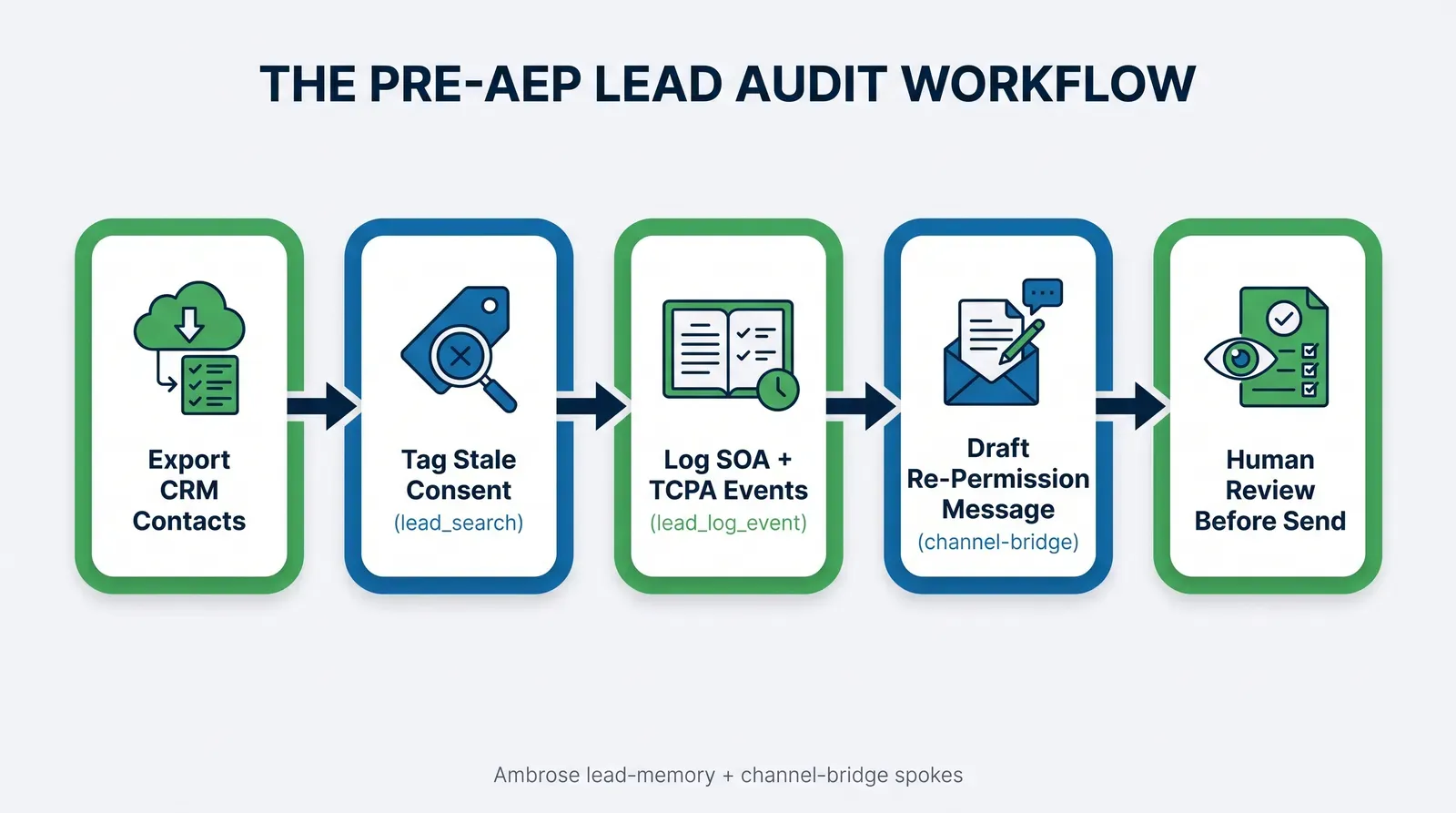
This is the part we’re not holding back. You don’t need software to run this audit — you need an export, a spreadsheet, and a couple of hours before AEP call volume picks up. Here’s the real process, in order.
Step 1: Export every contact, not just this year’s leads
Pull a full contact export from your CRM (most have a “export all contacts” or “export list” function under Settings or the contacts view) and from any separate lead vendor portal you’re still working leads out of. Don’t filter to the last 90 days on the export itself — filtering happens in the audit, not the export, and a full pull takes the same number of clicks as a partial one. Include every field your CRM tracks: name, phone, email, lead source, date added, last contact date, current status/disposition, and whatever free-text or notes field might contain consent or SOA information. If your CRM stores signed SOA PDFs or consent screenshots as attachments rather than fields, note which records have an attachment and which don’t — that’s data too, even if it’s not structured.
Step 2: Build the fields your CRM doesn’t have
Your export almost certainly won’t have a column for “consent capture date” or “SOA signed date” as structured data, even if that information exists somewhere in a note or an attached file. Add these columns to your spreadsheet and fill them in by reading through the notes and attachments: consent capture date (or “unknown” if there isn’t one), consent method (checkbox on a landing page, verbal on a recorded call, signed SOA, etc.), consent scope (which product line — Medicare Advantage, ACA, final expense, life), and SOA on file (yes/no/unknown). This step is the slow part. It’s also the part that actually creates the audit trail, because right now that information exists in a form nobody can query.
Step 3: Flag dead and duplicate contacts
Before you even get to consent, clean out the noise. Sort by phone number and flag duplicates — the same number appearing under two or three different lead records is common with recycled vendor batches and usually means you’re looking at one person, not three. Cross-check against your dialer or texting platform’s bounce and failure logs for numbers that have hard-failed on recent attempts; those are dead regardless of what the consent record says. A dead number with perfect consent documentation still isn’t worth calling.
Step 4: Bulk-flag stale consent with a simple date rule
Once you have a consent capture date column, this is a single spreadsheet formula: flag anything older than your chosen freshness window. There’s no CMS or FCC number that tells you exactly how old is too old — neither 47 CFR 64.1200 nor 42 CFR 422.2274 sets a fixed expiration — so this is a judgment call your agency has to make and apply consistently. A common, defensible starting point many agencies use internally: 12 months for general TCPA consent, and per-appointment for SOA, since an SOA is tied to a specific personal marketing appointment under 42 CFR 422.2274, not an ongoing relationship. Whatever window you pick, write it down and apply it the same way to every record — consistency is what makes it defensible if you’re ever asked to explain your process.
Step 5: Apply a tagging scheme
Once every record has a status, tag it. This is what turns a spreadsheet into something you can actually act on instead of just a wall of data.
| Tag | Meaning | What to do with it |
|---|---|---|
| CONSENT_FRESH | Dated consent inside your freshness window, correct scope | Safe to work normally |
| CONSENT_STALE | Dated consent, but outside your freshness window | Hold; route to a re-permission message before any call or text |
| CONSENT_UNKNOWN | No consent date or method found anywhere in the record | Treat as no consent; re-permission required before contact |
| SOA_MISSING | No SOA on file for a personal marketing appointment that occurred | Do not proceed to a Medicare sales conversation without one |
| SCOPE_MISMATCH | Consent exists but doesn't cover the product or channel you'd use | Treat as no consent for that specific use; capture new, scoped consent |
| DEAD_NUMBER | Hard-bounced or repeatedly failed on recent dial/text attempts | Remove from active work; don't keep re-attempting |
| VENDOR_CLAIMED | Vendor says consent is on file, but you don't have the underlying proof | Request documentation from the vendor before working; see the vendor question below |
| INHERITED_UNVERIFIED | Came from a book transfer or acquisition; consent tied to a different agent | Treat as unverified; re-permission pass before working, see below |
Step 6: Draft, don’t blast, the re-permission outreach
For everything tagged CONSENT_STALE, CONSENT_UNKNOWN, VENDOR_CLAIMED, or INHERITED_UNVERIFIED, the next move isn’t a sales call — it’s a short, clear message asking the person to re-confirm they want to hear from you, with an easy way to say no. Draft this once as a template, personalize the sender and product line, and route every flagged contact through it before anyone dials. This is also the step where a human should be reading what goes out, not an automated sequence firing on a list you just finished auditing for exactly this problem.
Step 7: Put a recheck on the calendar
An audit that happens once a year and never again just resets the clock on the same problem. Put a recurring reminder — monthly is reasonable for an active book — to re-run the date check on anything newly added and to re-flag anything that’s crossed your freshness window since the last pass.
Export everything
Full contact history, every field, from your CRM and any separate vendor portal. Don't pre-filter the export.
Add the missing columns
Consent date, method, and scope, plus SOA-on-file. Fill them in by reading the notes and attachments your CRM never structured.
Flag dead and duplicate contacts
Cross-check against bounce and failure logs first. A perfect consent record on a dead number is still not worth a dial.
Bulk-flag by date
One spreadsheet formula against your chosen freshness window. Pick the window, write it down, apply it consistently.
Tag every record
Use a fixed scheme — fresh, stale, unknown, missing, mismatch, dead, vendor-claimed, inherited — so the audit produces an action, not just data.
Draft re-permission outreach
One template, reviewed by a human, routed to every flagged contact before any of them get a sales call.
This works whether you're solo or on a team
A solo agent with a few hundred contacts can run this whole audit in an afternoon with a spreadsheet. A team with several thousand contacts across multiple agents needs the same six steps, plus someone who owns making sure every agent's book actually gets pulled into the export — the process doesn't change with scale, but who's responsible for running it does.
Everything above works whether you join anything or not. Go run it by hand, or let Ambrose run the query-and-log half of it once you’re in.
A worked example: what the audit actually finds
Take an illustrative agency book of 1,000 contacts accumulated over roughly two AEP cycles — this is a hypothetical built to show how the tagging plays out, not a claim about any specific agency’s real numbers.
| Tag | Illustrative count | Action before AEP |
|---|---|---|
| CONSENT_FRESH | 610 | Work normally |
| CONSENT_STALE | 180 | Re-permission draft before any contact |
| CONSENT_UNKNOWN | 95 | Re-permission draft before any contact |
| DEAD_NUMBER / duplicate | 75 | Remove from active work |
| SOA_MISSING or SCOPE_MISMATCH | 40 | No Medicare sales conversation until resolved |
In this illustrative split, 39% of the book needs something other than a normal dial before AEP starts — a re-permission message, removal, or a resolved SOA — and that’s the entire value of running the audit. Without it, every one of those contacts looks identical to the 610 that are actually fine, and the only way anyone finds out otherwise is discovering it mid-call, or worse, not discovering it at all.
Every contact looks the same
- Status field says "contacted" or "new" — nothing about consent age
- Stale, unknown, and fresh consent all get dialed the same way
- Consent gets checked, if at all, one lead at a time on a live call
- Dead numbers and duplicates burn dial time every cycle
- Nobody can produce a consent record on demand
1 status fieldfor a whole book
Every contact is tagged and actionable
- Consent date, method, and scope are structured and queryable
- Stale and unknown consent route to re-permission before a dial
- Dead and duplicate contacts are removed from the working list
- A dated, logged event exists for every consent capture
- The whole book can be re-checked on a recurring schedule
8 tagsfor the same book
Adjacent question: what about a vendor who says they already have consent?
This comes up constantly, especially heading into AEP when lead volume from vendors picks up. A vendor’s landing page or portal often shows a status like “TCPA consent: verified” next to a lead, and it’s tempting to treat that as the end of the question. It shouldn’t be, for two reasons.
First, the party who initiates the call or text generally carries the TCPA exposure, not the party who originally captured consent — a vendor’s internal claim doesn’t automatically transfer legal cover to you if that claim turns out to be wrong, incomplete, or doesn’t match what you’re actually sending. Second, “verified” on a vendor dashboard is often shorthand for “a checkbox was checked,” with no visibility into the actual disclosure language the consumer saw, what number they agreed to be contacted at, or what products the consent covers.
The fix is straightforward: ask the vendor for the underlying proof, not just the status flag. A specific, dated consent record — ideally something like a TrustedForm certificate or a screenshot of the exact disclosure language with a timestamp — is something you can log against the lead and point to later. A green checkmark on someone else’s dashboard is not. If a vendor can’t produce that documentation on request, treat the lead the same as CONSENT_UNKNOWN in your tagging scheme, regardless of what their portal says.
Adjacent question: what if I inherited a book from another agent?
Book transfers, agency acquisitions, and an agent taking over a retiring colleague’s clients are common in this industry, and they create a specific version of the stale-consent problem: the consent on file, if it exists at all, was given to someone else.
TCPA consent is tied to the specific seller identified in the disclosure the consumer signed — not to “whoever ends up servicing this account later.” An SOA under 42 CFR 422.2274 is tied to a specific personal marketing appointment, which by definition already happened, with a different agent. Neither framework contemplates a client’s existing consent automatically following the account to a new agent, a new phone number, or a new business entity.
That doesn’t mean an inherited book is unworkable. It means every contact in it should get the same INHERITED_UNVERIFIED tag and the same re-permission pass as a stale or unknown record from your own pipeline, before you start dialing it as if the prior agent’s relationship transferred cleanly. A short, honest message — introducing yourself, naming the prior agent or agency by way of context, and asking if they’d like to keep hearing from you — does more to protect both the relationship and your compliance position than assuming silence means consent.
Where the manual version breaks down at scale
The seven steps above are complete and they work for a solo agent or small team running one CRM. They get genuinely hard to sustain past a few thousand contacts, for two reasons that have nothing to do with the logic of the audit itself.
The first is the same bottleneck as any manual data project: someone has to actually read every note field and attachment to backfill the consent-date column, and that doesn’t scale linearly — it scales with headcount you probably don’t have to spare during a pre-AEP crunch. The second is a privacy problem. That spreadsheet, once built, is a list of names, phone numbers, and consent history sitting in a file that’s tempting to paste into a general AI tool to help sort or summarize. Doing that hands lead PHI or PII to a destination that almost certainly isn’t covered by a signed BAA — the exact mistake our guide on what not to paste into ChatGPT covers in full.
How Ambrose’s lead-memory and channel-bridge spokes handle this
Ambrose OS, the platform included with a Tech Savvy membership, has two spokes that map directly onto the manual audit above, and it’s worth being precise about what they do and don’t do.
lead-memory is a per-lead dossier store. lead_get_dossier pulls the full history and timeline for one lead. lead_log_event appends a dated event to a lead’s permanent timeline — “SOA signed 2026-03-14,” “TCPA consent captured via landing page checkbox,” “re-permission sent 2026-09-10.” lead_search queries across the whole lead database by tags, channel, or status (Ambrose docs, lead-memory spoke, fetched September 2026). Here’s the honest part: the docs do not describe a built-in field that auto-calculates consent age or flags expiration on its own. What lead-memory gives you is the infrastructure to make the audit queryable — you (or a routine) log the SOA and consent events as they happen, tagged the same way the manual scheme above tags them, and lead_search can then pull every contact tagged CONSENT_STALE in one query instead of you reading a thousand note fields by hand. It’s an audit trail you build by logging the event, not a tracker that materializes one for you.
channel-bridge is the outbound dispatcher — bridge_send_email and bridge_send_sms, running through Gmail, GoHighLevel, or direct SMTP for email, and Twilio or GHL for SMS. It runs in drafts mode by default: nothing sends automatically until a human turns auto-send on, per agent or team, after watching the drafts for a few days. Any outbound message body routes through the PHI Gateway unless the recipient is already on the agency’s BAA allowlist (Ambrose docs, channel-bridge spoke, fetched September 2026). That default-drafts behavior is exactly the posture Step 6 of the manual audit calls for: the re-permission message gets written and queued, a human reads it, and only then does it go out.
The phi-gateway spoke is the safety rail both of the above route through before anything reaches a destination outside your BAA allowlist. It runs a detection chain — known contacts in your own vault, then regex, then named-entity recognition, then an insurance-specific dictionary — and exposes phi_scrub to mask identifiers, phi_rehydrate to restore them for an authorized destination, phi_audit_query to review what’s been scrubbed, and phi_check_baa to confirm whether a given destination is covered (Ambrose docs, phi-gateway spoke, fetched September 2026). That’s the piece that makes it safer to let an AI tool touch a list like this at all, compared to pasting a raw spreadsheet of names and numbers into a general chatbot.
| Manual step | Ambrose equivalent |
|---|---|
| Log a consent or SOA date on a contact | lead_log_event appends a dated event to that lead's permanent timeline |
| Pull every contact tagged as stale or unknown | lead_search queries the whole book by tag, channel, or status in one call |
| Review a lead's full consent history before acting | lead_get_dossier returns the complete timeline for one lead |
| Draft a re-permission message for review, not auto-send | bridge_send_sms / bridge_send_email run in drafts mode by default |
| Keep the outreach off an unverified destination | phi-gateway routes anything outside the BAA allowlist through scrubbing first |
If you’d rather have a scheduled pass do the tagging every month instead of remembering to re-run it yourself, that’s what a Routine is for — a scheduled prompt that can run lead_search against your freshness window and post the results to Slack (Ambrose docs, Routines).
Ambrose’s lead-memory and channel-bridge spokes already do the query-and-draft half of this — one seat comes with the membership, and that’s the fastest way to stop reading note fields by hand.
Ambrose doesn't decide your freshness window for you
lead-memory logs and searches events; it doesn't set the 12-month (or whatever) threshold that defines "stale" for your agency. That's a policy decision your agency makes, the same as in the manual version — write it down, apply it consistently, and log why you chose it.
Compliance: the audit doesn’t change what governs your list
Auditing your CRM is an internal risk-management practice. It doesn’t loosen, and it doesn’t replace, any of the underlying rules that already apply to your contacts.
TCPA still governs every automated call and text. Prior express written consent requires a signature — physical or electronic — tied to a clear disclosure of what the consumer is agreeing to receive and at what number, and a called party can revoke that consent by any reasonable method, honored within a reasonable time not to exceed ten business days (47 CFR 64.1200(a)(2)-(3) and (a)(10), via Cornell Law’s eCFR mirror). Statutory damages run $500 per violation, up to $1,500 for a willful or knowing one (47 U.S.C. § 227(b)(3)). See our full TCPA rules breakdown for the complete consent and revocation framework, including the current status of the FCC’s one-to-one consent and revoke-all rules — this article assumes you already have that context.
CMS’s Scope of Appointment rule still requires a documented SOA before a personal marketing appointment. Under 42 CFR 422.2274(b)(3), agents and brokers must “secure and document a Scope of Appointment prior to a personal marketing appointment,” and subsection (c)(9)(ii) requires SOA records be appropriately completed for every personal marketing appointment, including telephonic and walk-in ones (Cornell Law eCFR mirror). CMS separately removed the requirement that the SOA be signed at least 48 hours in advance — our CMS 48-hour SOA rule change article covers that specific timing change; the underlying requirement to have a documented SOA at all did not go away.
“Chain of enrollment” is CMS’s related audit concept, not a synonym for your consent audit. CMS defines it as “the steps taken by a beneficiary from becoming aware of an MA plan or plans to making an enrollment decision” (42 CFR 422.2260, via govinfo.gov). That’s a beneficiary-protection requirement — CMS wants to be able to reconstruct how someone got enrolled if a complaint comes in. Cleaning up your CRM’s consent records supports that goal but doesn’t substitute for the full documentation trail CMS’s own Medicare Communications and Marketing Guidelines describe.
If you’re using AI anywhere in this workflow — to draft the re-permission message, to help tag records, or to run the audit itself — the NAIC’s AI Model Bulletin expectations apply: a written policy on how the tool is used, human review before anything goes to a client, and documentation you can produce if a regulator or carrier asks (NAIC, AI Model Bulletin & AI Principles).
Never paste your raw CRM export into a general AI tool
The audit spreadsheet this article walks you through building is a list of names, phone numbers, and consent history tied to real people who may be prospective Medicare or ACA clients. Don't paste it into a consumer chatbot to help sort or summarize it. Ambrose's PHI Gateway scrubs identifying information before a prompt reaches any destination that isn't on the agency's BAA allowlist, with every scrub event logged and available via phi_audit_query ([Ambrose docs, phi-gateway spoke](https://app.hiambrose.com/docs/spoke-phi-gateway), fetched September 2026) — described as HIPAA-aware by default, not HIPAA certified, since there's no such thing as HIPAA certification for a software platform.
What you get by joining
One Ambrose seat, including lead-memory and channel-bridge, comes with a Tech Savvy Insurance membership: $97 a month, billed monthly, cancel anytime, founding rate locked in while the membership stays active. Alongside the seat: weekly Zoom calls with open Q&A and build-with-you sessions, 30-plus hours of recorded training, Meta Ads and marketing training built for this industry, pre-built AI templates and bot deployments, and a free annual in-person member workshop — plus an explicit no-recruiting rule, so you can ask a real question about a messy CRM without ending up on someone’s downline pitch list.
Ambrose usage is separate from the $97 seat
The membership includes one Ambrose seat; usage inside Ambrose runs through its own credit ledger with spend caps, so cost stays visible instead of showing up as a surprise. See the full Spokes catalog for what else is available beyond lead-memory and channel-bridge.
Run the audit before AEP call volume hits
The export, the columns, the tagging scheme, and the re-permission draft above work whether you join anything or not. If you'd rather have lead_search and channel-bridge do the query-and-draft work for anything already in Ambrose, one seat comes with the Tech Savvy membership.
Join Tech Savvy — $97/monthThe close
Everything above, the export, the tagging scheme, the worked example, the vendor and inherited-book questions, works whether you ever join anything or not. That’s the point of writing it out completely. This is exactly the kind of thing we work through on a Tuesday with Ambrose open on the screen: running lead_search against a real book, watching which contacts come back tagged stale, and deciding together what the re-permission message should say before it goes anywhere. $97 a month, cancel anytime, and nobody will pitch you a downline: https://techsavvyinsurance.com/.
Before you audit or re-contact anything in your CRM
Tech Savvy Insurance is a training and software community, not an insurance company, agency, or law firm, and does not provide insurance, legal, tax, or compliance advice. You are responsible for your own licensure and for complying with all applicable CMS, HIPAA, TCPA, state, and carrier regulations, including consent, disclosure, SOA, and recording requirements for any call or text. AI-generated outputs may contain errors — always verify. Results may vary.
Frequently asked questions
Sources
- U.S. Census Bureau — Migration/Geographic Mobility, ACS 1-Year Estimates (2024 mover rate) — census.gov
- 47 U.S.C. § 227(b)(3) — TCPA statutory damages (govinfo.gov) — govinfo.gov
- 47 CFR 64.1200 — TCPA prior express written consent and revocation (Cornell Law eCFR mirror) — law.cornell.edu
- 42 CFR 422.2260 — Chain of enrollment / TPMO definitions (govinfo.gov) — govinfo.gov
- 42 CFR 422.2274 — Agent, broker, and other third-party requirements, incl. Scope of Appointment (Cornell Law eCFR mirror) — law.cornell.edu
- CMS — Medicare Communications and Marketing Guidelines — cms.gov
- CMS — Medicare Open Enrollment partner resources (2026 AEP dates) — cms.gov
- NAIC — Artificial Intelligence (Model Bulletin & AI principles) — content.naic.org
- WebRecon — December 2025 TCPA litigation stats and year in review — webrecon.com
- Ambrose docs — lead-memory spoke — app.hiambrose.com
- Ambrose docs — channel-bridge spoke — app.hiambrose.com
- Ambrose docs — phi-gateway spoke — app.hiambrose.com
Ready to put this into practice?
Join a private community of Health & Life insurance professionals using AI, Meta Ads, and automation to grow — without draining their bank account.
Join Tech Savvy — $97/month