
Since December 3, 2025, Meta’s own Customer List Custom Audiences Terms have banned building an ad audience from data that “includes, reflects, implies, or is based on” health information, financial information, or consumer report information. That single sentence covers most CRM exports insurance agents have been uploading to Meta for years — the “Diabetic,” “MAPD,” “Subsidy Eligible,” and “High Income” tags that made retargeting feel precise are exactly what the policy now targets. The fix doesn’t require abandoning Meta. It requires knowing which fields in your own client list count, and building the audience from the ones that don’t.
Key takeaways
- Meta's Customer List Custom Audiences Terms, effective December 3, 2025, ban Audiences built from data that includes, reflects, implies, or is based on health information, financial information, or consumer report information (Meta, Customer List Custom Audiences Terms).
- Meta's separate Personal Attributes policy bans ad copy that asserts or implies knowledge of a viewer's health or finances — its own listed examples are "Do you have diabetes?" and "Are you bankrupt? Check out our services." (Meta Transparency Center, Privacy Violations and Personal Attributes).
- An ad rejection, an asset restriction, and a selective account restriction are three different outcomes with three different scopes, per Meta's own Advertising Standards page — knowing which one you're looking at determines the fix.
- CMS still requires the TPMO disclaimer on any Meta ad that meets the definition of marketing, including social media posts (CMS, Contract Year 2023 MA Marketing Policies FAQ) — passing Meta's review and clearing CMS's rule are two separate checks.
- Ambrose's PHI Rail scrubs identifiers before anything reaches a non-BAA destination like Meta, using the phi-gateway spoke, before a client export ever gets formatted for a Custom Audience upload (Ambrose docs, PHI Rail).

The pain: the list that used to work just stopped
Here’s the exact moment this article is about. You’ve run the same retargeting play for two AEPs running: export a segment from your CRM — clients who are Medicare Advantage, or clients tagged with a specific chronic condition your carrier’s disease-management program serves, or leads who checked a subsidy-eligible box on a quote form — upload it to Meta as a Customer List Custom Audience, and build a lookalike off it. It worked. It’s how you filled half your webinar list last AEP.
Sometime in the last few months, it stopped working the same way. Maybe the audience just silently stopped growing. Maybe you got a notice that an audience was removed or restricted from use. Maybe nothing visibly broke yet, and you’re reading this because you finally got curious about why “high income” showed up as a banned example in someone’s LinkedIn post. Whatever brought you here, the mechanism is the same: Meta changed what a Customer List Custom Audience is allowed to contain, and most agents’ CRM exports were built years before anyone thought to check.
This is guidance, not legal or compliance advice
Tech Savvy Insurance is a training and software community, not a law firm, an insurance company, or an insurance agency, and nothing here is insurance, legal, tax, or compliance advice. This article describes what Meta's own published policy pages and CMS's own published guidance say, as of the dates cited. Meta and CMS both change these pages without much notice — verify the current policy text yourself at the URLs cited before you change how you run ads, and confirm anything state-specific with your own compliance department or counsel.
What changed on December 3, 2025
Meta’s Customer List Custom Audiences Terms are the legal terms you agree to every time you upload a list of emails, phone numbers, or other identifiers to build an Audience. As of the version effective December 3, 2025, Section 2 states plainly that the names you choose and the criteria you establish for your Audiences “will not include, reflect, imply, or be based on health information, financial information, consumer report information, or other categories of sensitive information” (Meta, Customer List Custom Audiences Terms).
Read that sentence slowly, because every word in it matters more than agents assume on first read. It doesn’t just ban an audience named “Diabetes patients” or “Bankrupt prospects” — obviously bad naming nobody was doing anyway. It bans an audience built from data that reflects or implies those categories, even with a completely neutral name. An audience named “Q3 Retargeting List” that was built by filtering your CRM to everyone tagged “Type 2 Diabetes” still reflects health information, whatever you called the audience itself. The policy reaches through the label to the underlying selection logic.
This is a change to the actual legal terms you agree to, not a suggestion buried in a help article — which means it applies retroactively to every audience already sitting in your ad account, not just ones you build going forward. If you built an audience list any time before December 3, 2025, filtered by a condition tag, a plan sub-type, or an income indicator, and haven’t rebuilt it since, there’s a real chance it’s sitting in your ad account right now in violation of terms you re-agree to every time you use it.
The policy doesn't ban the word "diabetic" in an audience name. It bans building the audience from who's diabetic, no matter what you call it.
Mike MooreWhat actually counts as health or financial information in a client list
This is the part worth sitting with, because “health information” sounds like it means diagnosis codes and nothing else, and that’s not how insurance CRMs are built. Almost every field an agent adds to make a list more useful for marketing is exactly the kind of field this policy targets.
| Category | Blocked example | Why it's blocked | Safe alternative |
|---|---|---|---|
| Health information | "Diabetic," "COPD," "cancer survivor," any disease-management or condition tag | Directly a medical condition — squarely inside the banned category | A neutral engagement tag like "Newsletter subscriber — active" |
| Plan-type as health proxy | "D-SNP," "MAPD chronic condition," "hospice" | Plan type here directly implies a specific diagnosis or health status | A general product-line tag like "Medicare client" without the sub-type |
| Financial information | "High income," "subsidy eligible," "credit score tier" | Directly a financial status or category | "High-value customer, Q3 2026" based on lifetime premium value, not income |
| Consumer report data | A tag pulled from a credit or background check vendor | Explicitly named as its own banned category, separate from financial information | Don't source audience criteria from consumer report data at all |
| Website behavior | "Visited /diabetes-plans page" | Page-visit data that reflects a health topic still reflects health information | "Visited pricing page" or "Requested a quote," described by action, not topic |
| Purchase or engagement data | "Purchase date," "opened last three emails," "webinar attendee" | Not blocked — pure engagement and behavioral data, no sensitive category attached | Use as-is; this is the category Meta's own safe-naming guidance points toward |
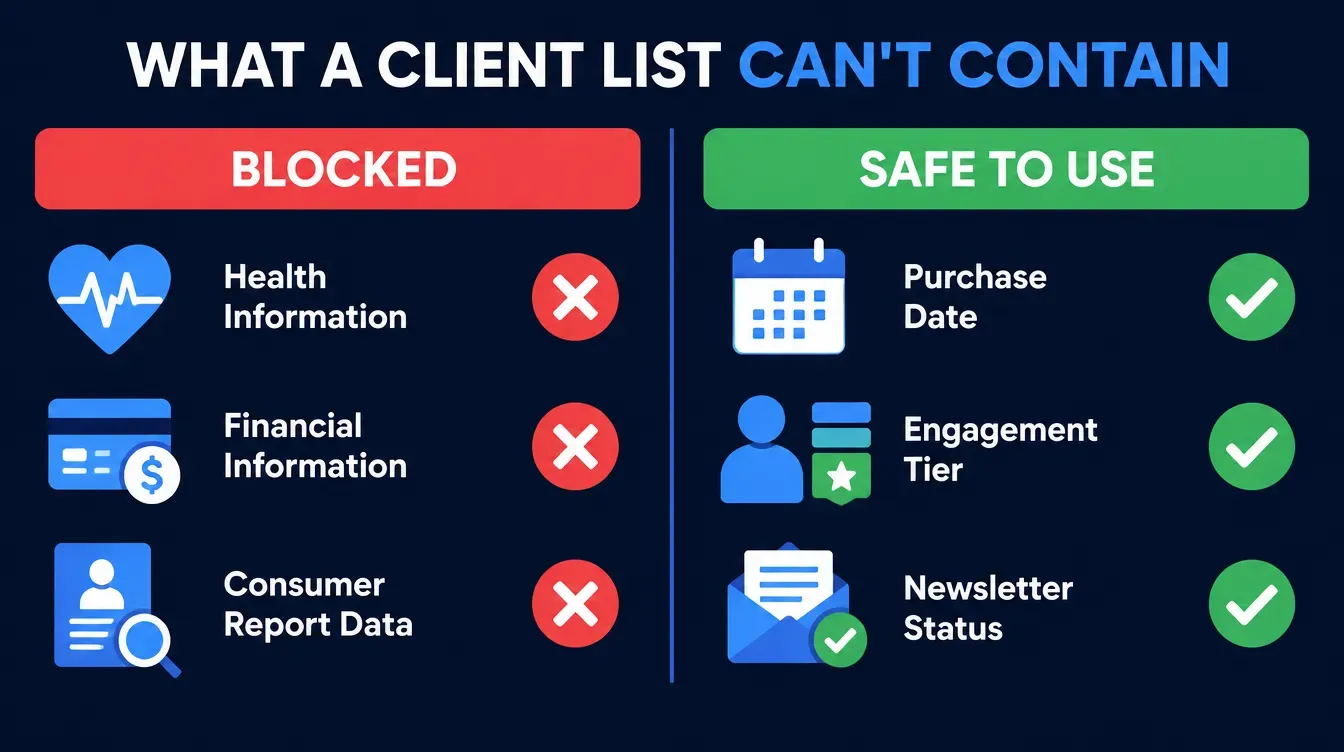
Notice what’s still allowed on the right side of that table. This isn’t Meta telling you to stop marketing to your existing book — it’s Meta telling you to stop building the audience out of why someone is a client and start building it out of that they’re a client, engaged, or a recent purchaser. A list of “everyone who opened one of the last three emails” is fine. A list built by filtering to “everyone whose condition tag is diabetes” is not, even if the resulting names, emails, and phone numbers you actually upload are identical to the first list. The violation lives in the selection logic, not the upload file itself — which is exactly why it’s so easy to miss.
The ad copy rule that catches even compliant lists
A clean audience doesn’t protect you from a second, separate rule: Meta’s Privacy Violations and Personal Attributes policy governs what the ad itself is allowed to say, independent of who it’s shown to. Per Meta’s Transparency Center, ads can’t “assert or imply personal attributes,” a list that explicitly includes “physical or mental health (including medical conditions)” and “vulnerable financial status,” and can’t “imply knowledge of Medical information of a user or user’s family” or “imply knowledge of personal or organizational financial information of a user or user’s family” (Meta Transparency Center, Privacy Violations and Personal Attributes, last updated June 26, 2024).
Meta publishes its own examples of what this looks like in practice, and they’re worth reading verbatim because so much stock Medicare marketing copy is written in the exact same register:
| Attribute | Meta's banned example |
|---|---|
| Health / disability | "Do you have diabetes?" |
| Health / disability | "Depression getting you down? Get help now." |
| Financial status | "Are you bankrupt? Check out our services." |
| Age | "Meet other seniors" |
Now hold those next to lines that run in real Medicare ad campaigns every AEP: “Worried about your prescription costs?” “Turning 65 this year?” “Struggling to afford your medications?” Structurally, each one is a second-person question presuming to know something specific about the viewer’s health or financial situation — the identical construction as “Do you have diabetes?” Meta’s automated review doesn’t grade on industry context. It grades on sentence structure and vocabulary, and carrier-supplied swipe copy fails this test constantly, which is exactly why “the offer is completely legitimate” and “the ad got rejected” aren’t contradictory statements.
Rewrite the presumption out, not the topic
"Turning 65 this year?" implies Meta's ad system already knows the viewer's age and health-plan status. "See Medicare Advantage plans available in your area" states the offer without presuming anything about the person reading it. Same audience, same offer, same landing page — the second version routinely clears review where the first gets flagged, because the presumption, not the topic, is the trigger.
Rejected, restricted, or selectively restricted: three different problems
Not every Meta compliance event is the same emergency, and conflating them wastes the hours you don’t have during AEP prep. Meta’s own Advertising Standards introduction names three distinct outcomes.
| Outcome | Scope | What Meta says | Your move |
|---|---|---|---|
| Ad rejection | One ad only | "If a violation is found at any point in the review process, the ad will be rejected." | Edit the flagged ad against the Personal Attributes examples above and resubmit; nothing else on the account is affected |
| Asset restriction | A Business Account, ad account, Page, or user account | "That account or asset can't be used to advertise across our technologies." | Open Account Quality and read the exact stated reason; this is the full-stop scenario |
| Selective account restriction | One user, on a shared Business Account or ad account | "Other members of those accounts may still be able to advertise." | Have a teammate with access continue running active campaigns while the restricted user's issue is resolved separately |
Meta’s own review-timing statement is the other piece worth knowing before you panic: “our ad review process starts automatically before ads begin running, and is typically completed within 24 hours, although it may take longer in some cases” (Meta Transparency Center, Introduction to the Advertising Standards). A single rejected ad is a same-day fix in most cases. A restricted asset, going into a season where every day of lost visibility is a day of lost enrollment volume, is not — and Meta doesn’t publish a guaranteed appeal timeline for that scenario in its public documentation, so don’t plan your AEP calendar around a number nobody at Meta has actually committed to.
What it costs going into AEP
Medicare’s Annual Enrollment Period runs October 15 through December 7 (Medicare.gov, Medicare Open Enrollment). Every day an ad account sits restricted between now and October 15 is a day of paid visibility an agent doesn’t get back — there’s no way to retroactively run the ad you couldn’t run on October 3rd on October 3rd again. That’s the real cost here, and it isn’t a hypothetical dollar figure pulled from a lead-vendor benchmark; it’s calendar math anyone running Medicare ads already understands instinctively once you say it out loud.
The other cost is compounding risk, not a one-time event. The Customer List Custom Audiences Terms are terms you re-agree to every time an audience you built years ago is still used in an active campaign, not just at the moment of upload. An audience built from a client list with condition tags in it two years ago that’s still attached to an active campaign today is a live violation sitting in your account right now, not a past mistake that already resolved itself. The fix isn’t a one-time cleanup before your next campaign launch — it’s an audit of every audience currently live in your ad account.
The audit costs one hour, not a rebuild
Open Ads Manager, go to Audiences, and open every Custom Audience currently in use. For each one, ask a single question: was this list filtered by a health, plan-sub-type, or financial field before it was exported? If yes, rebuild it from the neutral fields in the next section. For most agencies, this is an afternoon, not a project.
The manual fix: building a clean audience without touching PHI
Here’s the full method, and it costs nothing but the time to rebuild your CRM export logic once. None of this requires new software.
Filter by behavior, not by condition or plan sub-type
Instead of exporting "everyone tagged D-SNP" or "everyone tagged diabetic," export "everyone with an active policy" or "everyone who's called the office in the last 90 days." The resulting list of names and emails may overlap heavily with the old one — the difference is entirely in the selection logic, which is what the policy actually governs.
Name every audience by business segment, not by health category
"High-value customers, Q3 2026," "Website visitors — pricing page," and "Newsletter subscribers — active" are all safe, descriptive, and useful. "Diabetic prospects" or "Subsidy-eligible leads" are exactly the naming pattern Meta's enforcement targets first, because a suspicious name is the fastest signal its automated system checks.
Prefer website-behavior audiences over CRM-tag audiences where you can
A Custom Audience built from people who visited your pricing page or submitted a quote form carries no health or financial category by construction — the behavior itself is the criterion. It's a genuinely safer default than any CRM export, and for most agencies it's already sitting unused in the Meta pixel or Conversions API data you're already collecting.
Build lookalikes off the clean seed list, never the old one
A lookalike audience inherits whatever selection bias built its seed list. A lookalike built off a "diabetic clients" seed is functionally still targeting on health status one step removed — rebuild the seed first, then rebuild anything downstream of it.
Strip condition and income columns from the export file itself
Don't rely on remembering not to filter by a column that's still sitting in the spreadsheet. Export a file that contains only the fields Meta's upload tool needs — name, email, phone — and nothing your CRM tracks about the client's health or finances, so there's nothing left in the file to accidentally filter by next time.
Re-check every 90 days, not once
Meta's enforcement is ongoing and its policy pages change without a public changelog you'll see unless you go looking. Put a recurring calendar reminder to re-open Ads Manager, review every active audience's name and origin, and re-confirm it against the current version of Meta's own Customer List Custom Audiences Terms.
This works with a spreadsheet and an Ads Manager login. Nothing about it requires a membership, a platform, or a tool purchase — it’s a five-field export and a naming discipline, and it’s the whole fix.
The TPMO disclaimer your ad still needs, separately
Clearing Meta’s review says nothing about clearing CMS’s rule, and treating them as one checklist is how agents end up compliant on one side and exposed on the other. CMS defines a TPMO as any organization or individual, including independent agents and brokers, “compensated to perform lead generation, marketing, sales, and enrollment related functions as a part of the chain of enrollment” (CMS, Contract Year 2023 Medicare Advantage Marketing Policies FAQ, citing 42 CFR §§ 422.2260, 423.2260). CMS requires the standardized TPMO disclaimer to appear “in any marketing materials, including print materials and television advertisements, developed, used, or distributed by the TPMO” under 42 CFR 422.2267(e)(41)(v) and 423.2267(e)(41)(v) — and CMS states directly that “to the extent that a social media post meets the definition of ‘marketing’… the TPMO must include the disclaimer in the social media post” (CMS, Contract Year 2023 Medicare Advantage Marketing Policies FAQ).
A Meta ad that promotes Medicare plans meets that definition. If your ad copy, your carousel image, or your landing page doesn’t carry the disclaimer, an ad that cleared Meta’s review completely clean is still a CMS marketing violation waiting to be flagged in a completely separate audit. We’ve written a full landing-page walkthrough of what the disclaimer needs to say and where it has to appear in our Medicare landing page compliance guide — treat that as the second half of this checklist, not an optional add-on.
If AI drafted the ad copy, check it against this before it posts
An AI tool asked to “write a Facebook ad for Medicare Advantage leads” has no built-in knowledge of Meta’s Personal Attributes policy, and it will reliably produce exactly the second-person, presumptive phrasing that policy exists to catch — because that phrasing is common in the marketing copy the model learned from, not because the model is trying to violate anything. That’s a real, specific, and easily fixed risk, distinct from the general “don’t paste PHI into ChatGPT” warning covered elsewhere on this site.
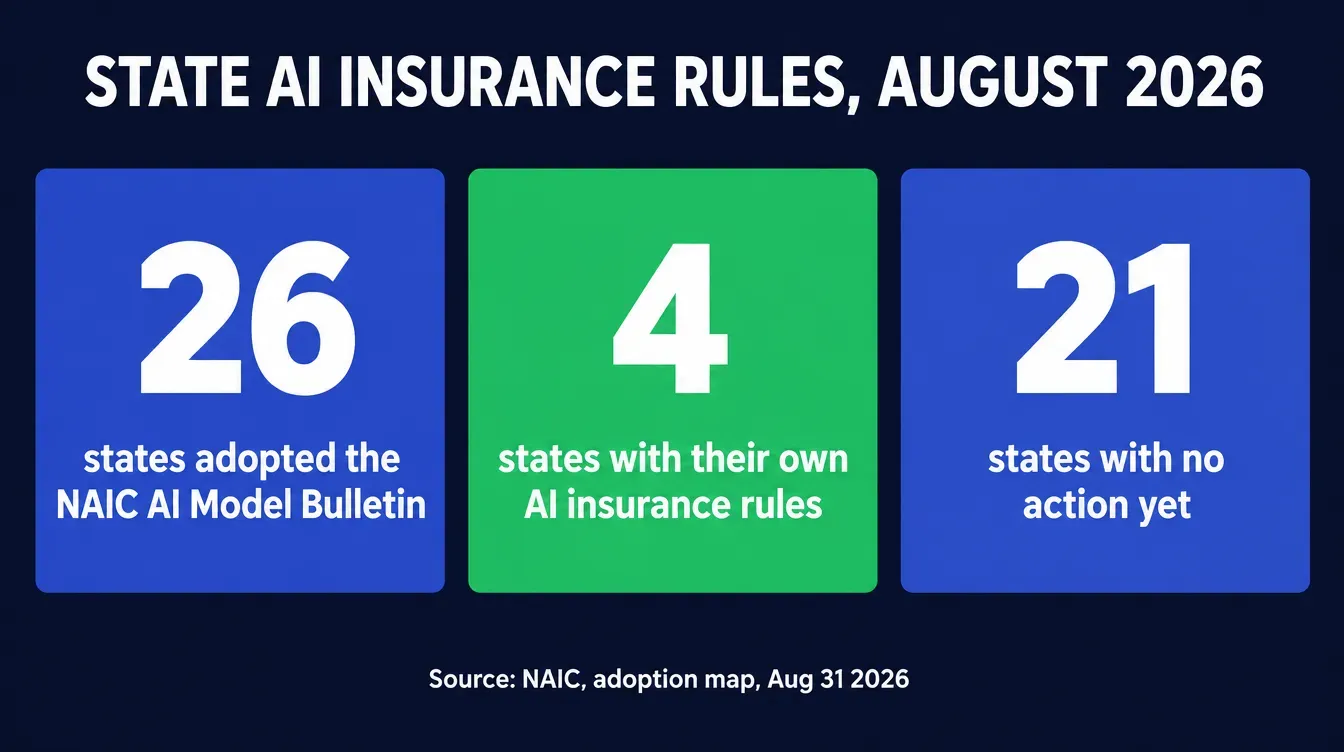
It also intersects with a second, separate compliance layer if your state is one of the growing number that has adopted the NAIC’s AI governance framework. As of the NAIC’s own adoption map, dated August 31, 2026, 26 jurisdictions have adopted the Model Bulletin on the Use of Artificial Intelligence Systems by Insurers, with four more (California, Colorado, New York, and Texas) operating under their own separate insurance-specific AI regulation (NAIC, Implementation of NAIC Model Bulletin: Use of Artificial Intelligence Systems by Insurers). The Model Bulletin sets a general expectation of written AI-use policies, human oversight of AI-generated content, and documentation of that oversight.
State action on AI insurance regulation, August 2026
26 jurisdictions have adopted the NAIC's Model Bulletin; 4 more run their own separate AI-specific insurance rule instead.
Source: NAIC, Implementation of NAIC Model Bulletin: Use of Artificial Intelligence Systems by Insurers, status as of August 31, 2026.
A written note — even one line in your campaign folder — stating that a human reviewed AI-drafted ad copy against Meta’s restricted-content rules before it posted is exactly the kind of documentation that expectation is asking for, and it costs you thirty seconds per campaign to produce.
Where Ambrose’s PHI Rail fits, and where it honestly doesn’t
Nothing in Ambrose’s documentation drafts, reviews, or approves Meta ad copy — that piece of this article stays a manual discipline, whether or not you ever use the platform. Where Ambrose applies directly is the client-list half of the problem: keeping a health or financial tag from ever reaching a Meta upload file in the first place.
Ambrose OS is described in its own documentation as an agentic AI operating system built specifically for insurance agencies, with every read and write scoped to the agency’s own tenant (Ambrose docs, What is Ambrose). Per Ambrose’s own architecture documentation, the PHI Rail checks whether a destination is on the agency’s BAA allowlist before any data reaches it. Meta is not a BAA-covered destination for health information, the same way ChatGPT or any other general-purpose tool isn’t. When a destination isn’t on that allowlist, the phi-gateway spoke — documented in Ambrose’s spoke catalog as a “PHI scrubber + re-hydrator” (Ambrose docs, Spokes) — scrubs identifiers using a layered detection order — “known contacts (vault membership) → regex patterns → Presidio NER → insurance-specific dictionary,” with the first hit winning — converting real values to typed aliases like PERSON_xxxx before anything is sent, and logging the scrub event’s timestamp, source, and identifier count without ever storing the actual values in that log (Ambrose docs, PHI Rail: Redact-Then-Rehydrate Pipeline).
Applied to this specific problem: a workflow that pulls a client segment through Ambrose before it’s formatted for a Meta upload has already had condition tags, plan-type detail, and income indicators aliased out before a human ever touches the export file. That’s not a Meta-specific feature — the PHI Rail doesn’t know or care that the destination is an ad platform — it’s the same general-purpose compliance mechanism the rest of this site describes for chatbots and CRM exports, applied here to a destination agents don’t usually think to flag as a compliance risk at all.
| Task | Doing it by hand | Running through Ambrose |
|---|---|---|
| Deciding which fields to export | You apply the checklist in this article to every export, every time | Still your call — nothing drafts the audience strategy for you |
| Keeping condition or income tags out of the file | Relies on remembering to strip those columns before every export | The phi-gateway spoke aliases those identifiers automatically before data leaves the tenant |
| Proving what was and wasn't sent | Whatever screenshots or export logs you happen to have kept | Every scrub event logged with timestamp, source, and identifier count |
Name the mechanism, not just "AI"
The specific thing worth naming here is the phi-gateway spoke's redact-then-rehydrate pipeline, checked against a BAA allowlist, not a general claim that "AI keeps your ads compliant." Nothing in Ambrose's documentation reviews Meta's Personal Attributes policy or approves ad copy — that judgment call stays yours, the same way it always has.
Everything above works whether you ever join anything or not. Run the six-step audience checklist on your next campaign, today, with nothing but a spreadsheet and an Ads Manager login.
This is the kind of thing we work through on a Tuesday with Ambrose open on the screen — pulling a real client segment, watching the phi-gateway spoke alias the fields out, and building the Meta upload from what’s left. $97 a month, cancel anytime, and nobody’s going to pitch you a downline while you’re fixing your audience list three weeks before AEP.
What you get by joining
One Ambrose seat, including the PHI Rail and phi-gateway spoke referenced above, comes included with a Tech Savvy Insurance membership: $97 a month, billed monthly, cancel anytime, with the founding rate locked in while the membership stays active. Ambrose usage runs through its own credit ledger, so cost stays visible instead of becoming a surprise later. Alongside the seat: weekly Zoom calls with open Q&A and build-with-you sessions, more than 30 hours of recorded training, Meta Ads and marketing training built for health and life agents specifically, pre-built AI templates and bot deployments, and a free annual in-person member workshop. It’s also an explicit no-recruiting zone — you can ask a real question about a restricted ad account without getting DM’d about a downline an hour later, which isn’t true of most agent Facebook groups.
Audit your active Custom Audiences this week
Open Ads Manager, open every audience currently in use, and check each one against the six-step method above — no membership required. If you'd rather have that export routed through a compliance layer built for exactly this, with people helping you build the workflow on a screen-share, one Ambrose seat comes with the Tech Savvy membership.
Join Tech Savvy — $97/monthRelated reading: our full Medicare landing page compliance checklist for what the TPMO disclaimer needs once someone clicks your ad, what not to paste into ChatGPT for the same PHI Rail logic applied to chatbots instead of ad platforms, and our Google Ads health insurance certification guide if Meta isn’t your only paid channel.
The close
Meta didn’t ban insurance advertising. It banned building an audience out of the specific thing that made insurance retargeting feel powerful for the last several years: filtering a client list by condition, plan sub-type, or income before anyone ever saw the ad. The fix is a five-field export and a naming habit, not a new platform. Run the audit this week, before Medicare’s Annual Enrollment Period opens October 15 (Medicare.gov, Medicare Open Enrollment) and every day of restricted reach actually costs something. If you’d rather have that export routed through a compliance layer built for exactly this, with a room of agents checking their own accounts alongside you on a Tuesday call, one Ambrose seat comes with a Tech Savvy membership: https://techsavvyinsurance.com/.
Before you rely on any figure in this article
Tech Savvy Insurance is a training and software community, not an insurance company, agency, or law firm, and does not provide insurance, legal, tax, or compliance advice. Results may vary. You are responsible for your own licensure and for complying with Meta's current advertising policies, CMS's Medicare marketing rules, HIPAA, and your own state's regulations, none of which this article can fully substitute for. Meta's policy pages and enforcement practices change without much notice — confirm the current text at the URLs cited above before you change how you run ads. AI-generated outputs, including anything drafted by an AI tool for your own ad copy, may contain errors: always verify.
Frequently asked questions
Sources
- Meta — Customer List Custom Audiences Terms (effective Dec. 3, 2025) — facebook.com
- Meta Transparency Center — Objectionable Content: Privacy Violations and Personal Attributes (last updated June 26, 2024) — transparency.meta.com
- Meta Transparency Center — Financial and Insurance Products and Services Policy — transparency.meta.com
- Meta Transparency Center — Introduction to the Advertising Standards — transparency.meta.com
- CMS — Contract Year 2023 Medicare Advantage Marketing Policies: Frequently Asked Questions (TPMO disclaimer and call recording) — cms.gov
- NAIC — Implementation of NAIC Model Bulletin: Use of Artificial Intelligence Systems by Insurers (status as of Aug. 31, 2026) — content.naic.org
- Medicare.gov — Medicare Open Enrollment — medicare.gov
- Ambrose docs — PHI Rail: Redact-Then-Rehydrate Pipeline — app.hiambrose.com
- Ambrose docs — Spokes (catalog) — app.hiambrose.com
- Ambrose docs — What is Ambrose — app.hiambrose.com
Ready to put this into practice?
Join a private community of Health & Life insurance professionals using AI, Meta Ads, and automation to grow — without draining their bank account.
Join Tech Savvy — $97/month