
A client calls in July, not during AEP, holding a new prescription their doctor just wrote and asking one question: “Is this covered, and what’s it going to cost me?” You don’t know, not off the top of your head — nobody could, across 32 Medicare Advantage prescription drug plans available to the average beneficiary in 2026 (KFF, Medicare Beneficiaries Have 32 Medicare Advantage Prescription Drug Plans Available, on Average, for 2026), each running its own formulary of thousands of drugs sorted into tiers that reset every plan year. So you say you’ll check and call back, dig through a PDF or call the carrier’s agent line, and twenty minutes later you have an answer that’s either right, or a guess dressed up as one. This article is the actual lookup: where the real data lives, how to join it by hand, and where Ambrose’s Brain does the same join without the twenty minutes.
Key takeaways
- CMS publishes the full Medicare Part D and MA-PD formulary, pricing, and pharmacy network data as free, downloadable files — six related CSV tables, released monthly and quarterly, no software license required (CMS, Prescription Drug Plan Formulary, Pharmacy Network, and Pricing Information Files).
- The average Medicare beneficiary has 32 Medicare Advantage prescription drug plans to choose from in 2026, each with its own formulary — which is why a manual, plan-by-plan drug check doesn't scale past one or two comparisons without a system (KFF, Oct. 14, 2025).
- Medicare Advantage insurers denied 12% of standard prior authorization requests on average in 2025, ranging from 5% at the lowest insurer to 17% at the highest, across six insurers covering 69% of MA enrollment (KFF, Aug. 13, 2026).
- NADAC (National Average Drug Acquisition Cost) and a plan's Beneficiary Cost file answer two different questions — what a pharmacy pays to acquire a drug versus what your client pays at the counter — and mixing them up is the single most common error in this workflow (Medicaid.gov, NADAC).
- Ambrose's Brain is documented as fronting more than 25 federal and healthcare data sources, CMS and NADAC named specifically, behind tiered access and rate limits — the same two data sources this article's manual method pulls from, reachable through one query instead of six files (Ambrose docs, Architecture and Glossary, fetched September 2026).
This is not the 2027 Part D deductible article
Our Medicare Part D changes for 2027 guide covers the new $700 deductible and $2,400 out-of-pocket cap CMS finalized for next plan year, and how to figure out which clients those changes actually affect. This article is a different, narrower problem: for one client, on one drug, right now, how do you find the real tier, the real restrictions, and the real cost across the plans available to them — the workflow those macro-level changes eventually get run through.
The pain: “is this covered” is a question you can’t answer from memory
Every working agent gets this call. A client’s doctor switches them to a new blood thinner, a new GLP-1, a new biologic, something that wasn’t on their radar at enrollment. Or a prospect wants to compare three plans before AEP and the deciding factor is whether their specific five-drug list is cheaper on Plan A or Plan B. Either way, the honest answer to “is this covered and what will it cost” is never something you can recite. It lives in a specific plan’s specific formulary, for a specific plan year, and it changes.
Most agents handle this one of three ways, and all three are slow, incomplete, or both. The first is calling the carrier’s agent support line and waiting on hold to ask a question the rep is reading off the same public data you could pull yourself. The second is digging through a plan’s Evidence of Coverage or Summary of Benefits PDF, which usually gives tier structure in general terms but not always a searchable, per-drug lookup. The third — and this is the one that should worry you — is answering from memory or a rough sense of “that plan’s usually pretty good on generics,” because checking properly feels like it takes too long to do for every drug question that comes up.
None of those three get you a citable, dated answer you could show a client or point to later if the coverage turns out different than you said. The fourth option, the one this article walks through, is going straight to the source CMS itself publishes.
Why this happens: 32 plans, thousands of drugs, and no built-in cross-reference
The scale is the actual problem, not agent effort. The average Medicare beneficiary has 32 Medicare Advantage prescription drug plans available to choose from in 2026 — down from 34 in 2025 and 36 in 2024, but still well above pre-2023 norms — based on KFF’s analysis of CMS’s own Landscape Files (KFF, Medicare Beneficiaries Have 32 Medicare Advantage Prescription Drug Plans Available, on Average, for 2026, Oct. 14, 2025). Add standalone Part D plans on top of that for clients staying on Original Medicare, and a single county can easily put forty-plus formularies in front of one client’s drug list.
Each of those formularies is its own document: a list of covered National Drug Codes (NDCs — the specific product identifier, down to dosage and package size, not just the drug’s brand or generic name), each one assigned to a cost-sharing tier, each one carrying its own flags for step therapy (try a cheaper drug first), quantity limits, and prior authorization. None of that is standardized across plans. The same medication can sit on Tier 2 with no restrictions on one plan and Tier 4 with a prior authorization requirement on another, in the same county, in the same month.
CMS does publish all of this as structured, public data — the Prescription Drug Plan Formulary, Pharmacy Network, and Pricing Information Files, a set of six related CSV tables covering Plan Information, Geographic Locator, Formulary, Beneficiary Cost, Pharmacy Network, and Drug Pricing, released monthly and quarterly and free to download since January 2021 (CMS, Prescription Drug Plan Formulary, Pharmacy Network, and Pricing Information Files). That’s genuinely useful — it means the answer isn’t locked behind a carrier phone tree. But it’s also not built for a human to look up one client’s one drug in thirty seconds. It’s built to be joined: plan ID to formulary ID to NDC to tier to cost-sharing amount, across six separate tables, refreshed monthly. Nothing about that format invites a quick answer. It invites exactly the twenty-minutes-per-question workflow most agents fall back to, or the guess most agents actually give instead.
What it actually costs to get this wrong
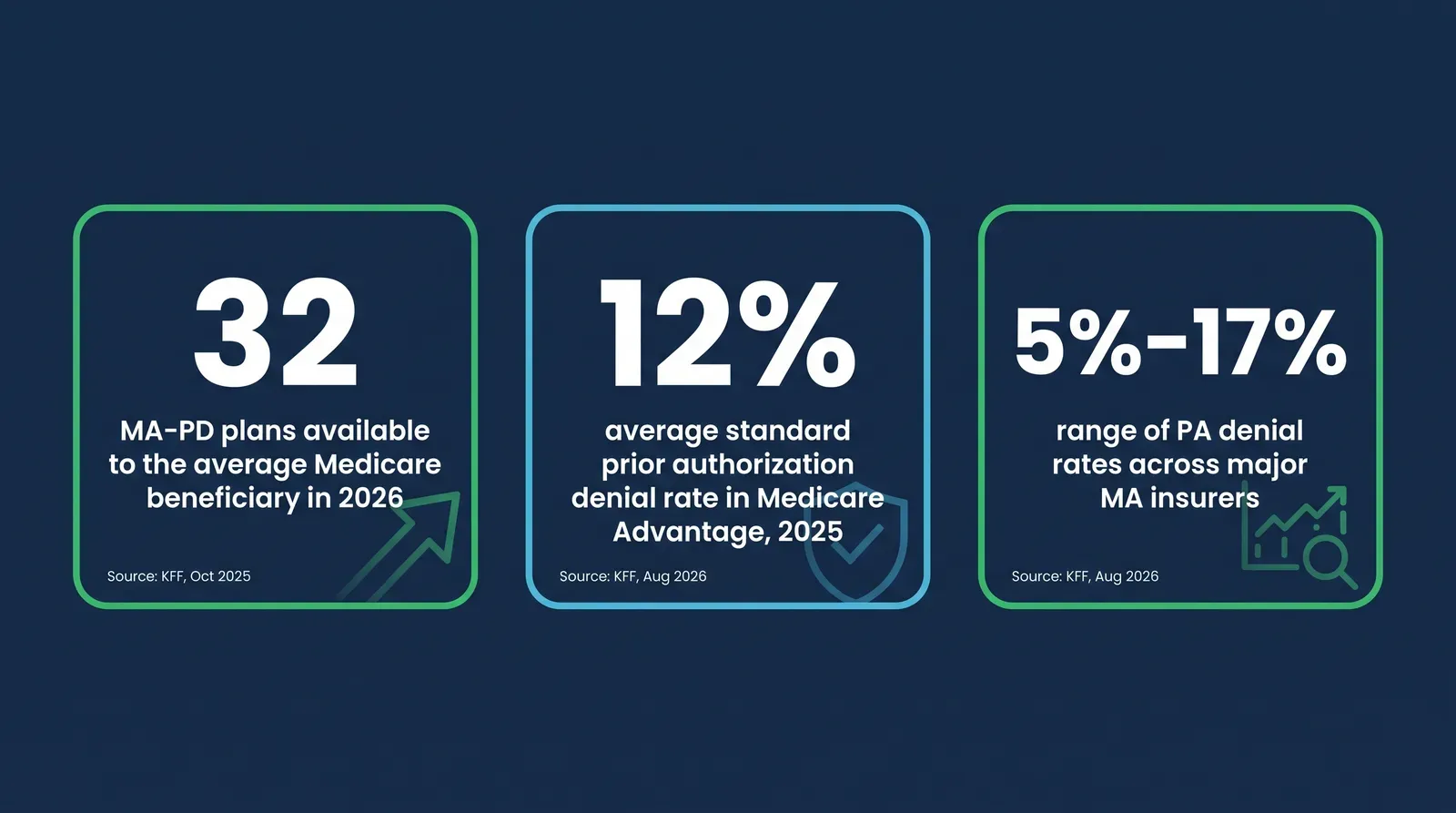
Getting a drug’s coverage or cost wrong doesn’t just mean an awkward phone call. KFF’s analysis of 2025 data from the six largest Medicare Advantage insurers — UnitedHealth Group, Humana, CVS, Kaiser Permanente, Centene, and Elevance, together covering 69% of Medicare Advantage enrollment — found an average standard prior authorization denial rate of 12%, ranging from 5% at Elevance to 17% at UnitedHealth Group, with expedited requests averaging 10% and ranging from 3% to 13% (KFF, Prior Authorization Metrics Provide New Insights Into Insurer Practices, but Gaps Remain, Aug. 13, 2026). That’s a one-source figure — KFF’s own report notes gaps remain in what’s publicly reported, so treat 12% as directionally real rather than a number every plan will match exactly. What it establishes clearly: prior authorization denial is common enough, across enough of the market, that “this plan probably covers it” isn’t a safe substitute for actually checking the PA flag on that specific NDC.
The cost to you personally shows up in three places. First, the client relationship — a client who enrolled on your word that a drug was covered, then found out at the pharmacy counter it wasn’t, or that it required a prior authorization nobody warned them about, doesn’t blame the plan first. They blame the agent who told them it was fine. Second, the compliance exposure — CMS’s Medicare Communications and Marketing Guidelines govern what agents can represent about specific plan benefits during a sales conversation, and an inaccurate coverage claim made during that conversation is a different problem than an inaccurate claim made in casual conversation (CMS, Medicare Communications and Marketing Guidelines). Third, the time — every one of these questions that gets answered with a guess instead of a check is a question you’ll probably field again in a follow-up call once the client finds out the guess was wrong, which costs more time than checking would have in the first place.
"Probably covered" isn't an answer. It's a guess that costs you the relationship if it's wrong.
Mike MooreThe full manual method: how to check a real drug’s cost by hand
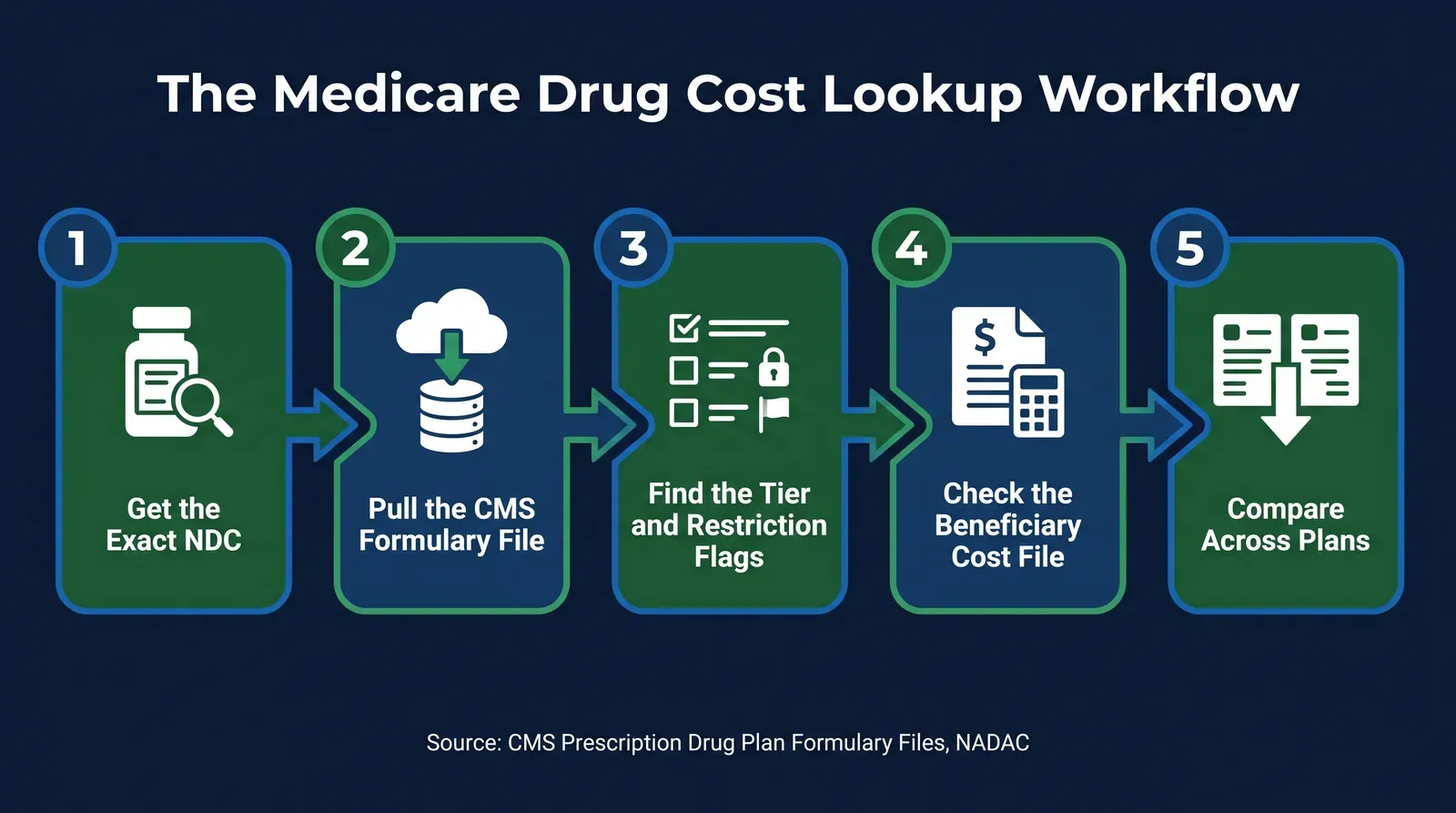
This is the part we’re not holding back. You don’t need a data science background or paid software to do this — you need the client’s exact drug list, a spreadsheet, and the willingness to download and join a few CSV files. Here’s the complete process.
Step 1: Get the exact drug, not just the drug name
Ask the client (or pull from the doctor’s prescription) the specific drug name, strength, and form — tablet versus capsule versus injectable, and the dosage. “Metformin” isn’t enough; “metformin hydrochloride 500 mg extended-release tablet” is. This matters because formularies are keyed to the National Drug Code (NDC), an 10-to-11-digit identifier that’s specific down to the manufacturer, strength, and package size. Two different NDCs for what a patient would call “the same drug” can land on different tiers of the same formulary. If you don’t have the exact NDC, the drug’s specific strength and form is usually enough to narrow it down using the plan’s own formulary search tool or the National Drug Code Directory the FDA maintains.
Step 2: Download the current CMS formulary file set
Go to CMS’s Prescription Drug Plan Formulary, Pharmacy Network, and Pricing Information Files page and pull the current month’s release (CMS, Prescription Drug Plan Formulary, Pharmacy Network, and Pricing Information Files). You’re downloading six related CSV tables:
| File | What it tells you |
|---|---|
| Plan Information | Which plans exist, their plan type (PDP or MA-PD), and their formulary ID |
| Geographic Locator | Which plans are actually sold in the client's county |
| Formulary | Which NDCs a formulary covers, the tier level, and whether step therapy, quantity limits, or prior authorization apply |
| Beneficiary Cost | The actual copay or coinsurance for each tier, by coverage phase (deductible, initial coverage, catastrophic) |
| Pharmacy Network | Which pharmacies are in-network for that plan, and preferred-network status |
| Drug Pricing | Plan-level average monthly cost for formulary Part D drugs |
Step 3: Narrow to the plans actually available to your client
Use the Geographic Locator file to filter Plan Information down to only the plans sold in your client’s county — no point cross-referencing a formulary for a plan they can’t enroll in. This is also where you separate PDP formularies from MA-PD formularies, since the Plan Information file’s plan type field tells you which is which, and that distinction matters for the rest of the client’s coverage picture beyond just drugs.
Step 4: Match the NDC against each plan’s Formulary file
For each plan still in your shortlist, search the Formulary file for the client’s exact NDC. Three outcomes: it’s covered and unrestricted, it’s covered with a step therapy, quantity limit, or prior authorization flag, or it isn’t on that formulary at all. Record the tier level and every flag for each plan — this is the raw data point that actually differentiates the plans for this specific client, more than the plan’s general “4-star” marketing or premium alone.
Step 5: Pull the real cost from the Beneficiary Cost file, not NADAC
This is the step where agents most often grab the wrong number. NADAC — the National Average Drug Acquisition Cost — is CMS’s estimate of what a pharmacy pays to acquire the drug, calculated from a survey of retail pharmacies, with a monthly file produced on the first Monday on or after the 15th of each month and weekly postings the rest of the month (Medicaid.gov, NADAC). That’s a useful, real number, but it’s the pharmacy’s ingredient cost, not the beneficiary’s copay. NADAC is most relevant if you’re cross-checking whether a plan’s own cost representation looks reasonable relative to the drug’s actual acquisition cost, or explaining to a client why a generic is so much cheaper than the brand version. For what the client pays at the counter, go to the plan’s Beneficiary Cost file, match the tier you found in Step 4, and read the copay or coinsurance for the coverage phase the client will be in — remembering that pre-deductible, initial-coverage, and catastrophic-phase costs for the same tier are usually three different numbers.
Step 6: Repeat per plan, and build a comparison table
Do Steps 4 and 5 for every plan on the client’s shortlist, and put the results side by side: plan name, tier, restriction flags, and estimated cost per phase. This is the artifact that actually answers the client’s question — not a single plan’s number in isolation, but the comparison that shows which plan is genuinely better for their specific drug list.
A worked, illustrative example
This is a hypothetical built to show how the numbers can differ, not a real pulled figure for any specific plan or drug this month — always confirm the current formulary before relying on any number with a client.
| Factor | Illustrative Plan A | Illustrative Plan B |
|---|---|---|
| Formulary tier | Tier 2 (preferred generic) | Tier 4 (non-preferred drug) |
| Restriction flags | None | Prior authorization required |
| Initial coverage phase cost-sharing | Flat copay, per Beneficiary Cost file | Coinsurance percentage, per Beneficiary Cost file |
| What this means for the client | Lower, predictable cost; no extra step before fill | Higher, variable cost; a PA delay is possible before the first fill |
Two plans in the same county, same client, same drug — genuinely different outcomes, and the only way to know which is which is the file-by-file check above, not the plan’s star rating or premium.
Step 7: Document what you found and when
Write down the plan year, the date you checked, and which files you used. Formularies update monthly and reset every plan year, so a coverage answer from March isn’t automatically still true in October. A dated record protects you if a client’s coverage changes later and they ask why you told them something different — you can show exactly what the data said on the day you checked it, which is a materially stronger position than “I’m pretty sure I checked.”
Get the exact NDC
Drug name, strength, and form — not just what the client calls it.
Download the CMS file set
Six CSV tables, free since January 2021, refreshed monthly.
Narrow to the client's county
Use the Geographic Locator file before you check any formulary.
Match the NDC per plan
Tier, and every step therapy, quantity limit, or PA flag.
Pull the real cost
Beneficiary Cost file for the copay — not NADAC, which is a different number.
Document the date
Plan year, check date, and source files — your defensible record if coverage changes later.
Everything above works whether you join anything or not. Go run it by hand on the next drug question you get — or let Ambrose run the same lookup once you’re in.
Where the manual version breaks down at scale
The seven steps above genuinely work for one client’s one drug question. They stop being practical the moment you’re trying to compare a client’s five-drug list across all 32 available plans, or trying to run this check for every renewal in your book before AEP. Six CSV tables, each running into the hundreds of thousands of rows nationally, joined by hand in a spreadsheet for even a dozen plans, is a multi-hour project — and every one of those hours is an hour you’re not spending with a client.
There’s a second problem underneath the scale problem. Once you’ve built a spreadsheet with a client’s name next to their specific drug list and health conditions implied by that list, you’re holding something that looks a lot like protected health information. It’s tempting to paste that list into a general AI tool to help speed up the cross-referencing. Don’t — that’s the exact mistake our guide on what not to paste into ChatGPT covers in full, and a drug list tied to a named client sits squarely in the category of things that shouldn’t leave your systems toward a destination without a signed BAA.
How Ambrose’s Brain handles the same lookup
Ambrose OS, the platform included with a Tech Savvy membership, documents an internal service called the Brain, described as fronting more than 25 federal and healthcare data sources — CMS, NADAC, FDA, and the Federal Register named specifically among them — gated behind access tiers with rate limits (Ambrose docs, Architecture and Glossary, both fetched September 2026). That’s the same two data sources, CMS and NADAC, this article’s manual method pulls from directly.
Here’s the honest part, the same way we’d want a vendor to be honest with us: the current public docs describe the Brain at the level of “which federal sources it fronts,” not as a list of individually named query tools for this exact drug-lookup use case. That’s different from Ambrose’s marketplace-finder spoke, which is documented with specific tools for ACA plan search, or medicare-watchdog, which is documented as scheduled MAPD/PDP/Med Supp intelligence for scanning an existing book against new plan-year data (Ambrose docs, Spokes catalog, fetched September 2026). The Brain is the foundational layer those spokes are built on. For an ad-hoc, this-one-drug-for-this-one-client question specifically, confirm with Ambrose directly or in a live session which surface — a direct Brain query, a future spoke, or medicare-watchdog’s book-level scan — is the right fit for what you’re asking, rather than assuming a specific named tool exists before you’ve verified it.
What that structure does get you, confirmed today: instead of you personally downloading and joining six CMS tables and a separate NADAC file, an agency’s Ambrose seat can reach that same underlying federal data through one system, described in the docs as HIPAA-aware by default — never “HIPAA certified,” since no such certification exists for a software platform — with tenant isolation scoping every read and write to your own agency (Ambrose docs, What Is Ambrose, fetched September 2026). That’s the same six-table join this article just walked you through by hand, run against a data layer built to be queried instead of downloaded.
Six files, one drug, one plan at a time
- Download and open six separate CSV tables per lookup cycle
- Join Plan Information to Geographic Locator to Formulary manually
- Cross-reference NADAC against Beneficiary Cost and risk mixing up the two
- Repeat the entire process for every plan on the comparison list
- No built-in record of what you checked or when
6 tablesper drug, per lookup
One query against the same underlying federal data
- The Brain fronts CMS and NADAC behind one tenant-scoped access layer
- No separate download-and-join per client question
- HIPAA-aware by default, with the client's info kept inside the agency's tenant
- Book-level, scheduled versions of this problem run through medicare-watchdog
- Still requires verifying the current, exact capability before relying on it for a client
1 tenant-scoped layerfronting the same sources
If the client-facing question is really “which of my existing clients are affected by this year’s formulary or benefit changes across the whole book,” rather than one drug for one client, that’s the job our Medicare book re-shop guide and the medicare-watchdog spoke are built for — scheduled scanning rather than an ad-hoc lookup.
Ambrose’s Brain fronts the same CMS and NADAC data this article just walked through by hand — one seat comes with the Tech Savvy membership, and that’s the fastest way to stop personally joining six CSV tables per client question.
Compliance: a data lookup doesn’t replace the rules that already apply
Checking a formulary carefully is a due-diligence practice. It doesn’t loosen, and it doesn’t replace, the rules that already govern what you say to a client about coverage and cost.
CMS’s Medicare Communications and Marketing Guidelines govern what you can represent about specific plan benefits. If a conversation about a drug’s coverage or cost happens as part of a sales or marketing interaction, the same disclaimer and accuracy expectations that apply to the rest of that conversation apply here — including the standard third-party marketing organization (TPMO) disclaimer requirement for agents communicating about specific plans (CMS, Medicare Communications and Marketing Guidelines). This article isn’t a substitute for that full guidance; confirm your own carrier’s and state’s specific marketing-review requirements before you put a cost figure in writing to a client.
If you use AI anywhere in this workflow — to help cross-reference a formulary, summarize a client’s drug list, or draft a comparison — the NAIC’s AI Model Bulletin expectations apply: a written policy on how the tool is used, human review before anything goes to a client, and documentation you can produce if a regulator or carrier asks (NAIC, AI Model Bulletin & AI Principles).
Never paste a client's named drug list into a general AI tool
A client's specific medications, tied to their name, are the kind of information that implies a health condition — treat it with the same caution as any other protected health information. Don't paste it into a consumer chatbot to speed up a formulary comparison. A platform described as HIPAA-aware by default, with tenant isolation and a documented PHI-handling layer, is a materially different destination than a general-purpose AI tool with no such controls.
What you get by joining
One Ambrose seat comes with a Tech Savvy Insurance membership: $97 a month, billed monthly, cancel anytime, founding rate locked in while the membership stays active. Alongside the seat: weekly Zoom calls with open Q&A and build-with-you sessions, 30-plus hours of recorded training, Meta Ads and marketing training built for this industry, pre-built AI templates and bot deployments, and a free annual in-person member workshop — plus an explicit no-recruiting rule, so a question about a drug formulary doesn’t turn into someone else’s downline pitch.
Ambrose usage is separate from the $97 seat
The membership includes one Ambrose seat; usage inside Ambrose runs through its own credit ledger with spend caps, so cost stays visible instead of showing up as a surprise. See the full Spokes catalog for what else is available beyond the Brain.
Check the next drug question with the real data
The six CMS files, the NADAC distinction, and the join logic above work whether you join anything or not. If you'd rather have the Brain reach the same CMS and NADAC data in one query, one seat comes with the Tech Savvy membership.
Join Tech Savvy — $97/monthThe close
Everything above, the six-file join, the NADAC-versus-Beneficiary-Cost distinction, the worked comparison, works whether you ever join anything or not. That’s the point of writing it out completely. This is exactly the kind of question we work through on a Tuesday with Ambrose open on the screen: a real client, a real drug, checking what the current formulary actually says instead of guessing. $97 a month, cancel anytime, and nobody will pitch you a downline: https://techsavvyinsurance.com/.
Before you quote a client a drug's cost or coverage
Tech Savvy Insurance is a training and software community, not an insurance company, agency, or law firm, and does not provide insurance, legal, tax, or compliance advice. You are responsible for your own licensure and for complying with all applicable CMS, HIPAA, state, and carrier regulations, including marketing, disclosure, and documentation requirements for any representation you make about plan coverage or cost. AI-generated outputs may contain errors — always verify against the plan's current, official formulary before a client relies on it. Results may vary.
Frequently asked questions
Sources
- CMS — Prescription Drug Plan Formulary, Pharmacy Network, and Pricing Information Files — cms.gov
- Medicaid.gov — National Average Drug Acquisition Cost (NADAC) — medicaid.gov
- KFF — Prior Authorization Metrics Provide New Insights Into Insurer Practices, but Gaps Remain (Aug. 13, 2026) — kff.org
- KFF — Medicare Beneficiaries Have 32 Medicare Advantage Prescription Drug Plans Available, on Average, for 2026 (Oct. 14, 2025) — kff.org
- CMS — Medicare Communications and Marketing Guidelines — cms.gov
- NAIC — Artificial Intelligence (Model Bulletin & AI Principles) — content.naic.org
- Ambrose docs — Architecture (the Brain) — app.hiambrose.com
- Ambrose docs — Glossary — app.hiambrose.com
- Ambrose docs — Spokes catalog — app.hiambrose.com
- Ambrose docs — What Is Ambrose — app.hiambrose.com
Ready to put this into practice?
Join a private community of Health & Life insurance professionals using AI, Meta Ads, and automation to grow — without draining their bank account.
Join Tech Savvy — $97/month