
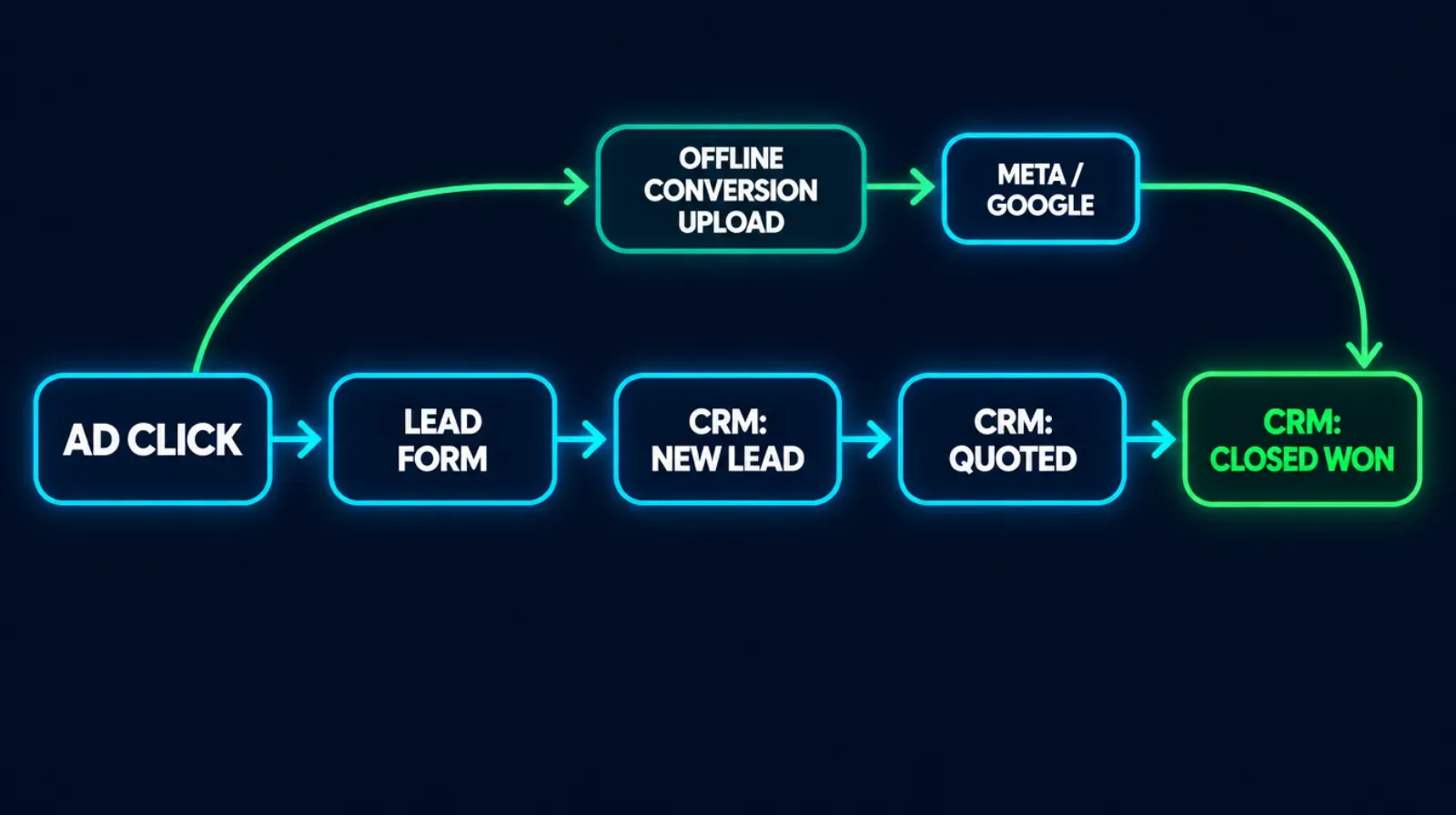
Your ad platform’s dashboard says Campaign A is your winner: cheap leads, high volume, great cost-per-lead. Your commission statement says something else entirely — Campaign A hasn’t produced a sold policy in six weeks, and the “expensive” Campaign B you almost paused is where three-quarters of this quarter’s issued business actually came from. Both things are true at once, because Meta and Google only know what you tell them, and most agencies never tell them what happened after the lead form. The fix is a specific, documented mechanism — sending a conversion event back to the ad platform when a policy actually closes — and it’s fully doable by hand before you ever touch a paid tool.
Key takeaways
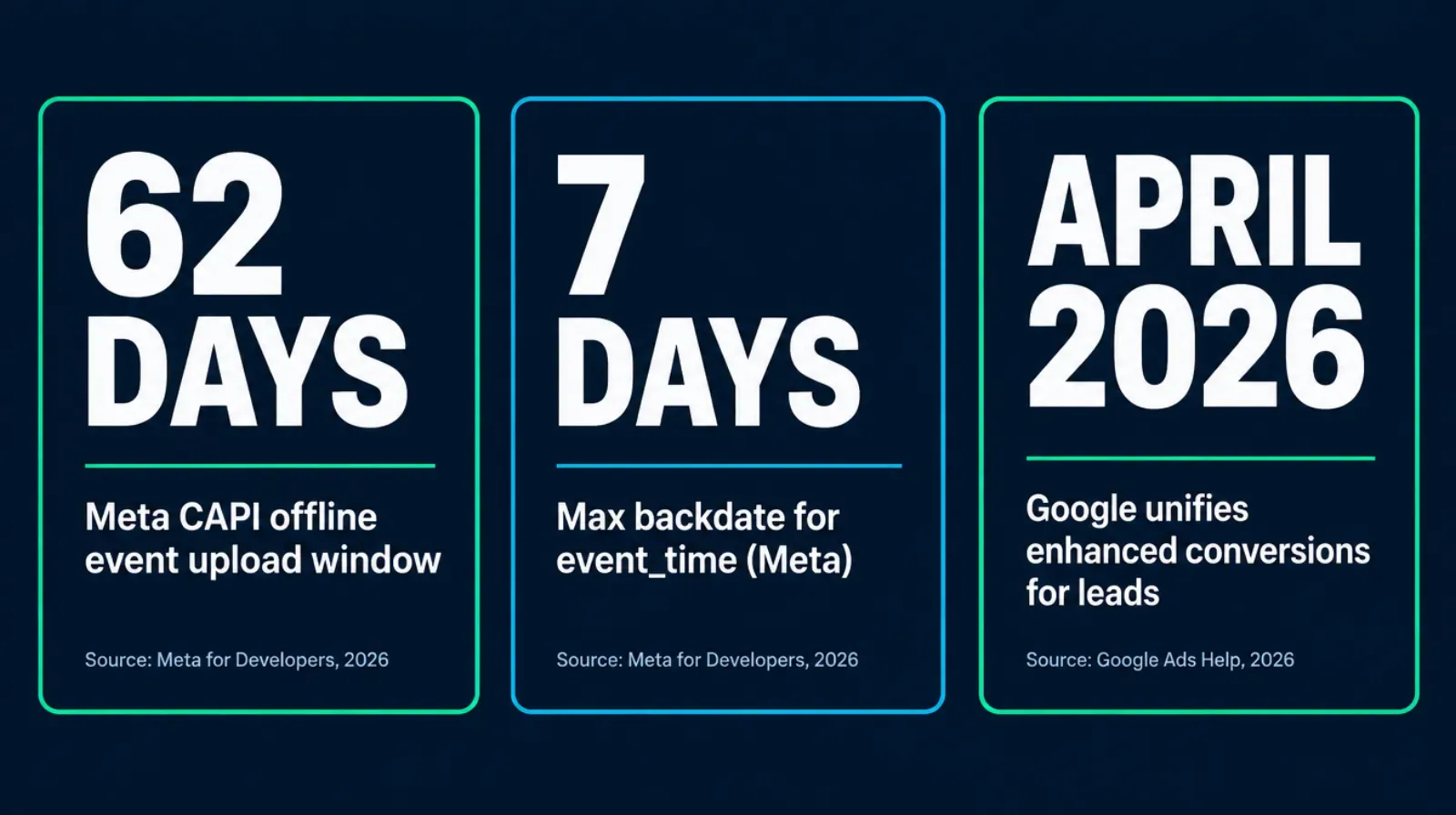
- Meta's Conversions API requires offline events to be uploaded within 62 days of the conversion, and the event_time you assign can be no more than 7 days before you send it — miss either window and Meta rejects the whole batch, not just the late event (Meta for Developers, Conversions API, fetched September 2026).
- Meta documents nine action_source values for a conversion event — email, website, app, phone_call, chat, physical_store, system_generated, business_messaging, and other — and none of them is named crm or call_center, whatever a third-party guide claims (Meta for Developers, server event parameters, fetched September 2026).
- Google Ads' offline conversion import needs a Google Click ID captured at lead time, plus a conversion name and date; enhanced conversions for leads adds hashed email or phone matching, and Google is unifying web and lead enhanced conversions into a single setting starting April 2026 (Google Ads Help, fetched September 2026).
- Ambrose's campaign-metrics spoke reports funnel performance across email, SMS, and social through to a booked call via three documented tools, but as of this session it isn't documented as reaching all the way to a CRM's Closed Won stage or pushing conversions back to Meta or Google automatically (Ambrose docs, spoke-campaign-metrics, fetched September 2026).
- You can build a working cost-per-issued-policy report with a spreadsheet and data you already have in your CRM, before spending a dollar on new tooling.
The pain: your best campaign and your busiest campaign are not the same campaign
Every agency that runs Meta or Google ads eventually hits this moment. You open Ads Manager and the numbers look good — cost per lead is down, volume is up, the algorithm reports it’s “learning” and optimizing. You open your CRM and the numbers tell a different story: the leads from that campaign are quoting, going quiet, and not closing. Meanwhile a smaller, pricier campaign you almost killed twice this year keeps quietly producing the policies that actually get issued.
This isn’t a hunch agencies have. It’s a structural fact about how ad platforms measure success. Meta and Google optimize toward whatever conversion event you’re sending them. If the only event firing is “lead form submitted,” that’s the only thing the algorithm is told to find more of — and a form submission is a terrible proxy for a sold policy, because it happens in seconds, before anyone has verified the person is a real prospect, qualifies for the plan, or even has a working phone number. The algorithm isn’t broken. It’s optimizing perfectly toward the wrong finish line, because nobody moved the finish line for it.
The agent-facing version of this: you keep spending on the campaign the platform tells you is winning, because the platform’s own reporting only sees half the story — the half between the click and the form fill. Everything that happens after that (the callback, the quote, the underwriting, the signature, the policy actually being issued) happens in your CRM, in a system Meta and Google can’t see into unless you specifically build a bridge back to them.
Why it happens: the pixel stops at the click, and nobody built the bridge back
Three things compound to create this gap, and none of them are a mistake — they’re just what happens by default if nobody actively closes the loop.
First, browser-based tracking only sees the front half of the funnel. A Meta Pixel or a Google Ads tag fires in someone’s browser at the moment they submit a lead form. It has no way to know what happens three weeks later in your CRM, because your CRM is a different system entirely, and nothing tells the ad platform to go check it. The pixel’s job ends the instant the page loads or the form submits.
Second, closing that loop requires a specific, deliberate integration — not a setting you toggle on. Meta’s mechanism is the Conversions API (CAPI): a server-to-server call that tells Meta “this specific person, identified by a hashed email or phone number, did this specific thing, at this specific time” — including an offline event like a policy being issued weeks after the original ad click (Meta for Developers, Conversions API, offline events, fetched September 2026). Google’s equivalent is offline conversion import, which uses the Google Click ID (GCLID) captured at the moment of the click to tie a later, offline outcome back to the original ad interaction, and Google’s newer enhanced conversions for leads adds hashed customer data matching on top of that (Google Ads Help, offline conversion import and enhanced conversions for leads, fetched September 2026). Both mechanisms exist, both are documented, and both require someone to actually wire the CRM stage change back to the platform. Neither happens by default.
Third, the technical details are exacting enough that agencies get the bridge half-built and assume it’s working. This is the part most guides skip, and it’s where real money gets lost even at agencies that think they’ve already solved this.
| Requirement | Meta (Conversions API) | Google Ads (offline conversion import) |
|---|---|---|
| Identifier captured at lead time | Hashed email and/or phone number | Google Click ID (GCLID), stored on the lead record |
| Event source label | action_source — one of 9 documented values: email, website, app, phone_call, chat, physical_store, system_generated, business_messaging, other | Conversion action name you define, tied to the GCLID |
| Upload time window | Event must be uploaded within 62 days of the conversion; event_time can be no more than 7 days before you send it, or the whole batch is rejected | No explicit window documented on the offline import page itself; upload as soon as the stage change happens |
| Newer/recommended path | CAPI alongside the Pixel, not instead of it | Enhanced conversions for leads — hashed data matching, unifying with web enhanced conversions into one setting starting April 2026 |
The mistake that breaks this quietly
Agencies that "already did CAPI" often used a third-party plugin that guessed at an action_source value like crm or call_center — values that don't exist in Meta's documented schema (Meta for Developers, server event parameters, fetched September 2026). Meta doesn't always hard-reject an unrecognized value the same way across every integration path, which means the event can silently fail to match cleanly to the original ad interaction, and you'd have no reason to notice unless you specifically went looking. If you set this up more than a few months ago, it's worth checking which action_source your integration is actually sending.
What it actually costs: a worked example, not an industry benchmark
Nobody can hand you a universal dollar figure for what misattribution costs your specific agency — that number depends on your spend, your close rate, and your average commission, and any guide that gives you a flat industry number without showing its source is guessing. So here’s a constructed example, with invented numbers, to show the mechanism plainly. Treat the dollar figures as illustrative, not as a benchmark to compare yourself against.
Say you run two Meta campaigns for a full quarter:
| Metric | Campaign A | Campaign B |
|---|---|---|
| Ad spend | $6,000 | $6,000 |
| Leads generated | 300 | 80 |
| Cost per lead (what the ad platform sees) | $20 — looks great | $75 — looks weak |
| Policies issued that quarter | 4 | 19 |
| Real cost per issued policy | $1,500 | $316 |
On the ad platform’s own dashboard, Campaign A looks like the winner by a wide margin — nearly four times cheaper per lead. Once you divide spend by what actually got issued, Campaign B is almost five times more efficient. If the only signal feeding the algorithm is “lead,” it keeps pushing budget toward Campaign A, because as far as it can tell, Campaign A is winning. Nothing about the platform is malfunctioning. It’s optimizing perfectly toward a number that was never the number that mattered.
Cost per lead versus cost per issued policy, illustrative example
Same two campaigns, same spend — the ranking flips once policies issued replaces leads generated
Illustrative worked example with invented figures, not sourced industry data. The point is the ranking flip, not the specific dollar amounts.
The ad platform will optimize toward whatever you tell it to optimize toward. Tell it "lead," and it'll get you leads. Tell it "policy," and it has to actually earn the budget.
Mike MooreThe manual fix: build a real cost-per-issued-policy report, no new tools required
This works with a spreadsheet, a CRM export, and an afternoon. It doesn’t require CAPI, GCLID capture, or anything automated — those come later, once the manual version proves the mechanism is worth the integration work.
Step 1: Tag every lead with its source campaign at the moment it’s captured
If your lead form, landing page, or CRM doesn’t already record which specific ad campaign (not just “Facebook” or “Google,” the actual campaign and ad set name) a lead came from, that’s the first gap to close. Most ad platforms pass this information through URL parameters automatically if your landing page or CRM is set up to capture them — check whether yours does before assuming you need new software.
Step 2: Track every lead through to a final outcome, not just a status
Your CRM needs a small set of end states that every lead eventually lands in: Quoted, Closed Won (policy issued), Closed Lost, or Dead. If leads just pile up in “New” or “Contacted” forever with no forced resolution, you can’t build this report — you need a workflow habit where every lead gets marked to a final state within a set window (30 or 60 days is reasonable for most lines).
Step 3: Once a quarter, pull spend and issued policies by campaign into one sheet
| Column | Where it comes from |
|---|---|
| Campaign name | Ads Manager or Google Ads export |
| Ad spend, this period | Ads Manager or Google Ads export |
| Leads generated, this period | Your CRM, filtered by campaign tag and lead-capture date |
| Policies issued attributable to those leads | Your CRM, filtered by Closed Won status where the campaign tag matches |
| Cost per issued policy | Ad spend divided by policies issued |
The honest complication: a lead captured in March might not close until June, so a strict quarterly view will always undercount recent campaigns and look artificially generous to older ones. Handle this by looking at cohorts by lead-capture month rather than by calendar quarter, and accept that the most recent 60 to 90 days of campaign data is always going to be provisional until those leads finish working through your pipeline.
Step 4: Act on the number, even when it’s uncomfortable
The point of building this report is to actually change budget based on it — pausing or cutting the campaign with a great cost-per-lead and a terrible cost-per-issued-policy, and protecting or scaling the one with the opposite pattern, even though everything in the ad platform’s own dashboard will tell you you’re doing it backwards. This is the step agencies skip, because it means arguing with a dashboard that looks confident.
Step 5 (optional): Close the loop automatically with CAPI or offline conversion import
Once the manual version has proven the mechanism matters, the next step is feeding “Closed Won” back to the ad platform directly, so its own algorithm starts optimizing toward policies instead of leads — using the exact mechanics in the table above. This is genuinely technical work: someone needs to capture the GCLID or set up hashed-identifier matching at lead time, build the export or webhook that fires on a CRM stage change, and respect the time windows Meta documents. Most agencies either have this built by whoever runs their CRM’s automation, or they stop at the manual version and simply act on the quarterly report by hand — both are legitimate, and the manual version alone already fixes the budget-allocation mistake.
What not to send to Meta or Google
Whatever event name and data you send back, never include a client's specific plan type, carrier, diagnosis-adjacent detail, or anything that reads as protected health information once tied to a real, identifiable person. A generic event name like "Closed Won" tells the algorithm what it needs to know. "ACA Silver Plan — Diabetes Management Rider Declined" does not need to exist anywhere near an ad platform's servers. Neither Meta nor Google is a HIPAA Business Associate for your agency, and sending PHI to a non-BAA destination is exactly the exposure our companion guide on Meta Ads and PHI covers in full.
Everything above works whether you ever touch Ambrose or join anything. It’s a workflow and a spreadsheet, not a purchase.
What Ambrose’s campaign-metrics spoke actually tracks, and where it stops today
Ambrose’s campaign-metrics spoke is documented with three tools: metrics_campaign_summary, which returns topline performance stats for a given campaign; metrics_recipient_engagement, which analyzes engagement at the individual recipient level; and metrics_funnel_breakdown, which reports performance across each stage of a funnel spanning email, SMS, and social channels, through to a booked call (Ambrose docs, spoke-campaign-metrics, fetched September 2026). Per-recipient identifiers are stripped before the underlying model sees them, with individual identifiers only reintroduced when you explicitly approve an action list based on the analysis — the same aggregate-first, re-identify-on-approval pattern the docs describe for this spoke’s privacy posture (Ambrose docs, spoke-campaign-metrics, fetched September 2026). Separately, the platform’s PHI Rail runs anything that qualifies as protected health information only against model providers covered by a signed Business Associate Agreement, with every read and write scoped to the agency’s own tenant id (Ambrose docs, PHI Rail architecture, fetched September 2026) — the same design principle behind not sending identified PHI to an ad platform, applied inside Ambrose itself.
Here’s the part worth being direct about, in the same spirit as every other honest gap we’ve written about on this site: campaign-metrics is documented as reaching a booked call, not confirmed this session to reach a CRM’s Closed Won stage or to push conversion events back to Meta or Google automatically. That’s a real and useful thing — a booked call is a meaningfully further step than a raw lead, and knowing which campaign actually produces booked calls (not just form fills) already tightens the loop considerably. But it’s not the same claim as “campaign-metrics closes the CAPI loop for you,” and this article isn’t going to pretend it does.
The spreadsheet from this article
- You tag leads by campaign and track them to a final CRM stage yourself
- Cost-per-issued-policy is a quarterly pull-and-divide exercise
- Acting on it means manually pausing or scaling campaigns in Ads Manager
- Works today, in any CRM, at zero cost
Funnel visibility to a booked call, queryable
- metrics_campaign_summary and metrics_funnel_breakdown surface channel performance in one query
- Per-recipient identifiers stay stripped until you explicitly approve an action list
- Stops at booked call today — the CRM-to-ad-platform loop is still yours to build or ask about
- Comes with one Ambrose seat included in the Tech Savvy membership
The honest version of this section
If closing the loop all the way to Meta's Conversions API or Google's offline conversion import matters to your agency specifically, ask about it directly rather than assuming a feature exists because it would be a natural next step. Documentation moves fast in an actively developed platform, and the accurate answer as of this session is: campaign-metrics gives you funnel visibility through booked calls, and the CRM-to-ad-platform bridge described in the manual method above is still work an agency does itself, or scopes as a custom build.
The compliance angle: sending customer data to an ad platform is a governance question, not just a marketing one
Beyond the PHI-naming issue already covered above, the broader compliance frame matters here too. The NAIC’s Model Bulletin on the Use of Artificial Intelligence Systems by Insurers, adopted December 2023, sets the expectation that decisions or actions made or supported by AI still have to comply with applicable insurance laws and regulations, and that insurers and agencies should be able to document their own governance around how AI-adjacent tools get used (NAIC, Insurance Topics: Artificial Intelligence, Model Bulletin, fetched September 2026). If any part of your attribution pipeline involves an AI tool summarizing CRM data, categorizing leads, or deciding which conversion events to send, that’s governance worth writing down: who approved the data flow, what gets sent, and what explicitly doesn’t.
If you sell Medicare Advantage or Part D, remember that the TPMO disclaimer requirement applies to marketing materials and communications broadly, not just to a specific ad — our companion guide on Medicare marketing claims covers the exact required wording CMS expects. None of that changes because the campaign in question is being measured for attribution instead of compliance; it just means the same disclosure discipline should already be baked into whatever’s running, independent of how well you’re tracking its ROI.
Does this apply if I only run a small, local budget?
Yes, arguably more than it does for a large agency. A $500-a-month local campaign can’t absorb four months of spend on a campaign that isn’t actually converting the way its lead cost suggests — the margin for waste is much smaller. You don’t need CAPI or GCLID capture at that scale to get value from this article; the manual spreadsheet in Step 3 is exactly sized for a single-agent or small-team budget, and it takes less time to build than most agents spend arguing with themselves about whether to pause a campaign.
What if my CRM doesn’t track a clean “policy issued” stage?
Fix that before anything else here. If your CRM’s pipeline is a vague set of stages that don’t map to a real, unambiguous “the policy is issued and active” moment, you don’t have an attribution problem yet — you have a pipeline-definition problem, and it’ll break every version of this report, manual or automated. Most CRMs built for insurance agencies already support a Closed Won or Policy Issued stage; the fix is usually agreeing on when to use it and enforcing that every closed lead actually gets marked, not adding new software.
What you get by joining
One Ambrose seat comes with a Tech Savvy Insurance membership: $97 a month, billed monthly, cancel anytime, founding rate locked in while the membership stays active. That includes weekly Zoom calls with open Q&A and build-with-you sessions, 30-plus hours of recorded training, Meta Ads and Google Ads training built for this industry specifically, pre-built AI templates and bot deployments, and a free annual in-person member workshop — plus an explicit no-recruiting rule, so a question about your ad account doesn’t turn into someone else’s downline pitch.
Ambrose usage is separate from the $97 seat
The membership includes one Ambrose seat; usage inside Ambrose runs through its own credit ledger with spend caps, so cost stays visible instead of showing up as a surprise. See the full Spokes catalog for what campaign-metrics sits alongside.
Tag every lead by campaign
At the moment it's captured, not reconstructed later from memory.
Force every lead to a final stage
Quoted, Closed Won, Closed Lost, or Dead — no lead lives in limbo forever.
Pull spend and policies by campaign
Quarterly, by lead-capture cohort, not by calendar quarter alone.
Act on cost per issued policy
Even when it contradicts what the ad platform's own dashboard says.
Never send PHI to an ad platform
Generic event names only — no plan type, no health detail, ever.
Know what campaign-metrics covers today
Funnel visibility to a booked call — the CRM bridge is still yours to build.
Stop funding the wrong campaign
The spreadsheet method above works whether you ever join anything or not. If you'd rather see campaign-metrics set up on your own account, with someone watching your screen, one Ambrose seat comes with the Tech Savvy membership.
Join Tech Savvy — $97/monthThe close
Campaign A will keep looking like your winner for as long as “lead” is the only word your ad platform understands. Fix that with the manual worksheet this week — it costs nothing and takes an afternoon — and if you want the queryable version with a room of people who’ve already built it, that’s what a Tuesday call in the Tech Savvy community looks like. $97 a month, cancel anytime, and nobody will pitch you a downline: https://techsavvyinsurance.com/.
Before you change ad spend based on this article
Tech Savvy Insurance is a training and software community, not an insurance company, agency, or law firm, and does not provide insurance, legal, tax, or compliance advice. You are responsible for your own licensure and for complying with all applicable CMS, HIPAA, state, and carrier rules, and with Meta's and Google's own advertising policies. AI outputs, including any AI-assisted campaign analysis, may contain errors — always verify before relying on it. Never send a client's protected health information to an ad platform without a Business Associate Agreement in place. Results may vary.
Frequently asked questions
Sources
- Meta for Developers — Conversions API, Offline Events — developers.facebook.com
- Meta for Developers — Conversions API, Server Event Parameters — developers.facebook.com
- Google Ads Help — About Offline Conversion Import — support.google.com
- Google Ads Help — About Enhanced Conversions for Leads — support.google.com
- NAIC — Insurance Topics: Artificial Intelligence (Model Bulletin, adopted Dec. 2023) — content.naic.org
- Ambrose docs — Spokes catalog — app.hiambrose.com
- Ambrose docs — spoke-campaign-metrics — app.hiambrose.com
- Ambrose docs — PHI Rail architecture — app.hiambrose.com
Ready to put this into practice?
Join a private community of Health & Life insurance professionals using AI, Meta Ads, and automation to grow — without draining their bank account.
Join Tech Savvy — $97/month