
Meta rejects or restricts health and life insurance ads almost always for one of two reasons: the account isn’t correctly classified under the Financial Products and Services Special Ad Category, or the ad copy trips the Personal Attributes policy by implying something about the viewer’s health, disability, or financial status (Meta, Financial and Insurance Products and Services policy, Transparency Center, updated Apr. 30, 2026; Meta, Privacy Violations and Personal Attributes policy, Transparency Center, updated Jun. 26, 2024). It rarely feels that specific in the moment. You get a red banner, a vague “doesn’t comply with our Advertising Standards” message, and a Tuesday afternoon that was supposed to be spent on calls instead spent guessing which of the eleven words in your headline was the problem. This article names the actual two policies, shows the exact ad-copy patterns that trip each one, and gives you the full manual audit method — the same checklist you could run against your account this afternoon with zero tools and no membership.
Key takeaways
- Insurance ads fall under Meta's mandatory Financial Products and Services Special Ad Category, required for any US advertiser (or advertiser reaching US audiences) since January 14, 2025 (Meta for Developers, Special Ad Category documentation).
- That classification fixes your targeting to a roughly 18-to-65-plus age range, removes lookalike and saved audiences and detailed-targeting exclusions, and sets a 15-mile (25-kilometer) minimum radius on any location target (Meta for Developers, Special Ad Category documentation).
- Meta's Personal Attributes policy bans ad copy that implies a viewer's health condition, disability, or "vulnerable financial status," even indirectly — "Do you have diabetes?" is a banned example Meta itself publishes (Meta, Privacy Violations and Personal Attributes policy, updated Jun. 26, 2024).
- The Annual Coordinated Election Period runs October 15 through December 7 every year (42 CFR 422.62(a)(2)(iii)) — a 54-day window where a restricted ad account costs more than the same restriction would cost in March.
- Ambrose's campaign-metrics spoke gives cross-channel funnel visibility with identifiers stripped before any model sees the data — it doesn't pre-clear ad copy against Meta's policy, and this article says so directly (Ambrose docs, spoke-campaign-metrics, fetched September 2026).
The pain: a rejection with no explanation you can act on
You wrote the ad, uploaded the image, set the budget, hit publish. Twenty minutes later: “This ad doesn’t comply with our Advertising Standards.” No line-item, no highlighted phrase, just a policy category name that could mean six different things. You change one word, resubmit, and it either clears or bounces again with the same unhelpful message. Do this three or four times in a week and Meta’s systems start reading your account itself as the problem, not just the ad — and now you’re staring at a restricted-account banner in Meta Business Suite two weeks before AEP starts, with client calls already on the books.
That’s the actual pain, and it’s worth being specific about what it isn’t. It isn’t Meta being arbitrary, and it isn’t a sign your product or your agency did something wrong. It’s two written, public policies that are stricter for insurance than for almost any other advertiser category, applied by an automated review system that flags patterns in text and account setup, not intent. The fix starts with knowing exactly which two policies you’re up against.
Why it happens: two policies, and most agents have only heard of one
The first policy is about who you are: the Financial Products and Services Special Ad Category. Any US advertiser, or any advertiser reaching US audiences, running ads for financial products or services — which explicitly includes insurance — has had to self-identify under this Special Ad Category since January 14, 2025 (Meta for Developers, Special Ad Category documentation). Meta’s own Financial and Insurance Products and Services policy adds that advertisers “may be required to be licensed in the country they are targeting if they wish to run ads for financial products or services,” and that Meta “may review any relevant licensing or otherwise confirm such advertisers’ authorization to run such ads” (Meta, Financial and Insurance Products and Services policy, Transparency Center, updated Apr. 30, 2026). If your ad account was set up before that requirement existed, or if a campaign got built under a generic “traffic” or “leads” objective without the Special Ad Category flag, Meta’s review system can flag the mismatch on its own — not because your ad copy said anything wrong, but because the account-level classification doesn’t match what the ad is actually selling.
The second policy is about what you said: Personal Attributes. This is the one that catches experienced agents who know about Special Ad Category and still get rejected. The policy prohibits ads that “assert or imply personal attributes,” and it lists the categories explicitly: “race, ethnicity, religion, beliefs, age, sexual orientation or practices, gender identity, disability, physical or mental health (including medical conditions), vulnerable financial status, voting status, membership in a trade union, criminal record, or name” (Meta, Privacy Violations and Personal Attributes policy, Transparency Center, updated Jun. 26, 2024). Meta’s own published examples are worth reading verbatim because they map directly onto how insurance copy actually gets written under deadline pressure:
Implies a personal attribute about the viewer
- "Do you have diabetes?" — implies knowledge of the viewer's medical condition
- "Are you bankrupt? Check out our services." — implies knowledge of financial status
- "Worried about your heart condition?" — implies a specific health condition
- "Struggling with your Medicare costs?" — implies the viewer's specific financial vulnerability
Describes the product, not the viewer
- "Depression counseling" — describes a service without addressing the viewer as having it
- "Find affordable coverage near you" — no assertion about the viewer's finances
- "Compare Medicare plan options in your area" — describes the product category
- "Book your appointment today" — Meta explicitly permits "you"/"your" without a personal attribute
Both examples on the left are close paraphrases of ones Meta itself publishes (Meta, Privacy Violations and Personal Attributes policy, Transparency Center, updated Jun. 26, 2024); the Medicare-specific ones on the right and left are ours, built the same way. The pattern underneath all of them: a question or statement addressed to “you” that assumes something personal is prohibited, and a statement about the product or a generic call to action is fine. “Find affordable coverage near you” and “Are you bankrupt? Check out our services” look structurally similar. One asserts nothing about the reader. The other assumes the reader is in a specific, sensitive financial state. That’s the whole distinction the automated reviewer is trained to catch, and it catches it more often in insurance copy than almost anywhere else because insurance ads are built, by habit, to name the exact pain point up front.
The same trap catches life and final-expense copy just as often as Medicare copy. “Worried about leaving your family with funeral costs?” implies the viewer’s financial and family circumstances in one line — prohibited on the same “vulnerable financial status” basis as the Medicare examples above. “Final expense coverage starting at a few dollars a day” describes the product’s pricing without asserting anything about the reader, and clears the same test. “Diagnosed with a health condition that made other insurers say no?” implies a specific medical condition; “Coverage options for a range of health backgrounds” describes the product’s flexibility instead. The fix is never to soften the pain point into vague marketing language — it’s to move the sentence from being about the reader to being about the product.
What it costs when it happens during AEP
None of the figures below say a specific ad or account will be penalized a specific amount — they establish why the timing of a restriction matters as much as the restriction itself.
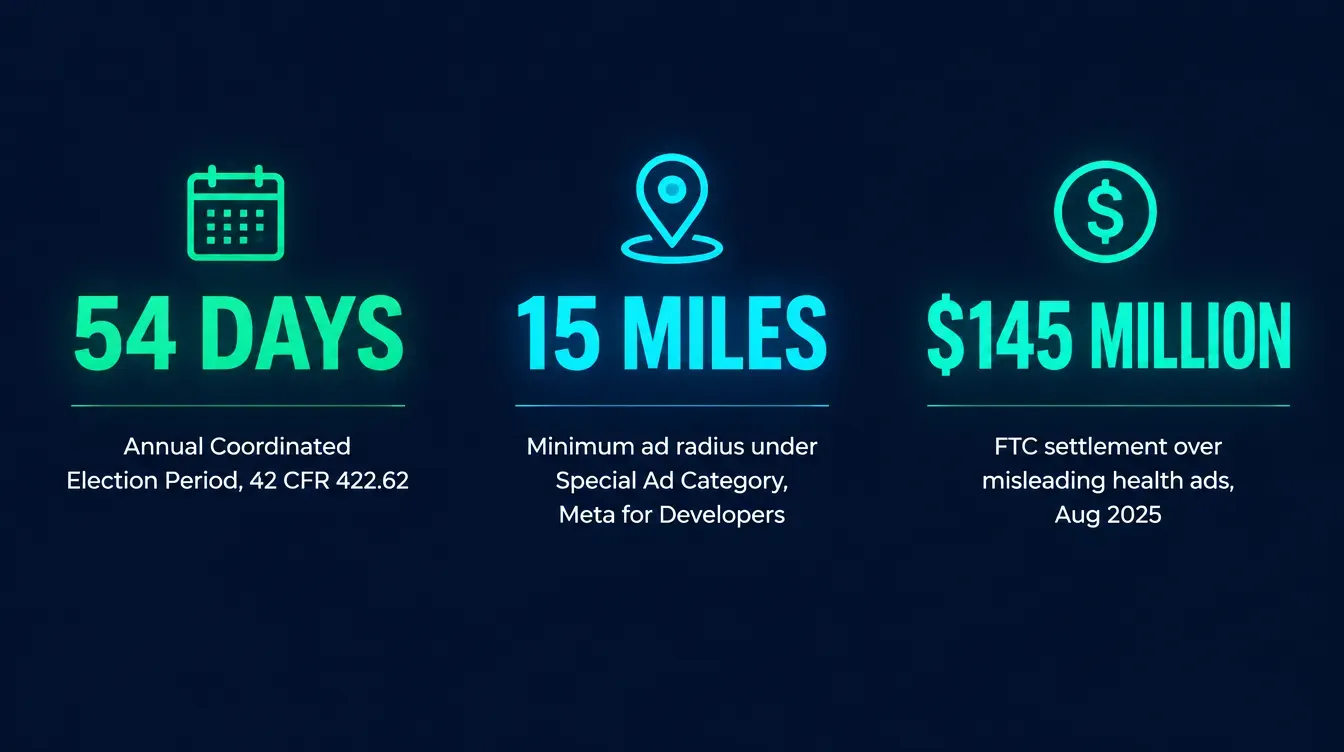
54 days decide the year, and it's the same 54 days a restriction is most likely to hit
The Annual Coordinated Election Period against the rest of the calendar year
Source: 42 CFR 422.62(a)(2)(iii), via Cornell Law's eCFR mirror, fetched September 2026.
The regulatory end of the spectrum is real, even though most agents will never get near it. In August 2025, the FTC announced that Assurance IQ and MediaAlpha (along with its subsidiary QuoteLab) agreed to pay a combined $145 million — $100 million from Assurance IQ, $45 million from MediaAlpha — to settle charges that they misled consumers shopping for health insurance, including operating lead-generation sites with names like “ObamacarePlans.com” that implied a government affiliation, and promoting a fictitious “Health Insurance Give Back Program” using paid actors (FTC, press release, Aug. 7, 2025). That’s not a borderline wording mistake; it’s a useful marker for how far “misleading” can run on the enforcement spectrum, and it’s part of why Meta reviews financial-services and insurance ads with more scrutiny than a typical retail or app-install campaign.
A rejected ad in March is an annoyance. A restricted account on October 20th is a lost enrollment season.
Mike MooreThe cost that actually lands on most agents is simpler: time and timing. The Annual Coordinated Election Period runs October 15 through December 7 — 54 days, set by regulation and unchanged since 2011 (42 CFR 422.62(a)(2)(iii)). If a pattern of rejections escalates into an account restriction during that window, the resolution process — auditing every active ad, fixing the underlying policy issue, and requesting a manual review through Account Quality in Meta Business Suite — competes directly with the highest-value selling weeks of your entire year. The same restriction, resolved in June, costs you an afternoon. Resolved in the third week of October, it costs you appointments you can’t get back.
The full manual audit: run this on your account today
This is the complete method, and it works with zero tools beyond your own Meta Business Suite login and a spreadsheet.
Step 1: Confirm your Special Ad Category classification
Open Ads Manager, go to the campaign level, and check whether Special Ad Category is set to Credit, Employment, Housing, or Financial Products and Services for every campaign promoting insurance. If a campaign was built before you knew this requirement existed, or copied from a template for a different vertical, it may still be running as an uncategorized campaign — which is itself a policy mismatch Meta’s review system can flag independently of your ad copy (Meta for Developers, Special Ad Category documentation).
Step 2: Check what the classification took away, and rebuild around it
Once a campaign is correctly classified, four things you may be used to using are gone: custom age ranges (fixed to roughly 18–65+), custom gender selection, lookalike audiences, and saved audiences; detailed-targeting exclusions are also unavailable, and any location target gets a 15-mile (25-kilometer) minimum radius (Meta for Developers, Special Ad Category documentation). If your targeting strategy depended on any of these — a lookalike built from your best clients, a tight 3-mile radius around a specific ZIP — that strategy needs to change, not sneak around the restriction. Attempting to route around Special Ad Category restrictions by miscategorizing the campaign is itself a policy violation, not a workaround.
| Targeting option | Standard campaign | Financial Products and Services |
|---|---|---|
| Age range | Custom, any range | Fixed, roughly 18–65+ |
| Gender | Custom selection | Must include all genders |
| Lookalike audiences | Available | Unavailable |
| Saved audiences | Available | Unavailable |
| Detailed-targeting exclusions | Available | Unavailable |
| Minimum location radius | No floor | 15 miles (25 km) from any pin, address, or city |
Source: Meta for Developers, Special Ad Category documentation, fetched September 2026.
Step 3: Read every headline and body line as if you were the reviewer, not the writer
Pull every active ad’s headline, primary text, and description into a spreadsheet — one row per ad. For each line, ask one question: does this sentence assume something personal about the specific person reading it, or does it describe the product? Use the table below as your scoring key.
| Ad copy pattern | Verdict | Why |
|---|---|---|
| "Turning 65 soon? Here's what to know about Medicare" | Allowed | Age-based life event, not a listed protected personal attribute, and doesn't assert a health or financial condition |
| "Tired of high blood pressure medication costs?" | Prohibited | Implies the viewer has a specific medical condition (Meta, Privacy Violations and Personal Attributes policy) |
| "Compare Medicare Advantage plans in your county" | Allowed | Describes the product/service category, no assertion about the viewer |
| "Can't afford your current health plan? We can help." | Prohibited | Implies knowledge of the viewer's financial status ("vulnerable financial status" is explicitly listed) |
| "Life insurance quotes, no medical exam required for some plans" | Allowed | Describes a product feature; doesn't assert the viewer has a medical condition that necessitates it |
| "Struggling to pay for insulin?" | Prohibited | Implies both a medical condition (diabetes) and financial vulnerability at once |
Note the row above where “Why” repeats as a header value — that’s intentional in how the table reads: every “Allowed” row earns its place by describing a product or a neutral life event, and every “Prohibited” row fails because it assumes something specific and personal about the reader. Run every line of every active ad through that same test.
Step 4: Verify your licensing and business information match what Meta has on file
The Financial and Insurance Products and Services policy notes Meta may confirm an advertiser’s “authorization to run such ads” (Meta, Financial and Insurance Products and Services policy, Transparency Center, updated Apr. 30, 2026). If your Meta Business Manager is registered under an old agency name, a personal name instead of your licensed business entity, or an address that doesn’t match your state license, fix that mismatch before you need it fixed under pressure — it’s a five-minute check now versus a multi-day back-and-forth during a review.
Keep these on hand before you ever need to respond to a licensing check: your state producer license number and National Producer Number (NPN), a current E&O certificate, and your business’s registration documents matching whatever name and address sits on your Meta Business Manager account. None of this is a Meta requirement written anywhere in the policy text itself — it’s what actually gets requested in practice when an authorization review asks for backup, and having it ready turns a multi-day delay into a same-day reply.
Step 5: Put the TPMO disclaimer where it belongs
If the ad discusses specific Medicare Advantage or Part D plan benefits, premiums, or cost-sharing, you’re almost certainly acting as a Third-Party Marketing Organization, and the disclaimer requirement under 42 CFR 422.2267(e)(41) applies. The regulation requires the disclaimer to be “electronically conveyed when communicating with a beneficiary through email, online chat, or other electronic means,” “prominently displayed on TPMO websites,” and “included in any marketing materials, including print materials and television advertisements” (42 CFR 422.2267(e)(41), via govinfo.gov and Cornell Law’s eCFR mirror). In practice for a Meta campaign: the disclaimer belongs on the landing page the ad drives to, at minimum, and a shortened reference in the ad’s body text is the safer default. This isn’t a Meta policy at all — it’s a CMS requirement that exists independently of whether Meta ever reviews the ad, and skipping it exposes you to CMS enforcement even on an ad that Meta approves without issue.
A Meta approval is not a compliance approval
Meta's review checks Meta's own Advertising Standards. It does not check CMS's Medicare Communications and Marketing Guidelines, your state's insurance advertising rules, or your carrier's marketing-review requirements. An ad can clear Meta's review and still violate a rule Meta was never checking for. Treat the two reviews as separate gates, not one.
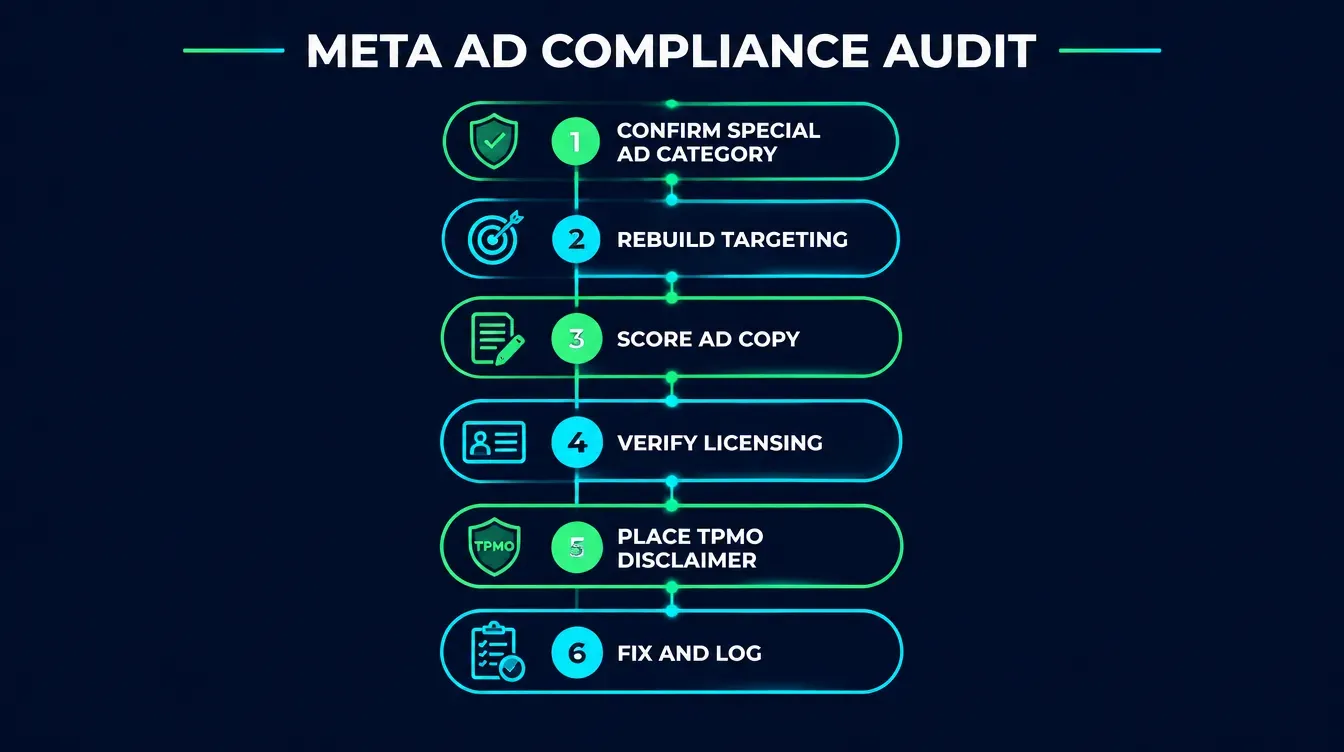
Step 6: Fix, resubmit one at a time, and log what changed
Don’t batch-edit ten ads and resubmit them all at once — if the pattern was systemic (a template phrase used across every ad), you want to confirm the fix actually clears review before you propagate it further. Log the original line, the changed line, and the date for every edit. That log is also your evidence, later, that you audit and fix compliance issues rather than ignoring them — worth having if an account review ever asks.
Confirm the classification
Financial Products and Services, set at the campaign level, on every insurance ad.
Rebuild targeting around the limits
Fixed age range, no lookalikes, 15-mile radius floor — plan for it instead of fighting it.
Score every line against Personal Attributes
Does it describe the product, or assume something personal about the reader?
Match your business info to your license
Business Manager name and address consistent with what your state has on file.
Place the TPMO disclaimer
Landing page at minimum, referenced in the ad — independent of Meta's own review.
Fix one at a time, log it
Confirm each fix clears before propagating it, and keep a dated record.
Everything above works whether you join anything or not. Run the six steps against your own account this afternoon — or let the community’s Meta Ads training walk you through it live on a Tuesday call.
If the account is already restricted
The six-step audit above is prevention. If you’re already looking at a restricted-account banner, the order changes slightly: first, open the Account Quality section of Meta Business Suite and read the specific reason listed — Meta names the policy category even when the individual-ad rejection message didn’t. Second, run the audit above against every currently active ad, not just the one that triggered the flag, because account-level restrictions are almost always a pattern, not a single ad. Third, fix what you find, and only then request a review. Requesting a review before you’ve actually changed anything just restarts the same review against the same problem.
When you do request the review, write it the way you’d want an underwriter to write a note on a file: specific, not defensive. Name the exact policy Meta cited, describe the specific change you made to each affected ad, and state the date you made it. “I’ve reviewed my active campaigns against the Personal Attributes and Financial Products and Services policies, corrected the three ads listed below, and attached the updated copy” gets read faster and taken more seriously than “please review, I don’t understand what I did wrong.” You’re not arguing the policy is unfair — you’re documenting that you found the problem and fixed it.
Two mistakes that turn a restriction into something worse
Opening a new ad account to keep running ads while the old one is restricted. This doesn’t bypass the review — it adds a second account with the same underlying issue, and Meta’s enforcement systems are built to connect accounts back to the same business, payment method, and admin. It reads as evasion, not as a fresh start, and it tends to escalate the response rather than avoid it.
Editing and resubmitting all flagged ads at once without confirming the fix on one first. If the violation was a phrase used across a template — “struggling to afford your premium?” copied into six different ad sets — fix and resubmit one, confirm it clears, and only then apply the same fix to the rest. Resubmitting all six with the same unconfirmed guess just multiplies the wait if the guess was wrong.
Does this apply to Google Ads too?
Not the same way. Google runs its own separate certification for US health insurance advertisers, distinct from anything covered in this article — our companion guide on Google Ads health insurance certification covers that process in full. The two platforms enforce different rules through different mechanisms: Meta’s Personal Attributes and Special Ad Category policies are specific to Meta’s own Advertising Standards, and running a compliant Meta account says nothing about whether the same ad copy would clear Google’s certification or vice versa. Treat every platform’s policy as its own gate, and don’t assume clearing one clears the others.
What Ambrose’s campaign-metrics spoke actually does here, and what it doesn’t
Be direct about the limit here, because overselling this is exactly the kind of thing that erodes trust in a compliance-adjacent post: Ambrose does not currently pre-screen your Meta ad copy against Meta’s own Advertising Standards. There’s no confirmed spoke today that reads a headline and tells you it violates Personal Attributes before you publish it. If a post on this topic implies otherwise, don’t believe it — believe the docs.
What campaign-metrics is documented to do is genuinely useful for the problem one layer downstream of the rejection itself. Its metrics_campaign_summary, metrics_recipient_engagement, and metrics_funnel_breakdown tools track performance across email, SMS, and social channels, with per-recipient identifiers stripped before any model processes the data (Ambrose docs, spoke-campaign-metrics, fetched September 2026). Practically: if a policy issue quietly throttles delivery on one campaign, or an account restriction cuts off a channel entirely, campaign-metrics is where you’d see the funnel break — one dashboard across channels instead of separately checking Ads Manager, your email platform, and your SMS provider to notice the same thing three different times.
The honest version of this section
The compliance review in Steps 1 through 6 above is a human-plus-checklist job right now, for every agent, membership or not. What a Tech Savvy membership adds isn't a tool that does the review for you — it's Meta Ads training built specifically for this industry, and a room of people who've had the same ad rejected and can tell you which of the two policies it was in under a minute.
What you get by joining
One Ambrose seat comes with a Tech Savvy Insurance membership: $97 a month, billed monthly, cancel anytime, founding rate locked in while the membership stays active. Alongside the seat: weekly Zoom calls with open Q&A and build-with-you sessions, 30-plus hours of recorded training, Meta Ads and marketing training built for this industry specifically, pre-built AI templates and bot deployments, and a free annual in-person member workshop — plus an explicit no-recruiting rule, so a question about a rejected ad doesn’t turn into someone else’s downline pitch.
Ambrose usage is separate from the $97 seat
The membership includes one Ambrose seat; usage inside Ambrose runs through its own credit ledger with spend caps, so cost stays visible instead of showing up as a surprise. See the full Spokes catalog for what campaign-metrics sits alongside.
Fix the account before AEP, not during it
The six-step audit above works whether you join anything or not. If you'd rather run it with someone watching your screen — and a room that's seen the exact rejection message you're staring at — one Ambrose seat comes with the Tech Savvy membership.
Join Tech Savvy — $97/monthThe close
Every step above, the classification check, the Personal Attributes scoring table, the TPMO placement, works whether you ever join anything or not — that’s the point of writing it out in full. This is the kind of thing that comes up on a Tuesday call more than almost anything else: someone’s account got flagged the week before AEP, and the room works through exactly which line caused it. $97 a month, cancel anytime, and nobody will pitch you a downline: https://techsavvyinsurance.com/.
Before you run insurance ads on Meta
Tech Savvy Insurance is a training and software community, not an insurance company, agency, or law firm, and does not provide insurance, legal, tax, or compliance advice. You are responsible for your own licensure and for complying with all applicable CMS, HIPAA, state, carrier, and platform advertising rules, including Meta's Advertising Standards, the TPMO disclaimer requirement, and your state's insurance marketing regulations. AI-generated ad copy may contain errors or policy violations — always have a human review it against Meta's current published policies before it runs. Results may vary.
Frequently asked questions
Sources
- Meta — Financial and Insurance Products and Services Policy (Transparency Center, updated Apr. 30, 2026) — transparency.meta.com
- Meta for Developers — Special Ad Category Documentation — developers.facebook.com
- Meta — Privacy Violations and Personal Attributes Policy (Transparency Center, updated Jun. 26, 2024) — transparency.meta.com
- FTC — Assurance IQ and MediaAlpha to Pay a Total of $145 Million to Settle FTC Charges (Aug. 7, 2025) — ftc.gov
- U.S. Government Publishing Office — 42 CFR 422.2267, Required Materials and Content (CFR-2025-title42-vol3) — govinfo.gov
- Cornell Law School, Legal Information Institute — 42 CFR 422.2267 (eCFR mirror) — law.cornell.edu
- Cornell Law School, Legal Information Institute — 42 CFR 422.62, Annual Coordinated Election Period — law.cornell.edu
- NAIC — Insurance Topics: Artificial Intelligence (Model Bulletin) — content.naic.org
- Ambrose docs — spoke-campaign-metrics — app.hiambrose.com
- Ambrose docs — Spokes catalog — app.hiambrose.com
Ready to put this into practice?
Join a private community of Health & Life insurance professionals using AI, Meta Ads, and automation to grow — without draining their bank account.
Join Tech Savvy — $97/month