
CMS lets Medicare Advantage marketing for next year’s plans start on October 1 — two full weeks before the Annual Election Period itself opens on October 15 (42 CFR 422.2263; 42 CFR 422.62). In that gap, you can present plans, run events, and hand a client every piece of paper they need — you just can’t accept, solicit, or hold onto an actual enrollment application until AEP starts. Agents blow past that line every fall, usually by accident, usually because nobody wrote down where it actually is.
Key takeaways
- Marketing next year's Medicare Advantage and Part D plans is allowed starting October 1 under 42 CFR 422.2263 — a full two weeks before AEP enrollment opens October 15.
- The Annual Election Period itself is defined at 42 CFR 422.62 as October 15 through December 7, and that's the earliest date a valid enrollment request can be dated.
- You can present plans, run events, and leave an application with a client in the October 1-14 window — you cannot solicit, accept, or take possession of a completed application before October 15.
- Intermediate sanctions under 42 CFR 422.752 attach to the carrier's contract, not just one agent, which means one agency's early-enrollment mistake can suspend enrollment for everyone selling that contract.
- The 48-hour Scope of Appointment rule is gone for 2027, but the SOA itself, and its 12-month validity window, are not — the two rules are easy to conflate and this article keeps them separate.
- Ambrose's War Room includes a documented Compliance persona (Dr. Elena Reyes) you can ask about a specific piece of pre-AEP content in real time, and one seat comes with a Tech Savvy membership.
What CMS actually allows between October 1 and October 15
The short answer: marketing, yes; enrollment, no. 42 CFR 422.2263 states plainly that “MA organizations may begin marketing prospective plan year offerings on October 1” of each year for the following contract year — and that authority extends to the agents and brokers marketing on the organization’s behalf (42 CFR 422.2263). That single sentence is the entire legal basis for everything an agent does in the first two weeks of October.
Inside that window, you can:
- Give a full product presentation covering next year’s plan benefits, premiums, and cost-sharing.
- Hold sales events and one-on-one appointments specifically to discuss next year’s plans.
- Distribute approved marketing materials for the upcoming plan year.
- Compare a client’s current plan against next year’s options, verbally or in writing, as long as the comparison is accurate and supportable.
- Hand a client a paper enrollment form, or point them to a plan’s enrollment link, so they have it in hand.
None of that requires AEP to have started. What requires AEP to have started is the enrollment itself, and that’s governed by a different regulation entirely: 42 CFR 422.62, which defines the Annual Election Period as “October 15 through December 7” for 2011 and every year since (42 CFR 422.62). An enrollment request dated before October 15 isn’t a late-processed AEP election — it’s not an AEP election at all, because the period that creates that election hasn’t opened yet.
| Activity | Oct. 1-14 | Oct. 15 onward |
|---|---|---|
| Present next year's plan benefits and pricing | Allowed | Allowed |
| Hold a sales event for next year's plans | Allowed | Allowed |
| Leave a paper application with a client | Allowed | Allowed |
| Accept, solicit, or take possession of a completed application | Not allowed | Allowed |
| Submit an enrollment request to the carrier | Not allowed | Allowed |
| Record a Scope of Appointment | Allowed, any time before the appointment | Allowed |
What has to happen before October 1, and why it matters here
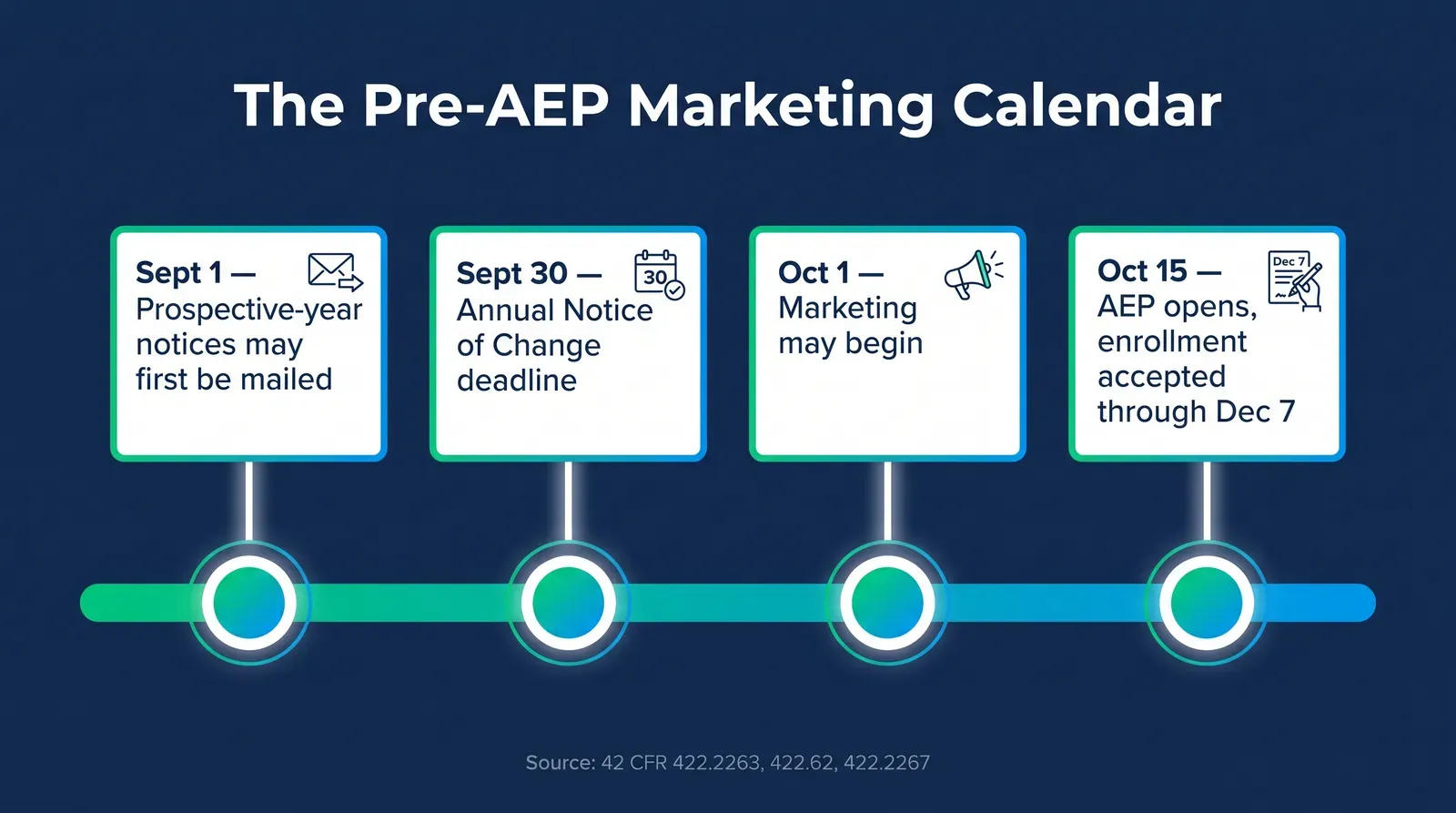
The two-week marketing window doesn’t start in a vacuum — two other deadlines land just ahead of it, and they’re where a lot of pre-AEP confusion actually starts. Under 42 CFR 422.2267, the Annual Notice of Change (ANOC) “must send for enrollee receipt no later than September 30 of each year,” and notices for prospective-year materials “may not be mailed prior to September 1 of each year, but must be sent in time for an enrollee to access the specified materials by October 15” (42 CFR 422.2267). The same section requires that current enrollees receive their Evidence of Coverage (EOC) by October 15 as well.
Put together, this is the actual mechanism behind the confusion: a client can legitimately receive a plan’s ANOC by September 30, get a marketing call or visit starting October 1, and still not be allowed to hand over a signed application until October 15. Three different dates, three different rules, one client conversation. It’s easy to see why an agent moving fast during the busiest six weeks of their year treats “the client already has the paperwork” as equivalent to “the client can submit it now.” Those are not the same thing, and the fifteen days between them is where the rule actually lives.
Why this specific window trips up experienced agents, not just new ones
If this were a new rule, the confusion would make sense on its own. It isn’t — October 1 and October 15 have governed Medicare marketing under this basic structure for years. What’s changed is the pressure around it, and that’s the part worth naming honestly instead of treating this as a simple knowledge gap.
Three things compress onto the same two weeks every fall. First, carriers finalize their own marketing materials and bid data late, which means a lot of the “next year’s plan” content agents actually want to present doesn’t exist in final form until right around October 1 itself — so agents are learning the details of what they’re allowed to market at the same moment they’re allowed to start marketing it. Second, commission timing and production goals create real pressure to get in front of clients the moment the calendar allows it, which is exactly the moment the marketing-versus-enrollment line is hardest to hold, because everyone in the conversation, agent and client both, wants to finish the transaction. Third, most agencies run this process across a team — a producing agent, a CSR handling paperwork, an assistant drafting outreach — and the one-line rule this article recommends only works if every one of those people has actually seen it, not just the licensed agent who read the CMS guidance.
That third point is where a lot of real violations start. An agent who fully understands the October 1-14 line can still end up with a CSR who “just wanted to get ahead of the AEP rush” and submitted a batch of applications on October 12 because nobody told them the date mattered. The rule isn’t complicated. Getting it into every hand that touches a client file during the two busiest months of the year is the actual operational problem.
Digital marketing and scheduled campaigns need the same line
The manual method above covers a live conversation — an appointment, a phone call, a face-to-face meeting. It’s worth calling out separately because digital marketing fails this rule in a way that’s easy to miss: automation doesn’t know what day it is unless you tell it to.
If you’re running Meta Ads, Google Ads, or an email or SMS sequence through GoHighLevel or a similar CRM aimed at next year’s plans, the campaign itself can go live October 1 the same as any other marketing. The problem shows up in the call-to-action. A “Compare Plans” or “Talk to an Agent” button is a marketing CTA and it’s fine starting October 1. A “Enroll Now” button connected to a live enrollment form that actually submits an application is not fine until October 15, even if the ad ran perfectly compliant copy for the two weeks before it. The rule doesn’t care that a machine executed the submission instead of a person — 42 CFR 422.2263’s marketing permission and 42 CFR 422.62’s enrollment-period restriction apply to the activity, not to who or what performed it.
This is exactly the kind of mistake a scheduled automation makes silently. An agency builds an “AEP enrollment funnel” in September, tests it, schedules it to go live October 1 because that’s when marketing opens, and never revisits the actual enrollment-submission step to gate it separately for October 15. Nobody decided to accept early applications. A workflow built two weeks before the rule that governs it went live on the wrong date, and it ran exactly as configured until someone noticed the completed-application count didn’t match what should have been possible yet.
The two-button fix
If you're building a pre-AEP campaign in any CRM or ad platform, build two distinct calls to action with two distinct live dates: a "Compare Plans" or "Request a Call" CTA that goes live October 1, and a separate "Enroll Now" CTA, pointed at an actual application, that doesn't go live — or doesn't accept a submission — until October 15. Test the second one specifically for its go-live date before the campaign launches, not after a client tries to use it early.
What it costs to get the line wrong
This isn’t a paperwork technicality that gets a warning letter. CMS can impose intermediate sanctions on the Medicare Advantage organization behind a contract under 42 CFR 422.752 when it determines a sanctionable violation occurred, and 42 CFR 422.750(a) lists what those sanctions actually are: “suspension of the MA organization’s enrollment of Medicare beneficiaries,” “suspension of payment to the MA organization for Medicare beneficiaries enrolled after the date CMS notifies the organization,” and “suspension of communication activities to Medicare beneficiaries by an MA organization” (42 CFR 422.750; 42 CFR 422.752). Those sanctions stay in effect until CMS confirms the underlying deficiency is corrected and unlikely to recur.
Read that mechanism carefully, because the part that should actually change your behavior is who it hits. A sanction attaches to the carrier’s contract number, not to one agent’s book. If a pattern of early or mishandled applications from one agency triggers a determination against a contract, every agent selling that contract can lose the ability to enroll a single beneficiary — during the exact six-week window that produces most of a Medicare-focused agent’s annual production. An individual agent’s shortcut on October 8 can become every colleague’s frozen enrollment pipeline on November 1.
The sanction doesn't ask whether you meant to hold onto that application. It asks whether the carrier's contract shows a pattern. That's a business risk that belongs to everyone selling that plan, not just the agent who cut the corner.
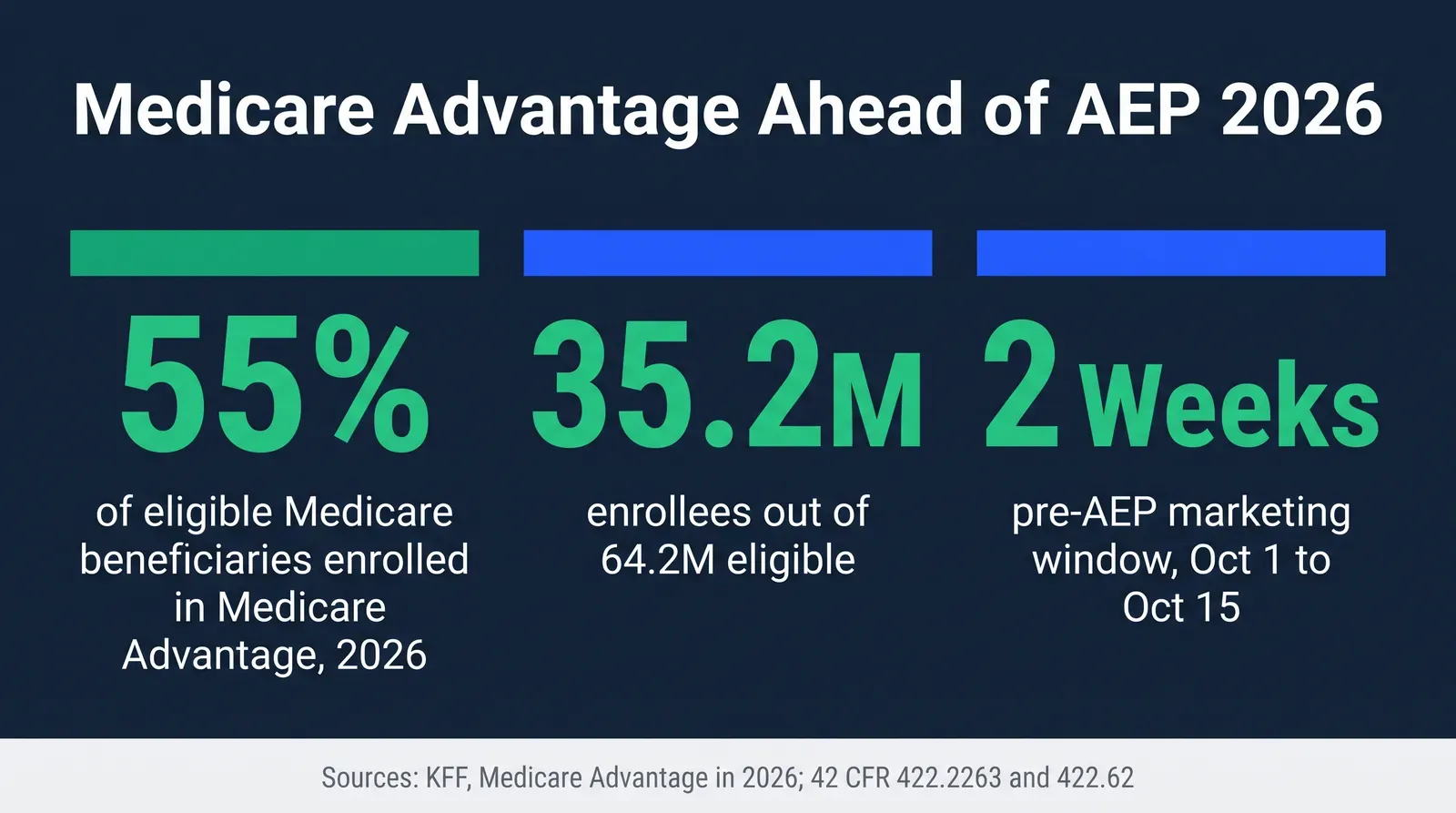
Mike MooreFor scale: Medicare Advantage covers a genuinely enormous share of the market this rule applies to. More than half — 55%, or 35.2 million of 64.2 million eligible Medicare beneficiaries — are enrolled in a Medicare Advantage plan for 2026 (KFF, Medicare Advantage in 2026). Every one of those beneficiaries, plus everyone shopping in for the first time, moves through this same two-week marketing window and the same October 15 enrollment line every single year.
The manual method: build your own pre-AEP compliance calendar
None of this requires software. Here’s the full method, given away completely, the way you’d actually run it with a shared calendar and a compliance checklist your whole team can see.
Mark the four dates on one shared calendar
September 1 (earliest prospective-year materials can be mailed), September 30 (ANOC deadline for current enrollees), October 1 (marketing begins), October 15 (AEP opens, enrollment applications may be accepted). Every piece of team confusion this article addresses traces back to one of these four dates being fuzzy in someone's head instead of written down.
Write a one-line rule for the October 1-14 window and post it where the team sees it
"We can present, compare, and hand over paperwork. We cannot accept, solicit, or hold a completed application until October 15." Put it on the wall, in the CRM, in the Slack channel pinned message — wherever your team actually looks before an appointment.
Build a two-question script for every October 1-14 appointment
Before wrapping any appointment in this window: "Did I present or compare plans?" (fine) and "Am I about to take a completed application?" (not yet). If the second answer is yes, the honest move is telling the client you'll follow up on October 15 to finalize it — not finding a workaround.
Separate your SOA process from your enrollment process explicitly
A Scope of Appointment can be recorded any time before the appointment and stays valid 12 months from the beneficiary's signature or their initial request for information under 42 CFR 422.2264. Recording an SOA in September or early October for a mid-October appointment is fine. Treating a recorded SOA as license to also submit the application early is the mistake — they're governed by different rules entirely.
Log every October 1-14 appointment with a timestamp and outcome
A simple spreadsheet row — client, date, what was discussed, application handed over yes/no, application submitted yes/no — is the entire audit trail you need if a carrier or CMS ever asks what happened during this window. It costs five minutes per appointment and it's the difference between "here's our record" and "we think that's what happened."
Set a hard team reminder for October 15, not a soft one
Every application handed over but not submitted during the window becomes actionable the moment AEP opens. A calendar alert on October 15 to go back through the log from step 5 and submit everything that's ready keeps a two-week backlog from turning into a scramble.
Worked example: the same appointment, two different outcomes
An agent meets a client on October 8 and reviews next year's plan side by side with their current one — fully allowed, that's marketing. The client says "let's do it" and hands back a signed application on the spot. Taking possession of that signed application on October 8 is the part that isn't allowed yet. The compliant version of that same meeting: the agent reviews the plans, the client signs the application to keep on file, and the agent tells them plainly, "I'll come back for this on the 15th, or you can call our office that morning to finalize it." Same client, same decision, same plan — the only difference is which side of October 15 the application actually changes hands.
Run this by hand, with a shared calendar and a printed one-line rule, and you’ll get through the window cleanly. The honest problem isn’t that the rule is complicated. It’s that AEP is the highest-pressure six weeks of the year, and a two-week gray zone right before it is exactly when a team under pressure improvises.
Where the manual method breaks down
The calendar and the checklist work fine for the dates themselves. Where they stop working is the judgment call in the middle of an actual conversation — the client who says something ambiguous, the borderline piece of ad copy your assistant drafted at 9pm, the voicemail script someone wants to blast to 200 people on October 3. None of those are covered by “know the four dates.” They need someone to actually look at the specific thing and say yes or no, and during AEP season, that someone is often just you, alone, deciding whether to send it now or wait for someone else to answer a text in the morning.
That’s a real gap, and it’s not a tooling problem you can checklist your way out of. It’s a coverage problem: compliance judgment isn’t available at 9pm on a Tuesday for most agencies, and CMS’s enforcement mechanism, described above, doesn’t care what time it was when the mistake went out.
How Ambrose’s War Room checks a specific piece of content before it goes out
This is the part of the job that’s a judgment call, not a date lookup — and it’s exactly what Ambrose OS’s War Room is documented to do. The docs describe it plainly: “the War Room is the chat surface for the executive team. Type a question; Ambrose decides which head answers, or convenes a small group, and synthesizes the response” (Ambrose docs, War Room). Nine executive personas are documented inside it, including Dr. Elena Reyes, a dedicated Compliance persona — confirmed live in the docs as of this article’s publish date.
In practice, that means the borderline voicemail script from the section above isn’t a judgment call you make alone at 9pm. You type the actual draft into the War Room, ask whether it reads as a service touch or a marketing communication for next year’s plan before October 1, and the Compliance persona answers with the same kind of reasoning this article walks through — pointed at the specific text in front of you, not a general FAQ. The dispatch mechanism is documented the same way: “You type a question. Ambrose (Chief of Staff) reads it, picks the right head(s)… Heads can dispatch their sub-specialists for deep work. Ambrose synthesizes the contributions into a single answer” (Ambrose docs, War Room).
The calendar itself can run on autopilot too
Ambrose's Routines feature is documented as "a scheduled prompt attached to an agent or a team," built from a cron schedule, a target, a prompt body, and an output sink like Slack, email, a GHL note, or a log (Ambrose docs, Routines). A routine set to fire on September 1, September 30, October 1, and October 15 — reminding the team what's allowed that day and posting the one-line rule from the manual method above straight to Slack — replaces the version of this task where the compliance calendar lives in one person's memory.
Don't paste a real client's name into the check
The moment a compliance question includes a specific client's name, phone number, or plan details, you're handling protected health information, and most general AI tools have no Business Associate Agreement with your agency. Ambrose's PHI Rail is documented as a "redact-then-rehydrate pipeline": it checks whether a destination is on the BAA allowlist, and if not, scrubs identifiers into typed aliases like PERSON_xxxx before anything reaches the model, then restores the real values in the response — with every scrub event logged, never the actual values (Ambrose docs, PHI Rail). Strip the client's name out of your compliance question with any general tool, or use one with that layer already built in.
| Part of the task | What actually addresses it |
|---|---|
| Knowing the four calendar dates | A shared calendar — no tool required, covered in the manual method above |
| Reminding the team automatically as each date arrives | A scheduled Routine posting to Slack |
| Judging whether a specific draft is a service touch or marketing | The War Room's Compliance persona (Dr. Elena Reyes) |
| Keeping a real client's details out of an unprotected AI check | The PHI Rail's alias-and-rehydrate pipeline |
| Deciding whether to actually send a borderline piece of content | You — the persona informs the call, it doesn't make it |
To be direct about what this doesn’t do: the War Room’s Compliance persona doesn’t replace your agency’s actual compliance officer or legal counsel, and it doesn’t guarantee CMS or a carrier would agree with its read. It gives you a documented, sourced second opinion at the moment you actually need one — which, for most agents during AEP, is not during business hours.
What you get by joining
One Ambrose seat, including the War Room and its Compliance persona, comes with a Tech Savvy Insurance membership: $97 a month, billed monthly, cancel anytime, founding rate locked in while the membership stays active. Alongside the seat: weekly Zoom calls with open Q&A and build-with-you sessions, 30+ hours of recorded training, Meta Ads, AI, and marketing training built for this industry specifically, pre-built AI templates and bot deployments, and a free annual in-person member workshop. It’s also an explicit no-recruiting zone — you can ask a real compliance question about your own pre-AEP script without ending up on someone’s downline pitch list.
Ambrose usage runs separately from the $97 seat
The membership includes one Ambrose seat. See the full Ambrose docs for what else is available beyond what's covered here.
Everything in the manual method above works whether you ever join anything or not. Write the four dates on your calendar and post the one-line rule — or let the War Room take the 9pm judgment calls while you’re the one deciding, with a sourced second opinion in front of you, whether to hit send.
Compliance: what this touches, and what it doesn’t
Nothing in this article changes the TPMO disclaimer requirement, which applies to every marketing call, chat, and piece of material regardless of the calendar date — we cover the exact required wording in our Medicare marketing claims article. Nor does it change the Scope of Appointment requirement itself: the 48-hour advance-signature rule is gone for 2027, but the SOA still has to be agreed upon, recorded, and kept valid for 12 months under 42 CFR 422.2264, which we cover in full in our 48-hour SOA rule guide.
If AI tools touch any part of how you draft or check pre-AEP marketing content, the NAIC’s Model Bulletin on the Use of Artificial Intelligence Systems by Insurers sets the governance expectation regulators increasingly apply: written policies, human oversight of AI-supported decisions, documentation of your AI systems, and accountability for third-party AI vendors, because “decisions or actions made or supported by AI must comply with all applicable insurance laws and regulations” (NAIC, Insurance Topics: Artificial Intelligence). Ambrose is HIPAA-aware by default, not HIPAA certified — there’s no such thing as HIPAA certification for a software platform, and any vendor claiming otherwise is worth a second look.
The close
October 1 opens the door. October 15 opens the enrollment. The fifteen days in between are where the actual work of AEP season starts, and where a team moving fast without a written rule improvises its way into a mistake that isn’t just personal — it can freeze enrollment for everyone selling that carrier’s contract. Write the four dates down, post the one-line rule, and run the manual method above exactly as written. If you’d rather have a documented Compliance persona checking your borderline drafts at 9pm instead of guessing, one Ambrose seat comes with a Tech Savvy membership, and the weekly build-with-you calls are where agents actually get it set up before the October rush hits: https://techsavvyinsurance.com/.
Before you rely on any figure in this article
Tech Savvy Insurance is a training and software community, not an insurance company, agency, or law firm, and does not provide insurance, legal, tax, or compliance advice. You are responsible for your own licensure and for complying with all applicable CMS, HIPAA, state, and carrier regulations. Regulations and enforcement priorities can change — confirm current requirements directly with CMS, your state Department of Insurance, or qualified legal counsel before relying on any figure here. AI-generated outputs may contain errors — always verify. Results may vary.
Frequently asked questions
Sources
- U.S. Government Publishing Office — 42 CFR 422.2263, General Marketing Requirements (CFR-2025-title42-vol3) — govinfo.gov
- Cornell Law School, Legal Information Institute — 42 CFR 422.62, Annual Coordinated Election Period — law.cornell.edu
- Cornell Law School, Legal Information Institute — 42 CFR 422.2267, Required Materials and Content — law.cornell.edu
- Cornell Law School, Legal Information Institute — 42 CFR 422.2264, Beneficiary Contact (Scope of Appointment) — law.cornell.edu
- Cornell Law School, Legal Information Institute — 42 CFR 422.752, Basis for Imposing Intermediate Sanctions and Civil Money Penalties — law.cornell.edu
- Cornell Law School, Legal Information Institute — 42 CFR 422.750, Intermediate Sanctions — law.cornell.edu
- Hall Render — CMS Revises Medicare Advantage Marketing Guidance for Scope of Appointment Forms (June 1, 2026) — hallrender.com
- KFF — Medicare Advantage in 2026: Enrollment Update and Key Trends (June 5, 2026, updated July 1, 2026) — kff.org
- NAIC — Insurance Topics: Artificial Intelligence (Model Bulletin) — content.naic.org
- Ambrose docs — War Room — app.hiambrose.com
- Ambrose docs — Routines — app.hiambrose.com
- Ambrose docs — PHI Rail — app.hiambrose.com
- Ambrose docs — What is Ambrose — app.hiambrose.com
Ready to put this into practice?
Join a private community of Health & Life insurance professionals using AI, Meta Ads, and automation to grow — without draining their bank account.
Join Tech Savvy — $97/month