
You’ve got ChatGPT open in one tab, a call-recording and transcription subscription in another, maybe a $20/month AI dialer for speed-to-lead, and your CRM’s own “AI assist” button that nobody on your team has clicked since the day it launched. You’re paying for four tools and still typing a client’s name into three of them by hand. If you’ve been asking which AI tool is “the best one,” that’s the wrong question — the honest answer is that each one is good at exactly one job, most of them don’t talk to each other, and the agent who wins isn’t the one with the most subscriptions. It’s the one who knows which tool to reach for, and when to stop reaching for a fifth one.
Key takeaways
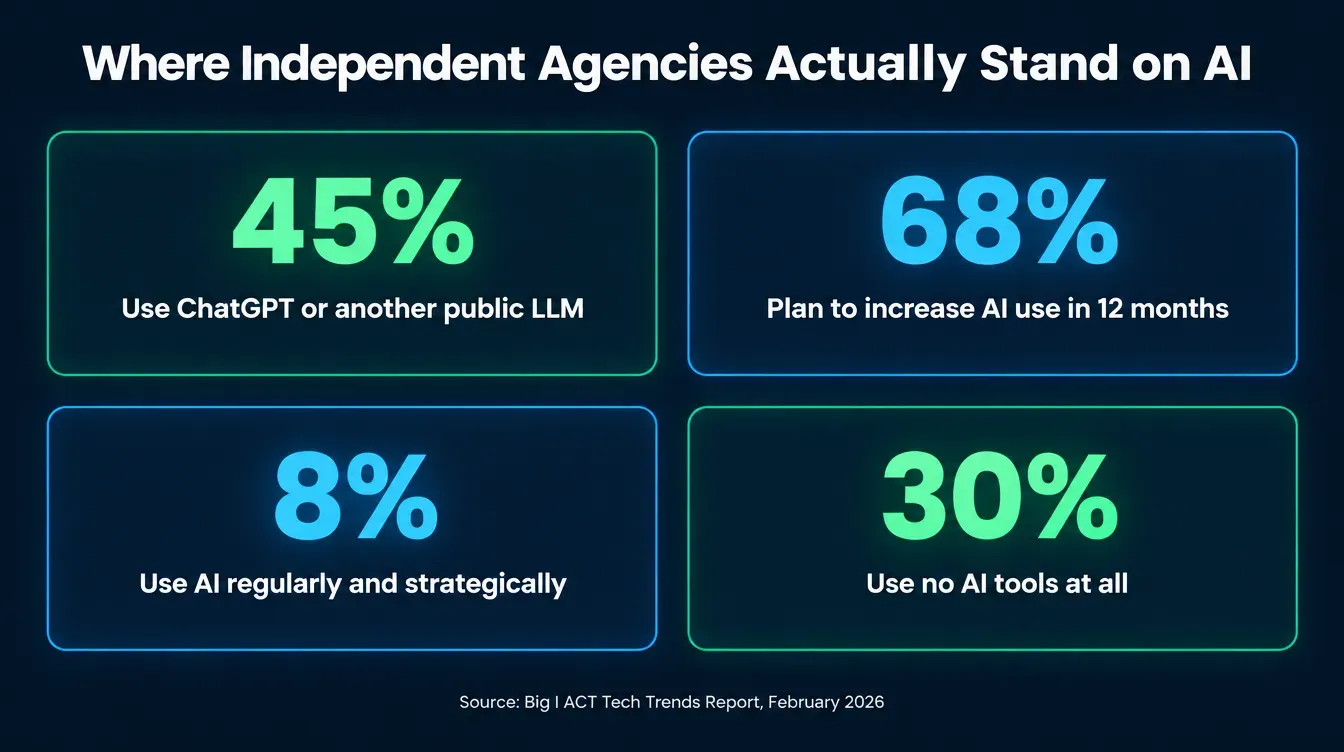
- 45% of independent agencies currently use ChatGPT or another public LLM — the single most-used AI tool in the channel — while 30% report using no AI tools at all (Big "I" ACT Tech Trends Report, February 2026).
- 68% of surveyed agencies say they're "somewhat" or "very likely" to increase AI use in the next 12 months, but only 8% currently use it "regularly and strategically" (Big "I", same report, page 4).
- 24% of agents name data privacy or compliance risk as their top AI concern, and 22% name inaccurate outputs — both ahead of cost (Big "I" press release, February 19, 2026).
- 55% of independent agencies have no written AI use policy at all (Big "I", same release).
- General chatbots, transcription apps, dialers, and CRM-native AI buttons each solve one slice of the job; none of them, by default, share memory with the others.
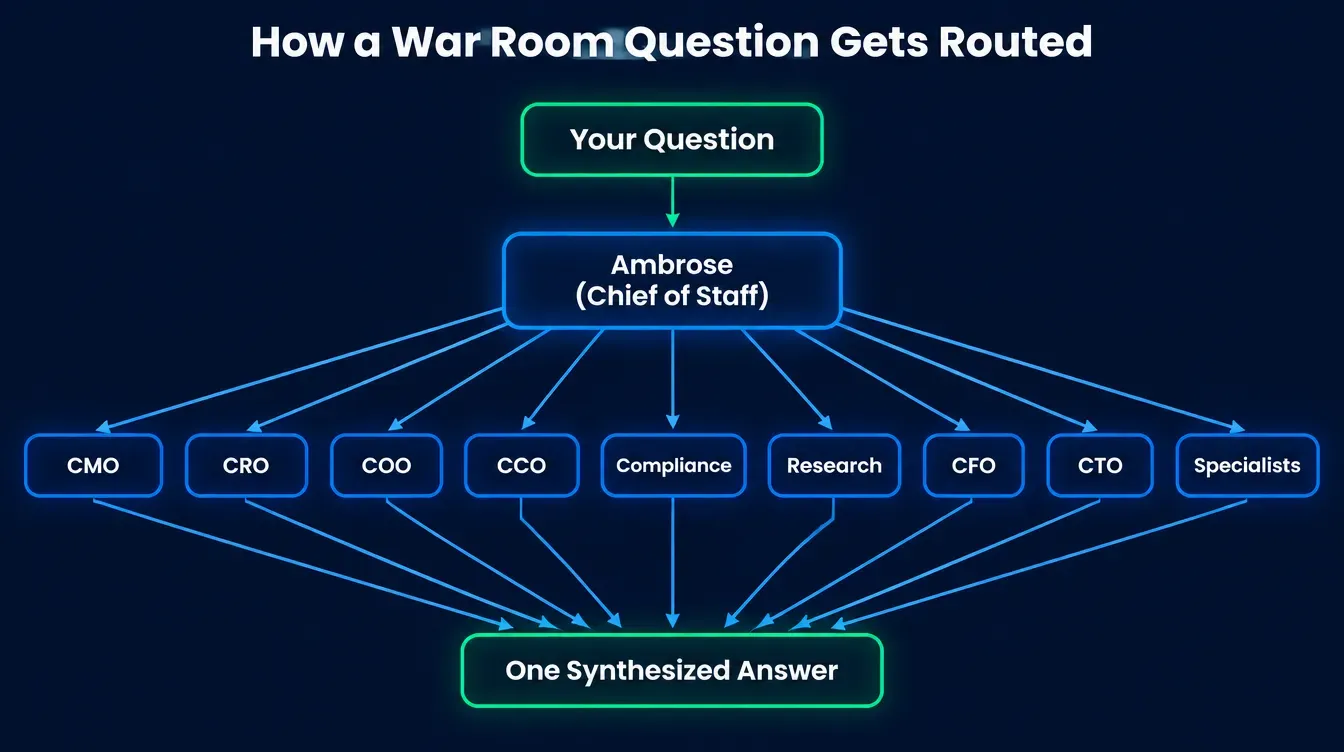
- Ambrose's War Room routes a question to the right one of nine executive-persona "heads," and any Ambrose agent or team can publish as its own MCP server or OpenAI-compatible endpoint — a documented way to stop re-typing context into a sixth tab (Ambrose docs, War Room and MCP, confirmed November 2026).
The stack you’ve actually got
Here’s the honest inventory, because it’s rarely the one agents admit to out loud. A browser tab with ChatGPT or Claude, used for drafting emails, summarizing a plan document, or brainstorming an ad. A transcription or call-summary tool bolted onto your dialer or Zoom. Maybe an AI-powered quoting assistant your carrier or your agency management system shipped last year. An “AI chatbot” widget on your website that answers three questions correctly and then loops. A marketing tool that writes ad copy. None of these were bought as a system — each one got added because it solved a specific annoyance on the day you found it, and none of them know the other four exist.
Big “I“‘s 2026 Agents Council for Technology (ACT) Tech Trends Report put real numbers on exactly this stack. Among independent agencies surveyed, 45% currently use ChatGPT or another public LLM, 20% use policy comparison tools, 18% use AI-enabled marketing tools, 13% use AI chatbots or virtual assistants, and 13% use document or data extraction tools — and 30% reported using no AI tools at all (Big “I”, Two-Thirds of Independent Agents Plan to Increase AI Use This Year, February 19, 2026). That’s not one dominant platform with a long tail of niche add-ons. It’s a genuinely fragmented market, which is exactly why “which AI tool should I use” doesn’t have a single right answer — the honest version of that question is “which AI tool should I use for this specific job,” asked five separate times a day.
"Vendors want to sell us their tool and often leave out crucial information, whether by design or because, when vetting new tech, we just don't know what questions to ask."
A Big "I" member, quoted in the 2026 ACT Tech Trends ReportWhy the confusion keeps happening
This isn’t agents being behind. Big “I“‘s report is direct about where the friction actually sits: “The biggest obstacle is not the technology itself but organizational readiness” (Big “I” ACT Tech Trends Report, page 4, February 2026). The report names six specific constraints working against agencies trying to sort this out, and most of them will sound familiar if you’ve ever sat through a vendor demo that promised to “do it all”:
| Obstacle, as named in the report | What it looks like day to day |
|---|---|
| Lack of documented processes | A workflow exists only in one employee's head, so there's nothing to automate against |
| Confusion over vendors | New AI-powered tools "appear rapidly, often overlapping in functionality," and agencies "struggle to distinguish marketing claims from real capabilities" |
| Resource and budget constraints | No dedicated IT staff or formal change-management process to evaluate anything properly |
| Portal and MFA fatigue | Staff log into multiple separate systems with separate credentials and separate multi-factor prompts |
| Security and governance gaps | "Some agencies still use consumer-grade tools to store sensitive data or copy client information into public AI tools," with no privacy review |
| Change fatigue and tool sprawl | Not resistance to technology — exhaustion from "constant system changes, retraining and overlapping solutions," which shows up as stalled adoption or shadow IT |
Notice what’s missing from that list: “agents don’t want to use AI.” That’s not the barrier. The barrier is that evaluating five overlapping point tools is itself a full-time job nobody at a small agency has time to do properly, and the report says so almost word for word — agencies “struggle to distinguish marketing claims from real capabilities.” The rest of this article is the evaluation you’d otherwise have to do yourself: what each category of tool is actually for, and where the edges of that job are.
The adoption gap, in one line
Here’s the single most useful number in the whole report for deciding what to do next: 68% of respondents to ACT’s “Agent Tech & AI Trends Survey” said their agency is “somewhat” or “very likely” to increase AI use in the next 12 months — “however, only a small minority (8%) are currently using it regularly and strategically” (Big “I” ACT Tech Trends Report, page 4, February 2026). That’s a 60-point gap between intention and practice. Most agents reading this aren’t behind the curve; they’re exactly where the rest of the channel is — interested, under-equipped to evaluate the options, and one bad vendor demo away from either overspending on the wrong tool or giving up on the category entirely. Neither is the right move. The fix is matching the tool to the job, not finding one tool that claims to do every job.
Tool by tool: what each one is actually good for
This is the part most “AI tools for agents” roundups skip, because naming a tradeoff is less fun than listing features. Here’s the honest version, category by category.
General-purpose chatbots (ChatGPT, Claude, Gemini)
Good for: drafting a first version of anything — an email, a social post, a client letter, a summary of a dense policy document you paste in. Brainstorming angles for a blog post or an ad. Explaining a concept back to you in plain English faster than a Google search would. 45% of agencies already use one of these, more than any other category (Big “I”, February 2026) — and that adoption number makes sense, because the barrier to entry is zero and the first draft it gives you is usually a real improvement on a blank page.
Not good for: anything where the answer has to be a specific, current fact about a specific plan. A general chatbot has no live connection to CMS, HealthCare.gov, or a carrier’s own current rate table. Ask it a specific plan’s premium or whether a specific doctor is in-network, and it will often give you a confident, fluent, wrong answer, because it’s generating the most statistically likely-sounding response rather than retrieving a real number. It also has no persistent memory of your book of business from one session to the next unless you build that yourself, and pasting a client’s name alongside their health information into a consumer account with no Business Associate Agreement is a real HIPAA exposure, covered in full in our ChatGPT and HIPAA guide.
Call transcription and summary tools
Good for: capturing what was actually said on a call, word for word, so you’re not relying on memory or handwritten notes, and generating a clean summary you can scan in thirty seconds instead of re-listening to twenty minutes of audio.
Not good for: acting on what it captured. A transcript is a record, not a task list. Most standalone transcription tools don’t automatically flag a compliance issue, write a follow-up task into your CRM, or connect what this client said today to what they said six months ago — that stitching is still manual unless the tool is built specifically for insurance workflows.
AI voice agents and speed-to-lead dialers
Good for: the first response to a new lead, instantly, at any hour — which matters, because the agent who responds first to an inbound lead has a documented, well-established advantage over one who calls back an hour later. This is the single highest-impact AI use case for a lead-gen-heavy agency, and we’ve covered the mechanics of it in depth in our speed-to-lead guide.
Not good for: everything after the first contact. A voice agent that qualifies and books an appointment is a narrow, well-defined job. It is not a substitute for a licensed human on the actual sales conversation, and every compliant deployment keeps a human in the loop for anything that constitutes advice or a close.
CRM-native “AI assist” buttons
Good for: small, contained tasks inside the one system you’re already logged into — drafting a message inside a GoHighLevel workflow, summarizing a note on a contact record, suggesting the next pipeline stage. The advantage is real: zero new login, zero new subscription, and it already has the contact’s record in front of it.
Not good for: reaching outside that one system. It doesn’t know what Medicare Plan Finder says about a client’s doctor, it doesn’t know what your Meta ad account is spending, and it won’t write a compliance note anywhere your agency management system can’t see. It’s good at the job in front of it and genuinely blind to everything else.
Policy comparison and AI-powered quoting assistants
Good for: speed on a narrow, repeatable task — pulling two or three plans side by side, or pre-filling a quote from intake data. 20% of agencies already use a policy comparison tool, the second most common category in Big “I“‘s report (February 2026), which tracks with how mechanical and well-defined this particular job is.
Not good for: anything outside its one lane. It’s a point solution by design, which means it’s another login, another subscription, and another place where client data sits in isolation from everything else you use.
All-in-one agentic platforms
Good for: being the thing that connects the other categories instead of adding a sixth one. This is a genuinely different shape of tool — not a single-purpose assistant, but a system where agents and teams are defined once and can reach multiple data sources and systems through a shared set of tool connections.
Not good for: replacing specialized output where a point tool is already excellent at one narrow thing — a dedicated transcription engine tuned specifically for call audio may still out-perform a general system on that one task alone. The honest tradeoff is breadth and connection versus depth on a single function.
| Category | Actually good for | Not good for | Adoption |
|---|---|---|---|
| General chatbot (ChatGPT, Claude, Gemini) | First drafts, brainstorming, summarizing a document you paste in | Specific plan, rate, or network facts; no persistent book-of-business memory | 45% |
| Call transcription / summary | An accurate written record of a call, scannable in seconds | Acting on what it captured; no automatic task or CRM write-back | Not broken out separately in the report |
| AI voice agent / speed-to-lead dialer | Instant first response to a new lead, any hour | The actual sales conversation; narrow by design | Not broken out separately in the report |
| CRM-native "AI assist" | Small tasks inside the system you're already in, zero new login | Reaching outside that one system entirely | 13% (AI chatbots/virtual assistants) |
| Policy comparison / AI quoting | Speed on one narrow, repeatable task | Everything outside that one lane; another isolated login | 20% |
| All-in-one agentic platform | Connecting the jobs above through shared memory and tool access | Out-performing a tool built and tuned for one narrow function alone | Not a category the report tracks |
Picking tools by agency size: three worked examples
The right answer changes with headcount, so here’s how this actually plays out at three sizes, using nothing beyond what’s in the categories above.
A solo agent with no staff. The single addition that matters most is a speed-to-lead voice agent, because a solo agent physically cannot answer every inbound lead the instant it arrives, and that gap is where leads go cold. A general chatbot for drafting follow-up messages is the second addition — cheap, immediate, and it doesn’t require touching client health data if you keep it to templates and generic copy. Skip the policy comparison tool at this size; the volume usually doesn’t justify a third subscription yet.
A 3-5 producer team with no dedicated ops staff. This is where tool sprawl actually starts to bite, because now the context has to move between people, not just between tabs. A transcription tool that every producer uses the same way creates a shared, searchable record instead of five private note styles. A written AI policy — even one paragraph, covering what’s approved and what client data can never touch a consumer AI account — closes the governance gap Big “I” found in 55% of agencies, and it matters more here than at a solo shop, because now more than one person is making that judgment call.
An agency with office staff and a real CRM workflow. This is the size where “my tools don’t talk to each other” stops being an inconvenience and starts being a real cost — a lead’s context genuinely gets lost moving from the ad, to the dialer, to the CRM, to whoever handles the follow-up. This is also the size where consolidating into one system with a shared memory, rather than adding a sixth point tool, usually pays for itself the fastest, because the thing you’re buying isn’t a feature — it’s the connection between the features you already have.
Name the job before the tool
"I need faster first drafts" and "I need my CRM to know what Plan Finder knows" are different problems. Write down the actual task before you look at a single demo.
Ask where the data actually comes from
For anything touching a real plan, rate, or network, ask the vendor directly: is this pulling a live federal or carrier source, or is it a language model generating a plausible answer? Get that in writing.
Check what it writes back to, and who approves it
A tool that only displays an answer in its own tab adds a manual copy-paste step every single time. A tool that writes to your CRM should also show you who approves that write before it happens.
Ask what happens to PHI
If client health information will ever touch this tool, ask directly whether it runs under a Business Associate Agreement. If the vendor hedges, that's your answer.
Count what you'd be adding, not just what it does
A great point tool is still one more login, one more credential, one more thing to retrain your team on. Weigh that cost against what it actually saves, honestly.
Write down the decision, even informally
55% of agencies have no written AI use policy at all (Big "I", February 2026). A single paragraph — what tools are approved, what's off-limits, who owns the decision — closes most of that gap by itself.
The cost agents underweight
We couldn't find a reliable, named, dated public benchmark for what the average agency spends across a stack of point AI tools, and most of the "per-tool savings" numbers circulating in vendor blogs have no disclosed sample or methodology behind them — which is exactly why we're not printing one here. What the ACT report documents instead, in plain language, is the pattern: agencies layering a quoting assistant, a marketing tool, a chatbot, and a document extraction tool on top of their core system, each billed separately (Big "I" ACT Tech Trends Report, page 7, February 2026). The real cost isn't any one subscription — it's that none of those four tools remembers what the other three already know about the same client.
How Ambrose consolidates this
Everything above is the manual version — evaluate each category, pick the right point tool for each job, accept that they won’t talk to each other, and carry the context between them yourself. Here’s the part Ambrose, the platform included with a Tech Savvy membership, actually changes, confirmed directly against its own documentation this week.
The War Room is the clearest answer to “which tool do I even ask.” It’s documented as a single chat surface for a fixed executive team: you type a question, Ambrose — acting as Chief of Staff — reads it and decides which head answers, or convenes more than one, then synthesizes their responses into one answer (Ambrose docs, War Room, fetched November 2026). The roster is nine heads: Ambrose itself as Chief of Staff, plus a CMO, CRO, COO, CCO, a Compliance persona, a Research persona, a CFO, and a CTO, each named individually in the docs. Each head “runs in its own Claude Agent SDK session with its own spokes and skills,” and heads “can dispatch their sub-specialists for deep work” (Ambrose docs, War Room, fetched November 2026). That’s a direct, documented answer to the “guessing which tool to use” problem above — instead of evaluating ten point tools against each other, you ask one room, and the room routes the question for you.
Underneath that, agents and teams are the building blocks, and they’re documented plainly: “An agent is the canonical AI persona unit in Ambrose. One agent = one identity + one voice + one memory + one set of capabilities” (Ambrose docs, Agents, fetched November 2026). Each agent owns a defined list of allowed spokes — the tool connections it’s permitted to use — rather than one generalist assistant trying to do every job at once. A team is documented as “a role config” that “bundles a prompt + tool access + routines + an immutable GHL webhook URL,” and is specifically “the canonical surface for GoHighLevel workflow webhooks” (Ambrose docs, Teams, fetched November 2026) — a direct, documented connection into the CRM most agencies in this community already run, rather than a separate chatbot that has no idea what’s in your pipeline.
The “my tools don’t talk to each other” problem has a specific, documented fix too. Ambrose states plainly that it “speaks MCP both ways: every spoke is an MCP server, and you can mount any external MCP server as tools” — and “every agent and team auto-publishes an MCP endpoint” of its own (Ambrose docs, MCP, fetched November 2026). Practically: any agent or team can also be reached through an OpenAI-compatible endpoint, meaning a tool like Claude Code, Cursor, or anything else that speaks that standard API can point at it directly with a base URL and model name (Ambrose docs, connect-openai, fetched November 2026). That’s the structural difference from a browser-tab chatbot — the assistant becomes something other tools can reach, instead of a dead end you have to manually copy answers out of.
And underneath all of it sits the Brain, which is the part that solves the “I can’t trust AI with real numbers” problem from the chatbot section above: it’s documented as covering “33 federal and health data sources and 205 live tools, including the CMS Medicare landscape, HealthCare.gov marketplace plans and rates, FDA and NADAC drug prices, the NPI provider registry, Census, the Federal Register, and FEMA disaster declarations” (Ambrose docs, What is Ambrose, fetched November 2026 — these counts move as sources are added, and were confirmed current as of this fetch). That’s the structural difference between a chatbot guessing at a plan detail and a system pulling it from the actual federal source.
It’s worth being precise about what’s documented and what isn’t, the same standard we hold every Ambrose claim to. The War Room page doesn’t itself name GoHighLevel, the vault, or the Brain as destinations every head can reach — that level of per-head detail lives on pages we didn’t fetch this session, so we’re not asserting it here. What is documented, directly, is the architecture: one tenant, agents and teams tool-gated to specific jobs, a shared data layer, and a connection surface (MCP, OpenAI-compatible endpoints) that lets the whole thing be reached from outside a browser tab — which is the actual fix for the tool-sprawl problem this article opened with.
What this doesn't replace
A dedicated point tool that's excellent at one narrow job — a transcription engine tuned specifically for call audio, say — may still out-perform a general system on that one function alone. Ambrose's advantage isn't "better at every single task than every specialized tool that exists." It's that one tenant, with a shared memory and a documented set of tool connections, replaces the manual work of stitching five separate logins together yourself.
The compliance layer nobody wants to skip
Whatever tool you pick, two governance points apply regardless of vendor. First, the NAIC’s Model Bulletin on the Use of Artificial Intelligence Systems by Insurers sets the expectation that AI use come with written policies, human oversight, and documentation — “decisions or actions made or supported by AI must comply with all applicable insurance laws and regulations” (NAIC, Insurance Topics: Artificial Intelligence). If 55% of agencies genuinely have no written AI policy (Big “I”, February 2026), that’s the single cheapest fix available to most readers of this article — it costs nothing but an afternoon. Second, if a tool touches client health information, know before you paste anything whether that tool runs under a signed Business Associate Agreement. If it doesn’t, the data shouldn’t go in, full stop — our ChatGPT and HIPAA guide walks through exactly what that looks like in practice.
What you get by joining
One Ambrose seat comes with a Tech Savvy Insurance membership: $97 a month, billed monthly, cancel anytime, founding rate locked in while the membership stays active. Alongside the seat: weekly Zoom calls with open Q&A and build-with-you sessions, 30+ hours of recorded training updated monthly, Meta Ads and AI training built for this industry specifically, pre-built AI templates and bot deployments, and a free annual in-person member workshop — with an explicit no-recruiting rule, so a real question about which tool to use for which job doesn’t turn into a downline pitch.
Everything above works whether you join anything or not
The tool-by-tool breakdown, the six-point evaluation checklist, and the compliance basics are usable today with whatever you're already paying for. What Ambrose changes is the number of separate logins the answer requires — and the War Room specifically is built so you don't have to be the one deciding which of ten tools to open first.
The close
Most of the AI confusion agents describe isn’t really about AI — it’s about evaluating a fast-moving, overlapping market of point tools with no time set aside to do it properly, which is exactly what Big “I“‘s own members told their researchers this year. You don’t need to buy five subscriptions to find out which one earns its keep; you need to name the actual job first, then pick the narrowest tool that does it well, or the one system built to connect all of them. If you’d rather have that evaluation done once, with people watching your screen while you set it up, that’s what the weekly build-with-you calls are for: https://techsavvyinsurance.com/.
Compliance note
This article is general information about AI tooling categories, not a recommendation to purchase any specific product, and nothing here is insurance, legal, tax, or compliance advice. The NAIC’s Model Bulletin on the Use of Artificial Intelligence Systems by Insurers expects written policies, human oversight, and documentation for any AI use that affects a consumer-facing decision (NAIC, Insurance Topics: Artificial Intelligence). Ambrose is HIPAA-aware by default, not HIPAA certified — no software platform can be “HIPAA certified,” and any vendor claiming otherwise is worth a second look. Results may vary.
Before you rely on any figure in this article
Tech Savvy Insurance is a training and software community, not an insurance company, agency, or law firm, and does not provide insurance, legal, tax, or compliance advice. You are responsible for your own licensure and for complying with all applicable CMS, HIPAA, state, and carrier regulations. Survey findings and vendor capabilities can change — confirm current details directly with the cited source or the vendor before relying on any figure here. AI-generated outputs may contain errors — always verify. Results may vary.
Frequently asked questions
Sources
- Big "I" — Two-Thirds of Independent Agents Plan to Increase AI Use This Year (press release, February 19, 2026) — independentagent.com
- Big "I" Agents Council for Technology — 2026 Tech Trends Report (full PDF) — independentagent.com
- Big "I" — ACT Tech Trends Report: Key Insights for 2025-2026 — independentagent.com
- Ambrose docs — What is Ambrose — app.hiambrose.com
- Ambrose docs — The War Room — app.hiambrose.com
- Ambrose docs — Agents — app.hiambrose.com
- Ambrose docs — Teams — app.hiambrose.com
- Ambrose docs — MCP — app.hiambrose.com
- Ambrose docs — Spokes — app.hiambrose.com
- NAIC — Insurance Topics: Artificial Intelligence (Model Bulletin) — content.naic.org
Ready to put this into practice?
Join a private community of Health & Life insurance professionals using AI, Meta Ads, and automation to grow — without draining their bank account.
Join Tech Savvy — $97/month