
Writing ACA content that actually ranks and gets cited means anchoring every county or metro page to real CMS marketplace data — plan counts, premium ranges, subsidy math — pulled for that specific geography and plan year, not a templated paragraph with the city name swapped in. You can build that by hand from CMS’s own public files in an afternoon per county, or you can point Ambrose’s marketplace-finder spoke at a ZIP code and get the same lookup back in one query. Either way, the number has to come from somewhere real, and this article shows both paths.
Key takeaways
- Only 37.9% of Google AI Overview citations now come from pages ranking in the top 10 organic results, down from 76% seven months earlier, across 863,000 keyword SERPs and roughly 4 million AI Overview URLs (Ahrefs, March 2, 2026).
- 23.0 million people signed up for 2026 ACA Marketplace coverage as of mid-January 2026, including 3.4 million new to the Marketplace entirely (CMS, National Snapshot, January 28, 2026).
- CMS publishes county- and zip-level marketplace plan data directly, through the Service Area, Rate, and Plan Attributes Public Use Files, for every plan year back to 2014 (CMS, Exchange Public Use Files).
- Ambrose's marketplace-finder spoke runs the same ZIP-to-county-to-plan lookup through eleven tools, backed live by healthcare.gov (Ambrose docs, spoke-marketplace).
- One Ambrose seat, including marketplace-finder, is included with a $97/month Tech Savvy Insurance membership.
The pain: every county page on your site reads the same
You’ve been told, correctly, that local content is the move: write about ACA plans in your county instead of ACA plans in general, and you’ll outrank the national carriers and the aggregator sites that can’t get specific. So you or an AI tool writes twenty pages, one per county in your service area, and when you read them back to back they’re the same article wearing different hats. “Residents of [County] have access to a range of Marketplace plans to fit their needs.” “Shopping for coverage in [County] doesn’t have to be complicated.” Every page hits the same beats, because nothing in the page is actually about that county — the plan names, the premium ranges, the subsidy cliffs, none of it is real. It’s a mail-merge with better grammar.
That would just be mediocre if it still worked. It doesn’t, and the reason it doesn’t is the same reason it never should have: a page with no verifiable information in it has nothing for a search engine to rank on and nothing for an answer engine to cite. You wrote twenty pages and built zero actual authority, because there was never a fact in any of them that a reader — or a model — could check.
This article covers ACA marketplace content specifically
The method below — find the primary CMS file, join it by geography, cite the plan year — carries over to Medicare content, but the actual data files and the Ambrose spoke that automates the lookup are different for Medicare. See the FAQ below for what changes if you write Medicare content too, and read our AEO guide for the broader citation mechanics this article assumes.
Why it happens: generic AI has no live connection to marketplace data
A general-purpose AI tool — ChatGPT, Claude, Gemini, whatever’s writing the draft in a content mill’s pipeline — was trained on a snapshot of the internet up to some cutoff date, and it has no standing connection to CMS’s marketplace filings unless something in its toolchain specifically gives it one. Ask it to write about ACA plans in a specific county and it has exactly two honest options: write around the numbers, or reach for whatever plausible-sounding figure showed up most often in its training data, which is frequently a stale number from a different plan year, or a number for a different county entirely, presented with total confidence.
Neither option produces a page worth publishing. The vague version reads like every other vague version, because there’s a finite number of ways to say nothing specific about health insurance. The confidently-wrong version is worse: a reader who catches a stale premium figure doesn’t just distrust that one number, they distrust the byline. And a reader considering whether to trust you with their household’s coverage decision is exactly the reader you can’t afford to lose that way.
This is also precisely the mechanism behind the citation shift in the takeaways above. Ahrefs’ March 2026 analysis of 863,000 keyword SERPs and roughly 4 million AI Overview URLs found that only 37.9% of AI Overview citations now come from pages ranking in the top 10 organic results for the same query, down from 76% just seven months earlier (Ahrefs, March 2, 2026). Citations are increasingly pulled from a broader set of pages based on what a passage actually contains, not just where a page ranks. A page that contains an identical, unsourced paragraph to nineteen other pages on your own site has nothing distinctive for that selection process to grab onto — it’s not that Google can’t find it, it’s that there’s no reason to cite it over any of the other identical pages, including the ones on other agents’ sites saying the same generic thing.
How the marketplace actually prices a plan, county by county
Understanding why the same plan costs a different amount forty miles away is what makes your content specific instead of decorative, so it’s worth walking through the actual mechanism before you touch a single file.
The ACA marketplace doesn’t price a plan per county. It prices a plan per rating area, a state-defined geographic zone that groups one or more counties together, and every county in the country maps to exactly one rating area within its state. A carrier files one premium for a given plan, at a given age and tobacco-use combination, per rating area — not per county and not per zip code. That’s why two neighboring counties can show identical pricing (same rating area) while two counties an hour apart show a real gap (different rating areas, different local cost-of-care assumptions baked into the filing). This is also why the Service Area PUF and Rate PUF are two separate files: service area tells you which plans a carrier actually sells in a given county, and the rate file, keyed to rating area rather than county, tells you what those plans cost. You need both, joined correctly, or you’ll either describe a plan nobody in that county can actually buy, or price a plan using the wrong area’s rate.
Within a rating area, three factors move an individual’s premium before any subsidy is applied: age (rates step up in defined age bands, capped at three times the youngest adult band under ACA rules), tobacco use (carriers may add a tobacco surcharge, capped under federal rules, though several states prohibit it outright), and family tier (self-only, self-plus-one, and family rates scale from the individual rate rather than being filed separately for every possible household size). None of those three factors are numbers you need CMS’s PUFs to explain structurally — they’re rating rules, not filed data — but the rate itself, for a given plan, age band, and rating area, only exists in the Rate PUF. That’s the number your content needs, and it’s the number a generic AI tool has no live path to.
| Factor | How it moves the premium | Where the number lives |
|---|---|---|
| Rating area | Sets the base filed rate for a plan; can differ meaningfully between neighboring rating areas in the same state | Rate PUF, joined to county via the rating-area crosswalk |
| Age | Steps up by defined age bands; the oldest adult band is capped at 3x the youngest under federal rating rules | Rate PUF, broken out by age band per plan |
| Tobacco use | Carriers may add a capped surcharge; several states bar tobacco rating entirely | Rate PUF, listed as a separate tobacco rate where applicable |
| Household composition | Self-only, self-plus-one, and family premiums scale from the individual rate | Rate PUF individual rate, applied per the standard household-scaling rule |
| Premium tax credit (APTC) | Caps the benchmark plan's cost as a share of household income for eligible households | Calculated against the household's actual income and the local benchmark plan, not a flat published rate |
That last row is the one worth being precise about in your own writing: the subsidy isn’t a number CMS publishes per county the way a premium is. It’s a calculation against a specific household’s income and the specific benchmark (second-lowest-cost Silver) plan in their rating area. You can explain the mechanism and show an illustrative example at a stated income; you cannot publish “residents of [County] pay $X after subsidies” as a factual claim, because it isn’t a fact until a household’s actual numbers are in it.
What it costs: a real market, served by content that describes nothing in it
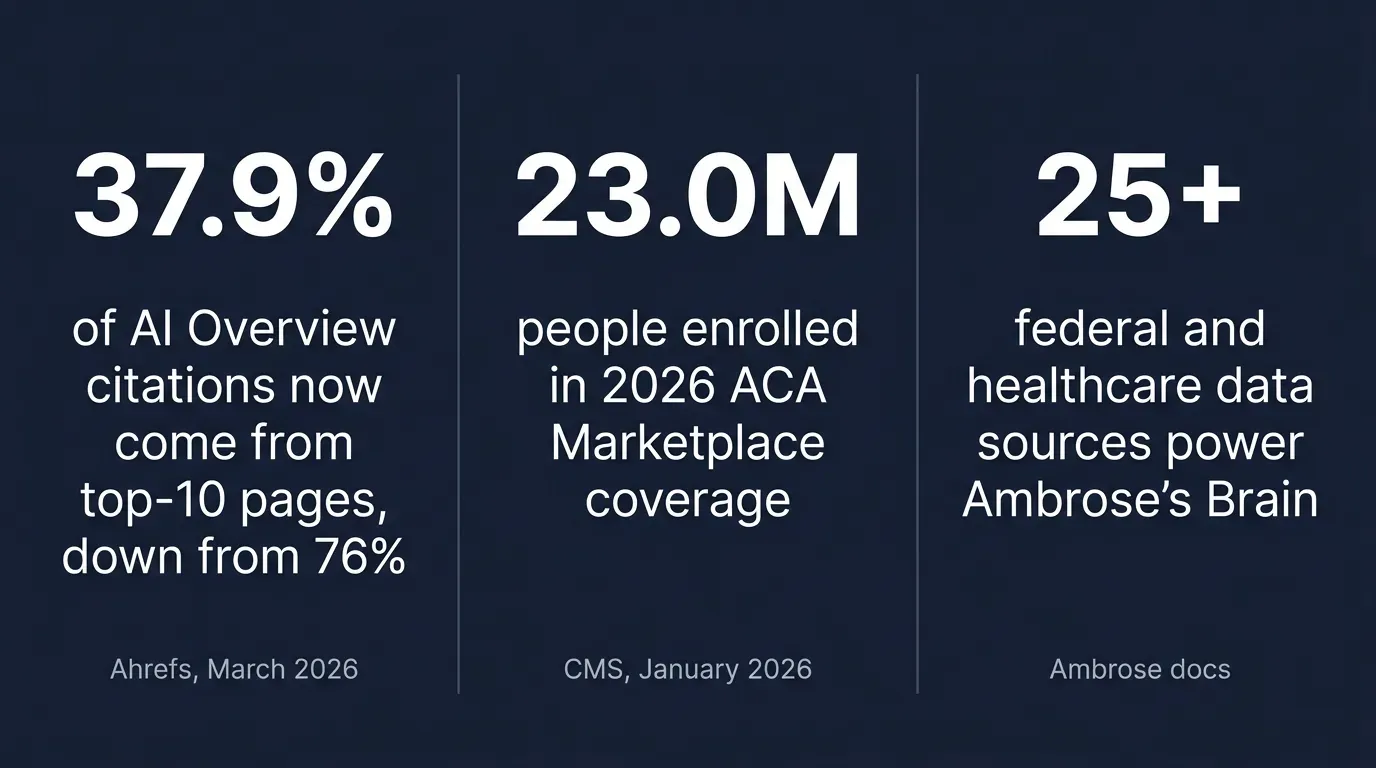
Put a number on the market this content is supposed to reach. CMS reports 23.0 million consumers signed up for 2026 individual market coverage through the Marketplaces as of the report’s cutoff — January 15, 2026 for HealthCare.gov states, January 10 for most state-based exchanges — including 3.4 million entirely new to the Marketplace and 19.6 million returning consumers who actively selected or were auto-re-enrolled into a 2026 plan (CMS, National Snapshot, January 28, 2026). Every one of those 23 million people is in a specific county, shopping against a specific set of plans, at a specific premium after a specific subsidy. A generic page can’t answer a single one of their actual questions, because none of their actual questions are generic. “What will I pay” is a household-composition-and-ZIP-code question, not a state-level one.
That’s the size of the audience a templated county page fails to actually serve, even on the pages that do manage to rank. And per the Ahrefs finding above, ranking is no longer even the reliable proxy for visibility it used to be — a growing share of what gets surfaced to a searcher is decided by whether the passage itself is specific and citable, not by position alone. Generic content is now failing on two fronts that used to be at least partially separable: it doesn’t serve the reader who lands on it, and it’s increasingly unlikely to be the thing an answer engine surfaces in the first place.
Twenty identical county pages don't give you twenty times the authority of one good page. They give you one page's worth of substance, spread thin enough that none of it holds together.
Mike MooreThe manual method: pull real county-level ACA data yourself, from CMS
This is the part we’re not going to hold back. If you want to build this entirely by hand, with nothing but a spreadsheet and CMS’s own public files, here’s the actual process, and it works whether or not you ever look at Ambrose.
CMS publishes the Health Insurance Exchange Public Use Files (Exchange PUFs) directly at cms.gov: downloadable, plan-and-issuer-level datasets on every qualified health plan (QHP) and stand-alone dental plan sold on an Exchange, going back to plan year 2014 (CMS, Exchange Public Use Files). The files are broken out by function, and the three you need for local content are:
| File | What it contains | What it gives your content |
|---|---|---|
| Service Area PUF | Issuer-level geographic coverage by state, county, and zip code | Which issuers and plans are actually sold in your county, before you write a word about them |
| Rate PUF | Premiums broken out by age, tobacco use, geography (rating area), and family tier | A real premium range for your county's rating area, by age band, instead of a vague "affordable" claim |
| Plan Attributes PUF | Deductibles, out-of-pocket maximums, HSA eligibility, and metal tier by plan | The actual plan design differences a reader in that county is choosing between |
Download the current plan year's files
CMS hosts the PUFs as ZIP archives, organized by plan year, at cms.gov's marketplace resources page. Grab the Service Area, Rate, and Plan Attributes files for the plan year you're writing about — not last year's, which is the single most common error in DIY local content.
Find your county in the Service Area file
Filter the Service Area PUF by state and county (or zip code) to get the list of issuers and plan IDs actually sold there. This is your starting list — don't write about a plan that doesn't show up here for your county.
Match plan IDs to the Rate PUF
Every plan in the Rate PUF is tied to a rating area, and every county maps to a rating area (the crosswalk is published alongside the PUFs). Pull the premium by age band for the plans your county's service area list surfaced.
Pull plan design from the Plan Attributes PUF
Join the same plan IDs against the Plan Attributes file for deductible, out-of-pocket max, HSA eligibility, and metal tier. This is what actually differentiates the plans you're describing, beyond price alone.
Build one table per county, cited and dated
Turn the joined data into a simple table: issuer, metal tier, premium range for a 40-year-old non-smoker, deductible. Cite CMS and the plan year directly under the table. That table is the entire reason your page is different from the templated version.
State the subsidy math generally, not as a personal promise
You can explain how the premium tax credit works and show an illustrative example at a stated income and household size, clearly labeled as illustrative. You cannot tell an anonymous reader what they personally will pay — that's a quote, not a blog post.
Illustrative subsidy example, not a promise to any specific reader
To show how a premium tax credit changes the math, you might write: "A 45-year-old at 250% of the Federal Poverty Level would see their benchmark plan premium capped as a share of income under current ACA rules — the exact dollar figure depends on the benchmark plan in their specific county and their exact household size." Keep it structural and clearly hypothetical. A specific dollar figure belongs in an actual quote, not an anonymous blog post. Results may vary, and this isn't tax or legal advice.
For a service area covering even ten counties, that’s ten Service Area lookups, ten rating-area crosswalks, and ten Plan Attributes joins, redone every plan year because the files, the rates, and sometimes the issuers themselves change annually. It’s genuinely doable with a spreadsheet and an afternoon per county. It’s also the exact kind of repetitive, dated, geography-keyed lookup that doesn’t need a human doing the join by hand once you understand what the numbers mean and why they matter.
Which counties to build first, and how to keep the pages from going stale
Don’t start with every county in your service area. Start with the counties where you already have the most clients or the most ad spend pointed, because that’s where a real, specific page does the most immediate work — replacing an ad landing page’s vague “get a free quote” content with an actual answer to “what plans exist here” tends to move quality score and conversion together, and it’s the fastest way to learn the PUF join process on data you already understand from working those clients.
Sequence the rest by rating area, not alphabetically. Because premiums are filed per rating area rather than per county, every county sharing a rating area with one you’ve already built shares that rating area’s rate data too — you’re re-running the Service Area lookup for a new county, but reusing the rate join you already did. A service area of thirty counties might sit across only six or seven rating areas, which means the real content lift is closer to seven premium lookups than thirty.
The refresh problem is real, and it's annual, not one-time
CMS re-issues the full PUF set on its own schedule tied to the Open Enrollment cycle, and issuers file mid-year corrections on top of that. A county page built on 2026 filings is describing a plan year that stops being current the moment 2027 rate filings post. Put a visible "plan year" label and a dated source line on every page, and build a standing reminder to re-pull the PUFs and update every published county page at the start of the next Open Enrollment cycle — a page with an unlabeled, uncorrected 2026 premium sitting live in 2027 is worse than no page at all, because it's now actively wrong instead of just absent.
Writing the page itself: structure that’s built to be cited
Pulling the right data is half the job. The other half is structuring the page so both a human skimming on a phone and an answer engine looking for a liftable passage can find the answer fast — and the difference between a page that gets cited and one that doesn’t usually comes down to structure as much as substance.
| Element | Generic templated page | Data-anchored page |
|---|---|---|
| Opening paragraph | "Residents of [County] have access to a range of plans to fit their needs." | States the plan count, metal tiers available, and premium range for the current plan year, sourced |
| Numbers | None, or a plausible-sounding figure with no citation | CMS-sourced, dated to a specific plan year, tied to a named rating area |
| Differentiation from the next county over | City name swapped; everything else identical | Different plan list and premium range if the rating area differs; explicitly identical and noted as such if it doesn't |
| Sources section | Absent, or "government data" | CMS named directly, with the specific PUF and plan year |
Open with a direct, two-to-four-sentence answer to the question in your headline — what plans are available, in plain terms, before any scene-setting. Follow with a key-takeaways box listing the plan count, the premium range, and the plan year, each one sourced. Put your data table high on the page, not buried after three paragraphs of throat-clearing, with data-label attributes on every cell so it reads correctly on mobile. Write your <h2> headings as the actual questions a reader in that county would ask — “What ACA plans are available in [County] for 2026” reads and gets cited better than “ACA Coverage Options” — and answer each one in the first two sentences underneath it, the same answer-first pattern this article uses. Link to your subsidy cliff explainer rather than re-explaining the 400% FPL rule from scratch on every county page, and close with a dated sources line naming CMS directly, not “government data.”
If you want a second opinion on whether a finished page is actually structured to be found and cited, Ambrose’s search-audit spoke scores a live URL on schema, content, technical factors, and AI-citation surface — useful as a check after you’ve built the page, not a substitute for building it with real data in the first place (Ambrose docs, Spokes).
How Ambrose’s marketplace-finder spoke runs the same lookup in one query
Ambrose OS, the platform included with a Tech Savvy membership, ships a spoke built for exactly this job. Per Ambrose’s documentation, marketplace-finder is a “live ACA marketplace plan search + APTC subsidy estimator backed by healthcare.gov,” with eleven tools built around the same ZIP-to-county-to-plan sequence the manual method above walks through by hand (Ambrose docs, spoke-marketplace):
| Manual step | marketplace-finder equivalent |
|---|---|
| Look up which county a zip code sits in | marketplace_county_by_zip resolves zip to county and FIPS code directly |
| Filter the Service Area PUF for your county's plans | marketplace_plan_search queries plans by household and county live against healthcare.gov |
| Join the Rate and Plan Attributes PUFs for one plan's full detail | marketplace_plan_detail retrieves the full benefit grid for a single plan |
| Work out the subsidy math by hand for an illustrative household | marketplace_subsidy_estimate calculates APTC eligibility for a given household |
| Manually check whether a specific drug or provider is in-network | marketplace_drugs_covered / marketplace_providers_covered check formulary and network status |
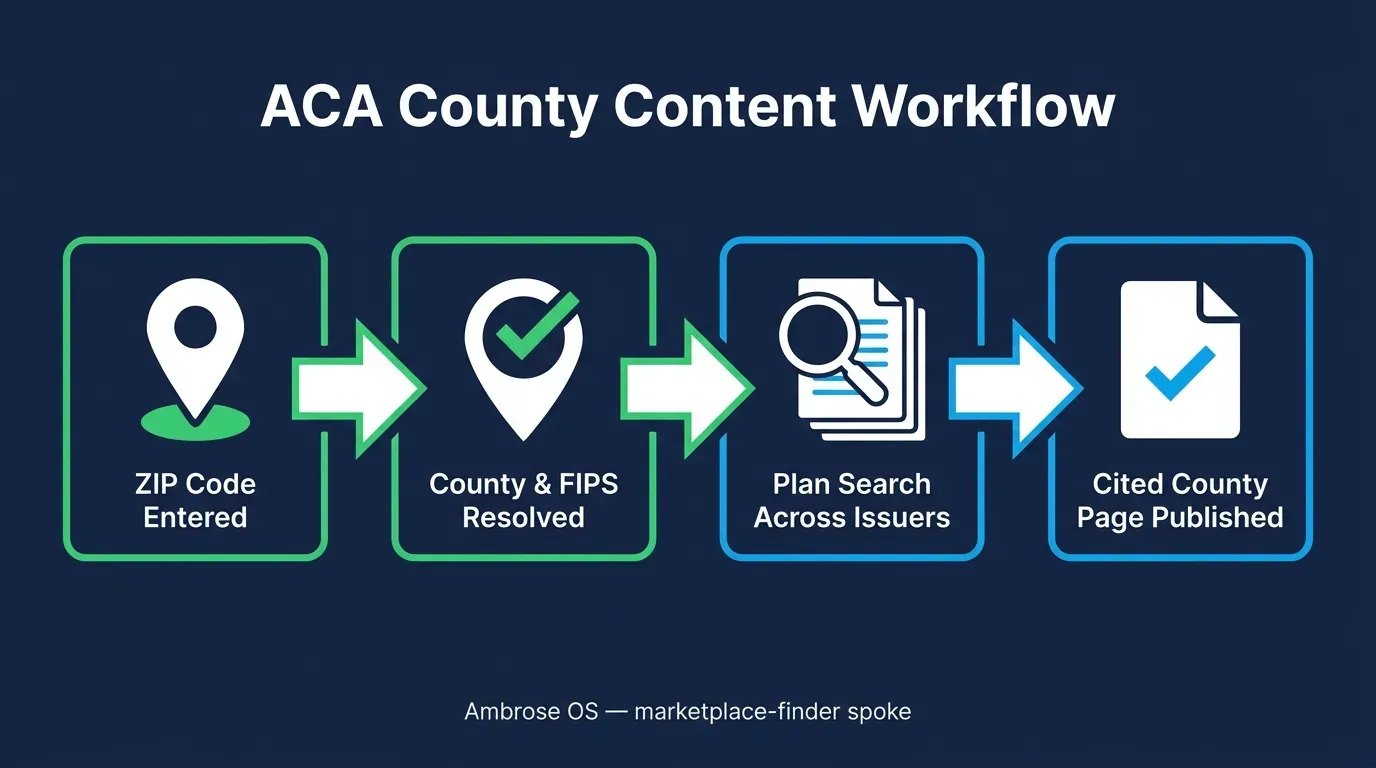
In practice, the query you’d type is close to plain English: “What ACA plans are available in [County], and what’s the estimated premium range and subsidy for a 45-year-old at 250% of the Federal Poverty Level?” The spoke resolves the county, pulls live plan data backed by healthcare.gov, and returns the plan list, premiums, and subsidy estimate together — the same output the manual method above produces, without three separate file downloads and a rating-area crosswalk.
The broader mechanism behind this is what Ambrose’s documentation calls the Brain: an internal service that fronts more than 25 federal and healthcare data MCPs, including CMS (Ambrose docs, Glossary and Architecture, fetched August 2026). marketplace-finder is one of the spokes built on that layer, purpose-specific to ACA plan search rather than the broader research surface the Brain also powers. The distinction matters for how you use it: reach for marketplace-finder when you’re finding and describing plans for content, and know that the same underlying data layer is what other spokes, like medicare-watchdog, call for a different job entirely — monitoring an existing book instead of searching the marketplace fresh.
A live pull is checkable, not automatically correct forever
marketplace-finder returning a number backed by healthcare.gov means you can verify it against a named source — it doesn't mean the number is frozen. Plan-year data changes, issuers file rate corrections, and AI-generated outputs, including anything returned through a spoke, can contain errors. Verify the current figure against the live source before you publish it or quote it to a client, and date every published table with the plan year it reflects.
Compliance: AI-assisted marketing content is still your content
Two rules apply here regardless of which method you use to gather the data.
The NAIC’s Model Bulletin on the Use of Artificial Intelligence Systems by Insurers, adopted in December 2023, sets the expectation that an organization using AI, including AI-assisted content creation, maintains a written AI governance program with human oversight, documentation of how the tool is used, and accountability for third-party AI vendors — the insurer or agency remains fully responsible for what the AI produces, whether it wrote the first draft or just pulled the numbers (NAIC, Insurance Topics: Artificial Intelligence). A published county page with a wrong or stale premium figure is your error to fix, not the tool’s, regardless of whether a person or a spoke pulled the original number.
If the same site also publishes Medicare content, know that the rules there are stricter and different: Medicare Advantage and Part D marketing materials fall under CMS’s Medicare Communications and Marketing Guidelines, which apply the same standard to AI-generated content as to anything else and require the TPMO disclaimer on applicable materials (CMS, Medicare Communications and Marketing Guidelines). ACA marketplace content, the subject of this article, doesn’t carry the TPMO disclaimer requirement, but don’t assume that exemption extends to any Medicare content on the same site.
What not to paste into a general AI tool while researching content
Pulling public CMS plan data is fine in any tool. Never paste a specific client's income, health information, or household details into a general-purpose AI tool to "check" whether their real situation matches your illustrative example — that's PHI leaving a system with no BAA behind it. Ambrose's PHI Rail aliases identifiers before any non-BAA destination sees them, which is exactly the gap it's built to close if a real client's data needs to touch an AI workflow at all.
What you get by joining
One Ambrose seat, including marketplace-finder and the rest of the spoke catalog, comes with a Tech Savvy Insurance membership: $97 a month, billed monthly, cancel anytime, founding rate locked in while the membership stays continuously active. Alongside the seat: weekly Zoom calls with open Q&A and build-with-you sessions, 30+ hours of recorded training, Meta Ads and marketing training built for this industry, pre-built AI templates and bot deployments, and a free annual in-person member workshop — plus an explicit no-recruiting rule, so a question about your county pages doesn’t turn into a downline pitch.
Ambrose usage runs on its own credit ledger
The $97/month membership includes one Ambrose seat; usage inside Ambrose runs through its own credit ledger with spend caps, so cost is visible rather than a surprise line item ([Ambrose docs, What is Ambrose](https://app.hiambrose.com/docs/what-is-ambrose)). Custom builds beyond a standard seat are scoped separately at strategicaiarchitects.com.
The close
Everything above, the PUF downloads, the rating-area crosswalk, the join, works whether you ever join anything or not — that’s the point of writing it out in full. If you’d rather have that same lookup return in one query instead of three file joins, with the number already tied to a live healthcare.gov source, one Ambrose seat comes with a Tech Savvy membership, and the weekly build-with-you calls are where agents actually run their first marketplace-finder query on their own service area, alongside people who’ve already done it: https://techsavvyinsurance.com/.
Before you publish any county page
Tech Savvy Insurance is a training and software community, not an insurance company, agency, or law firm, and does not provide insurance, legal, tax, or compliance advice. You are responsible for your own licensure and for complying with all applicable CMS, state, and carrier marketing requirements. AI-generated outputs, including any figure pulled through a spoke, may contain errors — always verify against the current, dated CMS source before publishing or quoting a figure to a client. Results may vary.
Frequently asked questions
Sources
- CMS — Health Insurance Exchange Public Use Files (Exchange PUFs) — cms.gov
- CMS — Marketplace 2026 Open Enrollment Period Report: National Snapshot (Jan. 28, 2026) — cms.gov
- Ahrefs — Google AI Overview Citations From Top-10 Pages Dropped From 76% to 37.9% (Mar. 2, 2026) — ahrefs.com
- NAIC — Insurance Topics: Artificial Intelligence (Model Bulletin) — content.naic.org
- CMS — Medicare Communications and Marketing Guidelines — cms.gov
- Ambrose docs — Glossary (the Brain) — app.hiambrose.com
- Ambrose docs — Architecture — app.hiambrose.com
- Ambrose docs — Spokes — app.hiambrose.com
- Ambrose docs — spoke-marketplace — app.hiambrose.com
- Ambrose docs — What is Ambrose — app.hiambrose.com
Ready to put this into practice?
Join a private community of Health & Life insurance professionals using AI, Meta Ads, and automation to grow — without draining their bank account.
Join Tech Savvy — $97/month