
You paid for GoHighLevel’s HIPAA add-on, flipped the toggle on the Medicare sub-account, and within a week your AI follow-up started sounding like it had never met the client. Here’s the short answer to why: on a HIPAA-enabled sub-account, HighLevel’s API refuses to return the message history inside a conversation. The request comes back as HTTP 401 with the code CONVERSATIONS_HIPAA_RESTRICTED. Contacts, custom fields, notes, tasks, and pipelines still come back fine. The one object a conversational AI leans on for memory is the one that’s gone, and nothing in HighLevel’s HIPAA documentation or API reference tells you so.
Key takeaways
- On a HIPAA-enabled GoHighLevel sub-account, GET /conversations/{id}/messages returns 401 CONVERSATIONS_HIPAA_RESTRICTED. We confirmed it on our own sub-account in September 2026. The same call succeeds on a non-HIPAA sub-account.
- Everything else we tested still works: contacts, custom fields, notes, tasks, pipelines and opportunities, and the conversation list, including a last-message preview per thread.
- HighLevel's HIPAA help article lists the covered data objects and the $297 per month price. It does not mention the API restriction, and it does not name Voice AI or Conversation AI as covered features.
- The manual fix is a discipline: keep the context your AI needs in notes and a custom field, which the HIPAA API still serves, and route call transcripts into notes with the Transcript Generated workflow trigger.
- Ambrose is built for exactly this split: HIPAA-on sub-accounts are treated as BAA-covered, non-HIPAA sub-accounts route through the PHI Rail, and the agent keeps its own per-contact conversation log in a custom field so it never needs the blocked endpoint.
Written for the agent running the sub-account, not a lawyer
This is the mechanism, the test, and the workaround, from people who run HIPAA-enabled sub-accounts every day. Tech Savvy Insurance is a training and software community, not a law firm or an insurance agency, and nothing here is legal, tax, or compliance advice. If you want the engineering version of the same test, with the raw API responses, it's on the Strategic AI Architects Playbook.
The week your follow-up AI forgot everyone
Here’s how it usually shows up. A client texts back about the plan change you discussed on a call last Tuesday. Your AI assistant, which used to reference that call, replies with something a stranger would write: “Thanks for reaching out! How can I help you today?” You check the contact. The call is right there in the conversation view. The notes are there. The AI just didn’t use any of it.
If that started happening around the time you turned on HIPAA for the sub-account, it isn’t a coincidence and it isn’t the AI vendor’s model getting worse. It’s an access change HighLevel makes underneath the sub-account, and most agents find out about it the way you just did: by watching the quality of their follow-up fall off a cliff and having no idea why.
The frustrating part is that the HighLevel interface looks identical. You can still scroll the conversation. Your team can still read every message. The restriction is on the API, the door that every outside tool, including your AI, uses to get in. Your people see the whole history. Your software sees a locked panel.
Why it happens: the wall HighLevel doesn’t document
HighLevel’s HIPAA compliance package does real work. Its help center describes AES-256 encryption for stored data, enforced multi-factor authentication, audit logging, a Business Associate Agreement you sign inside the app, and a per-sub-account toggle an agency owner has to turn on for each location that handles protected health information (HighLevel Support Portal, HIPAA Compliance in HighLevel). The same article lists what it covers: “Contacts, Notes, Custom Fields, SMS/MMS, voice recordings, email bodies & attachments, form/survey submissions, calendars, invoices.”
What the article does not say, anywhere, is that flipping that toggle changes what the public API will hand to a connected app. We only know because we tested it.
We run two GoHighLevel sub-accounts side by side. One is a general marketing account with HIPAA off. The other is a health insurance account with HIPAA on. In September 2026 we made the same API call against each: get the messages inside one conversation, the exact endpoint HighLevel documents as GET /conversations/:conversationId/messages (HighLevel API Reference). The non-HIPAA account returned the messages. The HIPAA account returned this:
{
  "statusCode": 401,
  "error": "Unauthorized",
  "message": "Can not fetch messages from HIPAA compliant account",
  "canonicalCode": "CONVERSATIONS_HIPAA_RESTRICTED"
}
That’s a purpose-built refusal, not a permissions mistake. The token was valid. The same token had just read the contact record, the custom fields, the tasks, and the conversation list for that very thread. HighLevel’s own API reference page for the endpoint lists no HIPAA condition and no such error code. It exists in the platform’s behavior and nowhere in its documentation.
Then we mapped what the HIPAA sub-account would still give us. Contacts came back. Custom fields came back. Tasks came back. The pipelines list came back, and an opportunity search with notes attached came back, notes included. The conversation search endpoint came back too, and it includes a field called lastMessageBody, which HighLevel documents as the text of the most recent message in each thread (HighLevel API Reference, Search Conversations). So an outside tool can see the last thing a client said. It cannot see the thing before that.
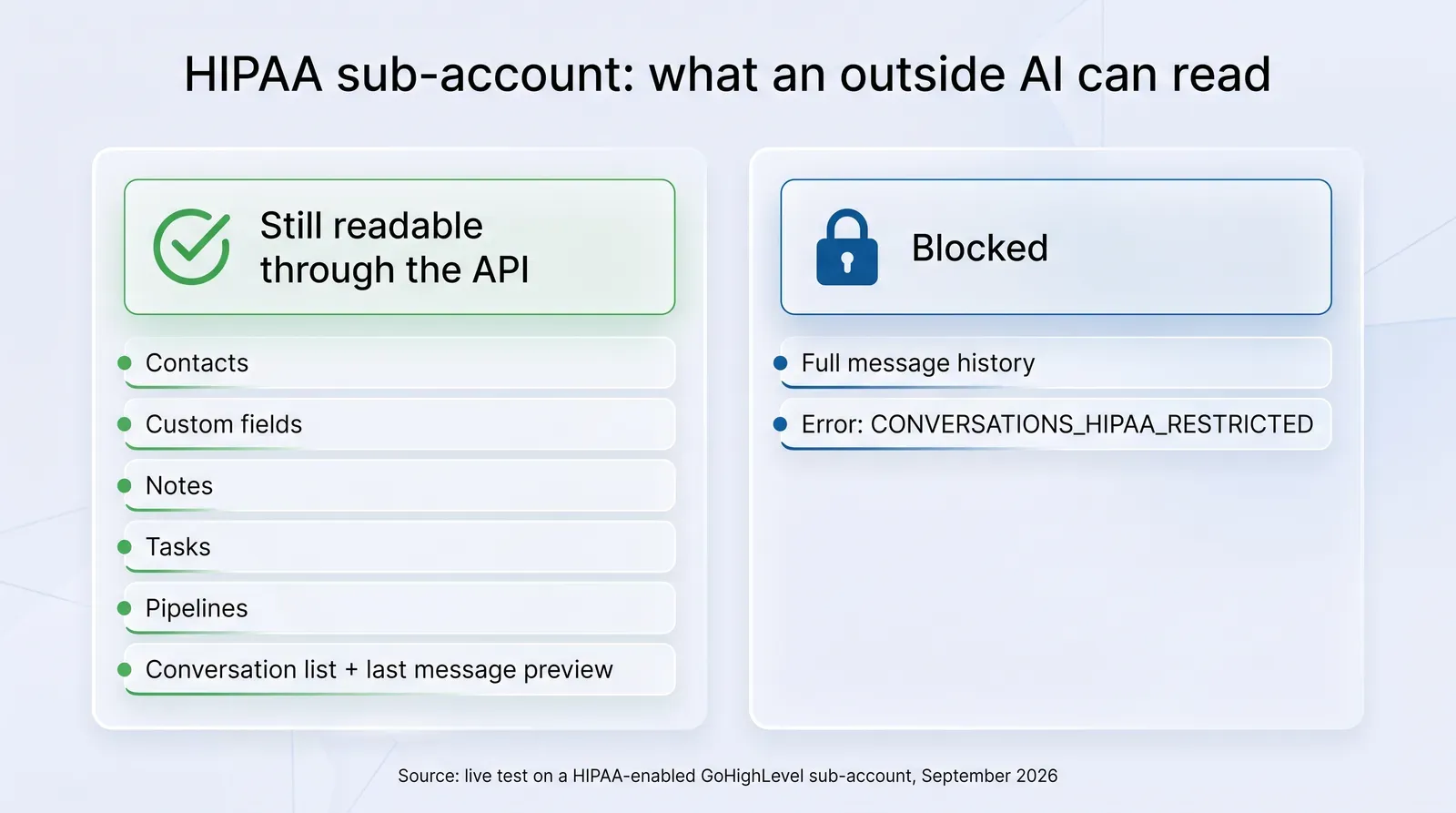
Read that list again from the point of view of a conversational AI. Almost every tool in this category builds its memory the same way: when a message comes in, it pulls the conversation history through the API, stuffs it into the prompt, and generates a reply that sounds like it remembers. Take away the history endpoint and the tool is left with the newest message and whatever a workflow happened to pass along. That is exactly the “Thanks for reaching out!” reply you got.
What it costs
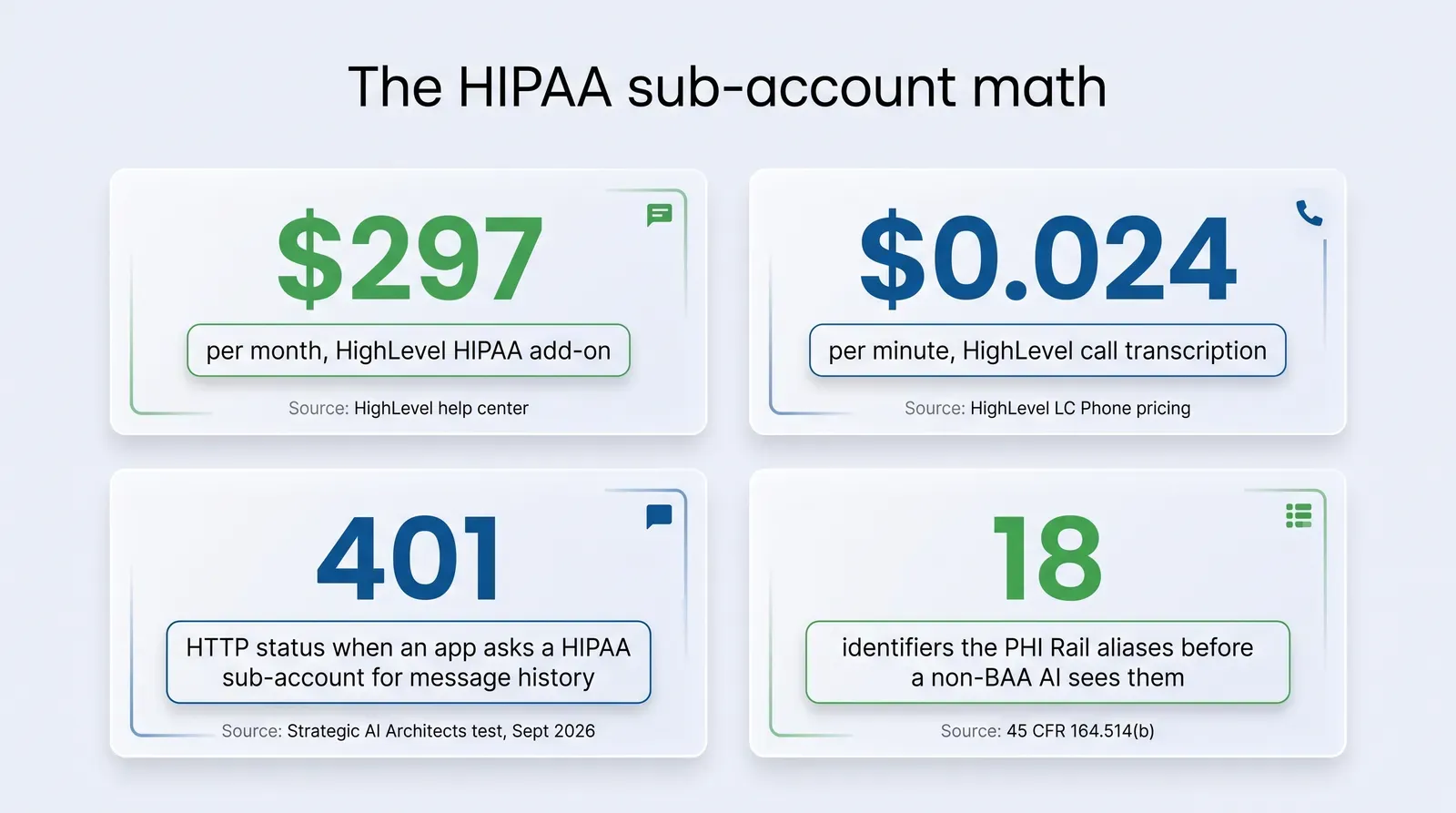
Start with the direct line items. HighLevel’s HIPAA module is $297 per month, billed at the agency level, and the help center is clear that it is a permanent decision once purchased (HighLevel Support Portal, HIPAA Compliance in HighLevel; HighLevel HIPAA module page). If you also lean on HighLevel’s own call transcription, that runs $0.024 per recorded minute on LC Phone, on top of the $0.0025 per minute recording charge (HighLevel Support Portal, LC Phone Pricing and Billing Guide).
The bigger cost doesn’t show up on an invoice. You bought the add-on so you could run a compliant book, and the side effect is that any AI tool relying on the history endpoint now answers your clients with less context than a brand-new hire would have. Every reply that ignores last week’s call is a reply the client has to correct, and a client who corrects you twice usually stops replying. There is no clean industry number for what that costs a Medicare or ACA book, and we’re not going to invent one. You can put a figure on it yourself: count the conversations in your HIPAA sub-account where a client had to repeat something the record already contained.
There’s a compliance cost hiding here too. If your fix for the missing memory is to paste the client’s thread into a general-purpose AI tool so it can “catch up,” you’ve just moved protected health information to a vendor with no Business Associate Agreement. Our earlier guide on what not to paste into ChatGPT covers the line in detail. The short version: a client’s name plus anything about their health, plan, or coverage is PHI, and 45 CFR 164.514(b)(2) lists 18 identifiers, from names and dates to phone numbers and beneficiary numbers, that have to come out before data counts as de-identified (45 CFR 164.514, Cornell LII).
Your team can read every message in the thread. Your software gets a locked panel. That's the whole problem in one sentence, and the toggle that caused it doesn't warn you.
Mike MooreHow to check your own sub-account in ten minutes
You don’t need a developer. You need a Private Integration token and a browser.
- Create a Private Integration token in the HIPAA sub-account (Settings, then Private Integrations) with the conversations read scopes. Never share this token and delete it when you’re done.
- Find one conversation ID. Open a client thread in the Conversations view; the ID is in the URL. Pick a test contact, not a real client, if you have one.
- Call the search endpoint first. GET https://services.leadconnectorhq.com/conversations/search?locationId=YOUR_LOCATION_ID with your token in the Authorization header and Version 2021-04-15. You should get a list back, with a lastMessageBody on each thread. That confirms the token works.
- Now call the messages endpoint. GET https://services.leadconnectorhq.com/conversations/YOUR_CONVERSATION_ID/messages with the same headers. On a HIPAA sub-account, expect the 401 above. On a non-HIPAA sub-account, expect the messages.
- Write down the date and the response. If HighLevel changes this behavior, and it could, you’ll want to know when your test was run.
If step 4 comes back with messages on a HIPAA account, the behavior changed since we tested it in September 2026, and that’s worth knowing before you build a workaround you don’t need.
The manual method: keep the context yourself
The good news inside the bad news is that HighLevel left the doors open on the objects that make the best long-term memory anyway. Notes and custom fields are both on the covered-data list in HighLevel’s HIPAA article, and both still read and write through the API on a HIPAA sub-account. So the manual method is a habit, not a hack: put the context you want your AI to remember where the API can still see it.
1. Make notes the system of record for every meaningful touch. After a call, one note: what the client asked about, what you quoted, what they said they’d do next, and the date. Keep it to facts your future self would need. Notes attach to the contact and come back in an opportunity search with getNotes set to true, which is exactly how we confirmed they’re still readable.
2. Keep a running “context” custom field. Create a large-text custom field on the contact object, call it something like AI Context, and keep a short, dated bullet list in it: last topic, open objection, promised follow-up. A workflow can append to it automatically when a form is filled or an appointment is booked. Whatever AI tool you use can read that field even when it can’t read the thread.
3. Route call transcripts into notes with a workflow. HighLevel’s Transcript Generated trigger fires “as soon as HighLevel finishes transcribing a recorded call” and passes “the full transcript, duration, direction, caller location, timestamps, and more” into the workflow, across Voice AI, LC Phone, and IVR calls, as long as transcription is turned on in the relevant settings (HighLevel Support Portal, Workflow Trigger: Transcript Generated). From that trigger, an Add Note action can drop the transcript onto the contact. Test it on one call first: whether the transcript field populates the note the way you expect is something to verify on your own account, not assume from a help article. Transcription costs $0.024 per recorded minute, so turn it on for the calendars and lines that matter, not every ring.
4. Feed your AI from those objects, not from the thread. Whatever tool sends your follow-ups, point its context at the notes and the custom field. Most tools can read a custom field through a workflow merge tag even when they can’t call the history endpoint. The reply quality comes back the moment the tool has something to remember with.
5. Never fill the gap by pasting. If you catch yourself copying a client thread into a chat window to “get the AI up to speed,” stop. That’s the PHI leak the HIPAA toggle was meant to prevent, and a general AI account has no BAA covering it.
A good note is a prompt you wrote in advance
Write every post-call note as if an assistant who has never met the client will read it in six weeks and have to sound informed. Topic, number, objection, next step, date. That's the whole format, and it survives any API restriction HighLevel adds later.
Where the manual method breaks
It breaks on volume and on people. A solo agent with 40 active conversations can keep notes and a context field current by hand. An agency running renewals during AEP cannot, and the first week that gets busy is the week the notes stop, which is the week the AI goes back to sounding like a stranger.
It also breaks on structure. A note is free text. Two producers write them two ways, and an AI that has to infer “what was the last objection” from six paragraphs of mixed formatting will get it wrong some of the time. A custom field helps only if everyone appends to it the same way, and nobody polices a custom field on a Friday afternoon in November.
And it breaks on transcripts. A workflow can drop a raw transcript into a note, but a 22-minute call is a lot of text, and the useful part, the objection, the plan the client asked about, the date they said to call back, is buried in it. Somebody still has to extract that, or your AI has to, on every reply, from every transcript in the record.
How Ambrose handles a HIPAA sub-account
Ambrose was built around this split rather than surprised by it, and the pieces are documented, so we can be specific.
It knows which sub-accounts are HIPAA. Ambrose’s GoHighLevel spoke is documented with a per sub-account HIPAA override: “BAA sub-accounts are treated as safe; others route through PHI Gateway” (Ambrose docs, spoke-ghl). A single Ambrose tenant can work across your marketing sub-account and your HIPAA sub-account at the same time and apply the right posture to each, instead of treating the whole agency as one bucket.
It never needed the blocked endpoint for the newest message. When a client replies, a GoHighLevel workflow hands the message to Ambrose through a webhook at the moment it arrives. The agent is reading the message the workflow delivered, not asking the API for a history it can’t have.
It keeps its own conversation log where the API still reads. In the current build, Ambrose maintains a per-contact custom field named AI Conversation JSON, a large-text field it creates on first use and appends to with each generated SMS or email entry and a server-side timestamp. Custom fields are on HighLevel’s covered-data list and, in our test, still read normally on a HIPAA sub-account. That field, plus the notes, is the memory. It’s the manual method from the previous section, done by the software on every touch instead of by a producer on a good day.
It gets the transcript without depending on the API path. Ambrose pulls the call audio into the agency’s own vault and transcribes it there. The transcription runs under the platform’s BAA-covered AWS account, and Amazon Transcribe is on AWS’s list of HIPAA eligible services, alongside Amazon Bedrock (AWS, HIPAA Eligible Services Reference). The transcript, and the summary the agent writes from it, come back to the contact as notes, which is the object your producers already read. Nothing about that flow asks HighLevel’s message-history endpoint for anything.
Everything non-HIPAA goes through the PHI Rail. For sub-accounts and destinations that aren’t BAA-covered, Ambrose’s PHI Rail is documented as checking the destination against a BAA allowlist, and when the destination isn’t on it, calling the PHI Gateway to “scrub identifiers, get back a payload of typed aliases (PERSON_xxxx, EMAIL_xxxx, …) + a hydration map,” sending the scrubbed payload to the model with a guardrail instruction never to invent identifiers, and then splicing the real identifiers back into the response. Every scrub event is logged with counts, never the values (Ambrose docs, Architecture: PHI Rail). The detection chain runs known contacts first, then regex, then named-entity recognition, then an insurance-specific dictionary.
| Part of the job | By hand | What Ambrose does |
|---|---|---|
| See the newest client message | Workflow merge tag, or a producer reading the thread | GoHighLevel workflow webhook delivers the message on arrival |
| Remember the earlier messages | A producer keeps a dated AI Context custom field current | Appends every generated touch to the AI Conversation JSON custom field automatically |
| Call transcript into the record | Transcript Generated trigger plus an Add Note action, $0.024 per minute | Audio into the agency vault, transcribed under a BAA-covered AWS account, transcript and summary written to notes |
| Know which sub-account is HIPAA | Somebody remembers | Per sub-account HIPAA override in the ghl spoke configuration |
| Keep PHI out of non-BAA AI | Strip names before pasting, every time | PHI Rail aliases identifiers before any non-BAA destination sees them, then re-hydrates the response |
Two honest boundaries. First, the AI Conversation JSON field and the vault transcription path are how the current build works, confirmed in the product this session; the per sub-account posture and the PHI Rail are the parts documented publicly at the links above. Ambrose ships fast, so confirm any capability in its current docs before you repeat it to a client. Second, HighLevel’s BAA is HighLevel’s. It covers the objects HighLevel lists. Ambrose’s posture treats a HIPAA-on sub-account as BAA-covered for the GoHighLevel data itself, and handles the model side separately, which is the layer HighLevel’s own HIPAA article never addresses.
HighLevel's BAA does not name its AI features
The only AI feature HighLevel's HIPAA article mentions is Reviews AI. Voice AI and the AI Agent action can now route to external model providers, billed per model, and HighLevel says its subprocessor list lives in its Data Processing Agreement rather than in public docs. Before you put PHI through a HighLevel AI feature on a HIPAA sub-account, get a written answer from HighLevel on whether that feature and its model provider sit under your BAA. Our sister article on what the GoHighLevel BAA actually covers goes deeper on the boundary.
Compliance: what this touches, and what to check with your own program
The NAIC Model Bulletin on the Use of Artificial Intelligence Systems by Insurers sets the expectation regulators are carrying into agency-level AI use: a written policy on how AI is used, human oversight of what it produces, documentation you can hand over, and accountability for the vendors in the chain. A conversational AI that keeps its own memory in your CRM is a vendor in that chain. Know where its memory lives, who can read it, and which BAA covers it.
Two more things to keep straight. Ambrose is HIPAA aware by default, not HIPAA certified, because no software certification exists under HIPAA, and you remain the covered entity or business associate responsible for your own compliance program. And AI outputs may contain errors: a summary written from a transcript is an input to your judgment, not a substitute for reading the note before you call the client back. If you handle Medicare marketing calls, the retention rules in our guide to Medicare call recording retention for 2027 still apply to the recordings this workflow produces.
What you get by joining
One Ambrose seat, including the GoHighLevel spoke with its per sub-account HIPAA posture and the PHI Rail, comes with a Tech Savvy Insurance membership: $97 a month, billed monthly, cancel anytime, founding rate locked in while the membership stays active. Ambrose usage runs on its own credit ledger with spend caps, separate from the $97, so the cost stays visible (Ambrose docs, What is Ambrose).
Alongside the seat: weekly Zoom calls with open Q&A and build-with-you sessions, where a HIPAA sub-account setup like the one in this article is exactly the kind of thing we do with the screen open; 30+ hours of recorded training; Meta Ads, AI, and marketing training built for health and life agents; pre-built AI templates and bot deployments; and a free annual in-person member workshop. It’s also an explicit no-recruiting zone, so you can ask “why did my AI forget my clients” without ending up on someone’s downline list.
If you'd rather see it than read it
This is the kind of thing we work through on a Tuesday with Ambrose open on the screen: point it at a HIPAA sub-account, watch what it reads, watch what it writes back. Membership is $97 a month, cancel anytime, and nobody will pitch you a downline.
The close
Everything above works whether you join anything or not. Run the ten-minute test on your own sub-account, move your AI’s memory into notes and a custom field, and wire the transcript trigger to a note. Your follow-up will start sounding like it remembers again. When you’d rather have Ambrose keep that memory current on every touch, under a posture that already knows which sub-account is HIPAA, one seat comes with the membership.
Frequently asked questions
Sources
- HighLevel Support Portal: HIPAA Compliance in HighLevel (covered data objects, BAA signing, per-sub-account activation) — help.gohighlevel.com
- HighLevel: HIPAA Compliance module page ($297 per month add-on, AES-256 encryption, in-app BAA) — gohighlevel.com
- HighLevel API Reference: Get Messages by Conversation ID (GET /conversations/:conversationId/messages) — marketplace.gohighlevel.com
- HighLevel API Reference: Search Conversations (GET /conversations/search, lastMessageBody field) — marketplace.gohighlevel.com
- HighLevel Support Portal: LC Phone Pricing and Billing Guide (call transcription $0.024 per minute) — help.gohighlevel.com
- HighLevel Support Portal: Workflow Trigger, Transcript Generated — help.gohighlevel.com
- 45 CFR 164.514, Other requirements relating to uses and disclosures of protected health information (Safe Harbor identifiers and re-identification codes), Cornell Legal Information Institute — law.cornell.edu
- AWS: HIPAA Eligible Services Reference (Amazon Bedrock, Amazon Transcribe) — aws.amazon.com
- Ambrose docs: Architecture, PHI Rail — app.hiambrose.com
- Ambrose docs: spoke-ghl (per sub-account HIPAA override) — app.hiambrose.com
- Ambrose docs: Spokes catalog — app.hiambrose.com
- Strategic AI Architects: Why Your AI Can't Read Conversations in a HIPAA GoHighLevel Sub-Account (the engineering write-up of this test) — strategicaiarchitects.com
- Strategic AI Architects: Your GoHighLevel BAA Doesn't Make Your Funnel HIPAA Safe — strategicaiarchitects.com
Ready to put this into practice?
Join a private community of Health & Life insurance professionals using AI, Meta Ads, and automation to grow — without draining their bank account.
Join Tech Savvy — $97/month