
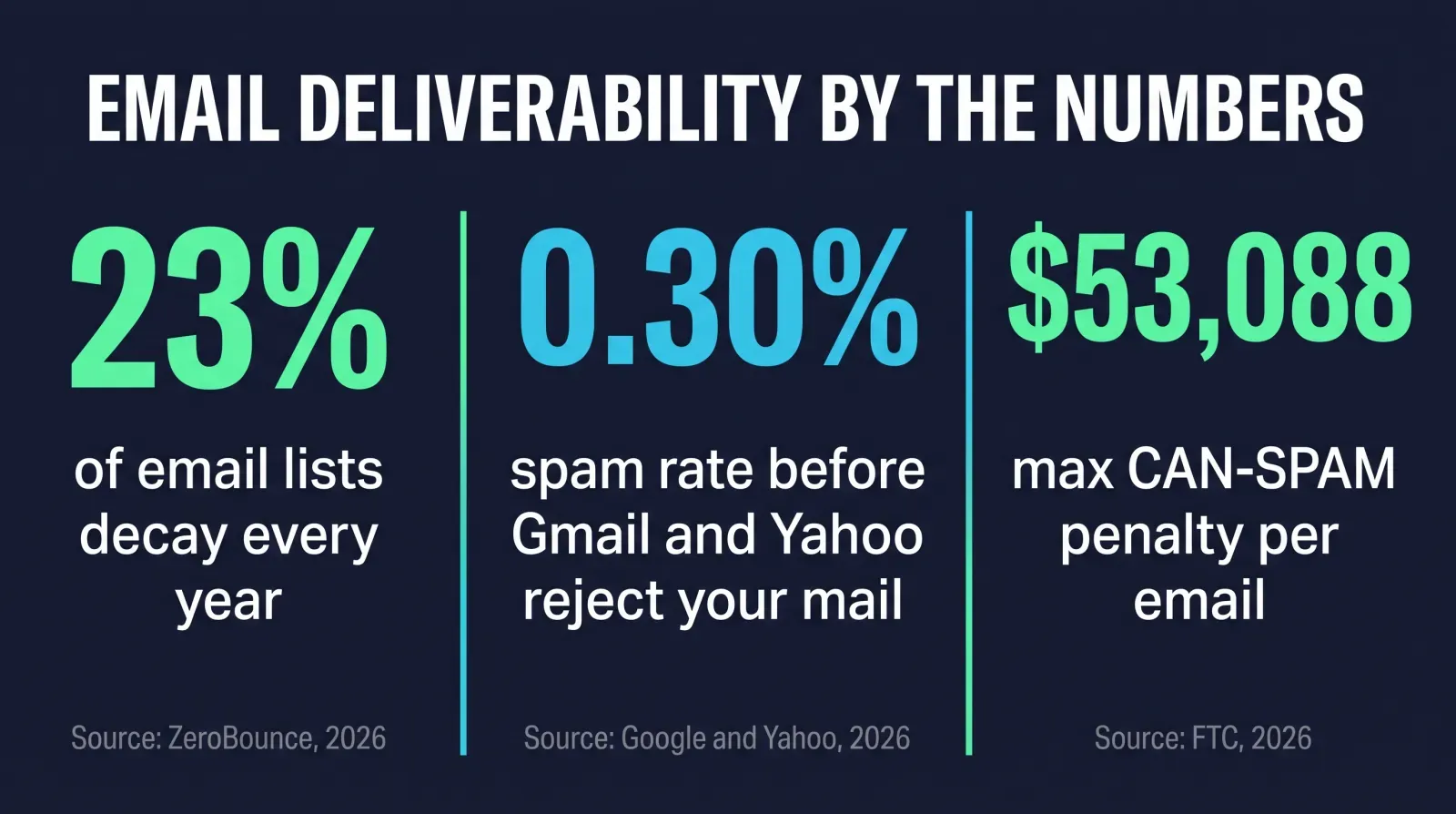
Gmail and Yahoo now reject bulk email outright — not filter it to spam, reject it — from any sender whose spam-complaint rate climbs above 0.30%, and both mailbox providers require SPF, DKIM, and DMARC authentication plus a working one-click unsubscribe before they’ll trust your domain at all (Google, Email sender guidelines; Yahoo, Sender Best Practices). Most insurance agents find this out the hard way: a campaign to a purchased or years-old list quietly tips the domain over that line, and every email after it — including the appointment confirmation your actual client needed — starts bouncing too.
Key takeaways
- Gmail and Yahoo both enforce a 0.30% spam-complaint ceiling and require SPF, DKIM, and DMARC authentication for bulk senders — non-compliant mail can be rejected outright, not just spam-foldered (Google; Yahoo, 2026).
- About 23% of an email list decays every year, per ZeroBounce's analysis of over 11 billion verifications in 2025 — meaning a list you built and never touched again is already a quarter bad data by the time you send to it.
- CAN-SPAM penalties run up to $53,088 per violating email, and "each separate email" is a legal term, not a figure of speech (FTC, 2026).
- You can build and verify a clean prospect list by hand for free, using the same public-data methods described step by step below — no purchased list required.
- Ambrose's lead-hunter spoke automates exactly this: it discovers public business prospects on Google Maps, guesses a likely work email, and verifies deliverability before you send a single message, and it never touches client PHI to do it.
- One Ambrose seat, including lead-hunter, comes with a Tech Savvy Insurance membership.
What “email deliverability” actually means
Deliverability is whether a message you send actually lands in the recipient’s inbox — not whether it “sends” without an error, and not whether it lands anywhere at all. A message can leave your outbox successfully and still never reach an inbox: it can get filtered to spam, quarantined, or, increasingly in 2026, rejected by the receiving server before it’s ever delivered to any folder. Three technical pieces determine which of those happens, and every insurance agent sending email — whether that’s a Mailchimp newsletter, a HighLevel drip campaign, or a one-off note from Outlook — should know what each one does.
SPF (Sender Policy Framework) is a DNS record you publish that lists which mail servers are authorized to send email claiming to be from your domain. When a receiving server gets a message from “[email protected],” it checks the SPF record for youragency.com to see if the sending server is on the approved list.
DKIM (DomainKeys Identified Mail) attaches a cryptographic signature to the message header. The receiving server uses a public key published in your DNS to verify the signature, confirming the message wasn’t altered in transit and genuinely originated from a server you control.
DMARC (Domain-based Message Authentication, Reporting and Conformance) is the policy layer sitting on top of both. It tells receiving servers what to do when a message fails SPF or DKIM — quarantine it, reject it outright, or let it through anyway — and it gives you reporting on who’s sending mail claiming to be from your domain, which is also how you catch someone spoofing your agency’s name.
Google’s and Yahoo’s own current sender documentation both require all three, configured and passing, for anyone sending in bulk to their users (Google, Email sender guidelines; Yahoo, Sender Best Practices). If your agency’s domain doesn’t have all three set up, that’s the first thing to fix, and it’s usually a fifteen-minute conversation with whoever manages your domain’s DNS — your CRM or ESP vendor, HighLevel included, will typically hand you the exact DNS records to paste in.
The 2026 rules, and what actually triggers them
| Requirement | Gmail | Yahoo |
|---|---|---|
| Spam-complaint ceiling | Below 0.30%, measured in Postmaster Tools | Below 0.3% |
| SPF required | Yes | Yes |
| DKIM required | Yes | Yes |
| DMARC required | Yes | Yes, at least p=none, must pass |
| One-click unsubscribe | Required on marketing and subscribed mail | Required, RFC 8058 method recommended |
| Stated volume threshold | 5,000 messages/day to Gmail addresses | No specific threshold published |
Read that table carefully and one thing stands out: Gmail’s 5,000-message daily threshold is the only volume number either company publishes. Most solo agents and small agencies never send 5,000 emails to Gmail addresses in a single day, which means it’s easy to assume none of this applies. It does. Yahoo doesn’t publish a volume threshold for its requirements at all — its guidance applies to senders generally — and Gmail’s ordinary, non-bulk spam filtering runs on every message regardless of volume. A 40-person agency blasting a purchased list of 2,000 contacts is well under Gmail’s bulk threshold and can still tank its own domain reputation through ordinary complaint-based filtering. The volume threshold determines whether Google’s formal bulk-sender enforcement applies to you; it does not determine whether bad sending practices can hurt your deliverability.
Why an insurance agent’s list decays faster than they think
Email addresses don’t stay valid forever, even when nothing about your list looks obviously wrong. People change jobs, close old inboxes, switch from a personal Gmail to a work address, or simply stop checking an account they set up years ago. ZeroBounce, an email verification company, analyzed more than 11 billion email verifications it processed in 2025 across customers ranging from solo operators to large enterprises, and found that at least 23% of an email list decays every year — a mix of addresses that go fully invalid, turn into spam traps, or get flagged as abuse/complaint sources (ZeroBounce, Email List Decay Report 2026). That figure is actually down from 28% the year before, per the same report — but even at the lower rate, a list you built in 2024 and never touched again is carrying a meaningful share of dead weight by now.
Here’s what that decay rate means in practice for a list you didn’t build carefully in the first place. Say you bought or inherited a list of 3,000 insurance prospects that’s a year old and was never verified at collection. Apply the sourced 23% decay figure and you’re looking at roughly 690 addresses that are now invalid, dead, or otherwise likely to bounce or trip a spam trap — before you’ve accounted for whatever share of the list was already bad on day one from being purchased rather than collected directly. Send your first campaign to that list unverified, and you can hit Gmail’s 0.30% spam-complaint ceiling on the very first send, particularly if a chunk of those dead addresses have been recycled into spam traps, which is exactly what tends to happen to abandoned mailboxes over time.
This is a materially bigger problem for insurance-specific outreach than for general B2B email. A cold email to a software buyer that lands wrong costs you one lead. A cold email campaign that tanks your domain reputation can take down the deliverability of the transactional and service email your actual book of business depends on — the renewal reminder, the e-signature request, the appointment confirmation — because mailbox providers increasingly evaluate reputation at the domain level, not just the specific sending list.
What it actually costs to get this wrong
Two different costs stack on top of each other here, and agents usually only think about one of them.
The first is regulatory. CAN-SPAM, the federal law governing commercial email, doesn’t require opt-in consent the way TCPA does for texts and calls — you can email someone you haven’t gotten explicit permission from, as long as the message is truthful, clearly labeled as an ad when it is one, includes a real physical address, and gives the recipient a working way to opt out that you honor within 10 business days (FTC, CAN-SPAM Act: A Compliance Guide for Business). Where agents get exposed is on the mechanics: no visible unsubscribe link, a deceptive subject line, or continuing to email someone after they opted out. The penalty structure is what makes this expensive fast — each separate email in violation is subject to a civil penalty of up to $53,088 (FTC, same guide). “Each separate email” is doing real work in that sentence: a single bad send to 400 people that lacks a working opt-out mechanism is legally 400 separate violations, not one mistake.
Direct enforcement against small agencies is rare — the deliverability damage isn't
FTC enforcement actions specifically against small insurance agencies over CAN-SPAM are uncommon; the Act is more often enforced against large-scale spam operations. The statutory exposure is real and worth knowing, but the far more likely cost of sloppy list practices is the second one below: your own domain quietly losing the ability to reach anyone's inbox. Results may vary, and none of this is legal advice — talk to a licensed attorney about your specific situation.
The second cost is the one that actually happens to agents regularly: deliverability collapse. Since Google and Yahoo’s bulk sender enforcement took effect, a sender that crosses the spam-complaint threshold doesn’t just get spam-foldered — mail can be rejected outright, meaning it never reaches the recipient in any folder at all (Google, Email sender guidelines; Yahoo, Sender Best Practices). If your agency uses a shared sending domain or a shared IP through your CRM or ESP — common with HighLevel and most all-in-one platforms — a reputation hit from one bad campaign can degrade deliverability for every other message going out under that same sending infrastructure, including messages that have nothing to do with the campaign that caused the problem.
The FTC fine is the risk you can look up. The renewal reminder that silently never arrives is the one that actually costs you a client.
Mike MooreThe manual fix: building and protecting a clean list, step by step
None of this requires software you have to pay for. Here’s the complete method, in order, with nothing held back for later.
Authenticate your domain first
Set up SPF, DKIM, and DMARC before you send anything else. Your email platform (Mailchimp, HighLevel, Google Workspace, whatever you use) will give you the exact TXT records to add in your domain's DNS settings. Use a free checker like mail-tester.com to confirm all three pass before your next send.
Register with Google Postmaster Tools
It's free, and it's the same tool Google references in its own bulk sender guidance for checking your spam rate. It shows your domain's reputation and spam-complaint rate directly from Gmail's side, which is the number you're actually trying to keep under 0.30%.
Audit your current list for format and duplicates
Before verifying deliverability, remove obvious junk: malformed addresses, duplicates, and any address without an "@" and a valid-looking domain. This is a five-minute spreadsheet pass — sort, filter, delete — before you spend any time on the harder verification step.
Verify deliverability before the first send
For any list you didn't collect through a direct opt-in (a lead form, a signed application, a business card), run it through a free or low-cost email verification tool before sending — most check MX records and mailbox-level deliverability without ever sending a real message. This is the step that catches the 23% decay problem before your domain does.
Build one-click unsubscribe into every template
Not just a mailto: link at the bottom — a real, working unsubscribe that removes the person immediately, or within the 10-business-day window CAN-SPAM requires at minimum. Most modern ESPs support RFC 8058 one-click unsubscribe natively; confirm yours does and that it's turned on.
Throttle new domains and new lists
Don't blast a fresh or newly-verified list all at once. Warm it up: a few hundred sends on day one, ramping over a week or two, gives mailbox providers a normal-looking pattern to build trust against instead of a spike that reads as spam behavior.
Re-verify anything older than 6 months
Given the sourced 23% annual decay rate, a list sitting unused for half a year already has real rot in it. Re-run verification before reactivating a dormant list rather than assuming it's still the same list you built.
Worked example: what verification actually saves you
Take the 3,000-contact, one-year-old list from earlier. At a 23% decay rate, roughly 690 addresses are bad. Run the list through verification first, remove those 690, and you're sending to 2,310 addresses with a real chance of landing. Skip verification and send to all 3,000, and those 690 bad hits — bounces, spam-trap conversions, abuse complaints — are exactly what pushes a small sender over Gmail's 0.30% threshold on a single campaign. The math isn't subtle: verifying first isn't optional caution, it's the difference between a list that works and a domain that stops working.
Building a prospect list from scratch, without buying one
The manual method above assumes you already have a list. If you don’t — if you’re trying to build a referral-partner pipeline of local CPAs, financial advisors, HR consultants, or other small businesses that could send you Medicare, ACA, or life insurance referrals — here’s how to do that by hand, completely free.
- Search your target category on Google Maps or Google Search for your service area: “CPA firms near [city],” “financial advisors in [county],” “HR consulting [metro area].” Public business listings give you the business name, address, phone number, and usually a website.
- Find the person’s name from the business’s own “About” or “Team” page, or from their LinkedIn profile — most small professional-services firms list their principals publicly.
- Guess the email pattern from the domain. Most small businesses use a predictable pattern: [email protected], [email protected], or [email protected]. Check the “Contact Us” page or an existing published email on the site (an info@ address often reveals the domain’s pattern) to infer the format.
- Verify the guess before you send anything. Use a free MX-record lookup (mxtoolbox.com is a common free option) to confirm the domain accepts mail, then run the specific guessed address through a free-tier email verification tool to check whether that individual mailbox actually exists and accepts mail.
- Log the source and date for every contact you add — where you found them and when — so you have a defensible record of how the list was built if anyone ever asks, and so you know when it’s due for re-verification per the six-month rule above.
Buying a list
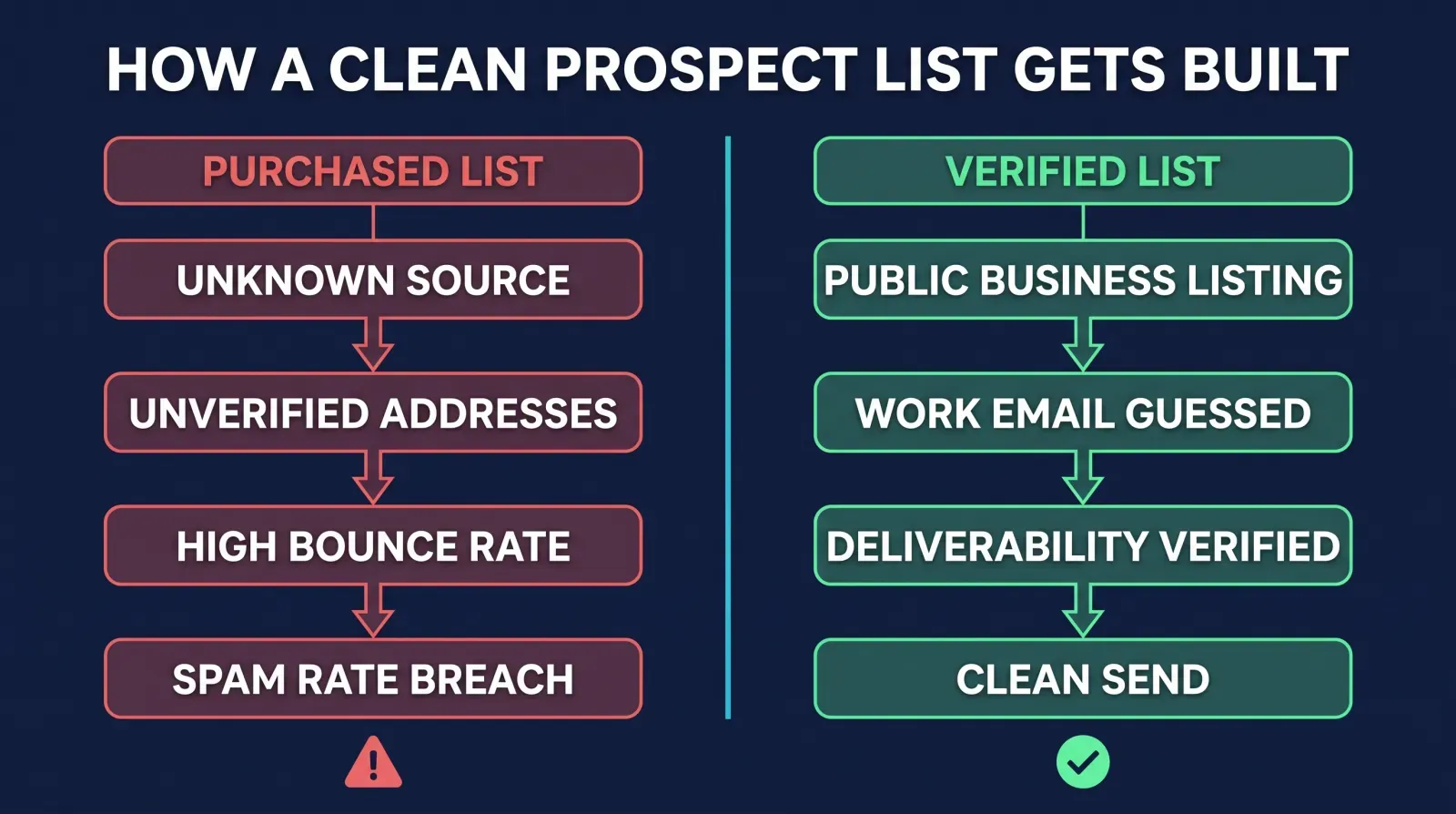
Fast, but you have no idea how the vendor collected it, how old it is, or what share is already dead. You inherit someone else's decay problem on day one, with no record of consent or sourcing if a complaint comes in.
Building it from public data
Slower by hand, but every address is traceable to a specific public source, current as of the date you found it, and verified before the first send — which is the entire difference between a list that protects your domain and one that quietly damages it.
Run through 50 to 100 local prospects this way and you’ll spend a real afternoon on it — which is the honest tradeoff of the free version. It works, and it’s completely within CAN-SPAM’s rules as long as your outreach itself is truthful, labeled correctly if it’s an ad, and includes a working opt-out. It just doesn’t scale past a part-time effort without eating a chunk of your week, every week.
How Ambrose’s lead-hunter spoke automates this
The five-step manual process above — find the business, find the person, guess the email, verify it, log the source — is exactly what Ambrose’s lead-hunter spoke does, according to its own documentation. It’s one of 18 built-in spokes (tool servers) that Ambrose agents can dispatch to (Ambrose docs, Spokes), and it exposes three specific tools: hunter_gmaps_scrape, which pulls prospect information from public Google Maps business listings; hunter_email_guess, which infers a likely work email address from a person’s name and their company’s domain; and hunter_verify, which tests whether that guessed address can actually receive mail before anything gets sent to it (Ambrose docs, lead-hunter spoke).
Two details from the documentation matter beyond the basic function. First, lead-hunter is marked HIPAA-free, specifically because it “operates on public prospect business data only” — no client PHI ever crosses the wire, which is a meaningfully different compliance posture than anything touching your existing book of clients (Ambrose docs, lead-hunter spoke). Second, it has built-in guardrails: exports are restricted to Google-sourced data, and it blocks Microsoft-owned domains specifically to avoid terms-of-service violations — meaning the tool is designed around not scraping platforms it isn’t allowed to scrape, not just around technical capability.
What this replaces
Instead of the afternoon spent manually cross-referencing a Google Maps search, a team page, an MX lookup, and a free verification tool one prospect at a time, an Ambrose agent runs the same three steps as one dispatch: discover, guess, verify. The output is the same kind of clean, source-traceable list the manual method produces — it's the labor that changes, not the underlying method.
| Step | Manual method | lead-hunter tool |
|---|---|---|
| Find local prospects | Google Maps search, by hand, one category at a time | hunter_gmaps_scrape |
| Find a likely email | Check team page, LinkedIn, guess the domain's pattern | hunter_email_guess |
| Verify it's real before sending | Free MX lookup + free-tier verification tool | hunter_verify |
| PHI exposure | None — public data only | None — HIPAA-free by design, public data only |
To be direct about what this doesn’t do: lead-hunter finds and verifies prospect contact data. It doesn’t write your outreach message, and it isn’t a substitute for the authentication and unsubscribe setup covered earlier — a perfectly verified list sent from a domain without SPF, DKIM, and DMARC configured will still hit deliverability trouble. The tool solves the list-quality half of the problem; the sending-infrastructure half is still on you, whether you build the list by hand or not.
This is different from your existing client list
lead-hunter is built for discovering new, public-data prospects — not for anything touching your current book of business. The moment a list includes an existing client's name tied to health information, that's protected health information, and it needs Ambrose's PHI Rail, not lead-hunter. The PHI Rail aliases identifiers into coded references before anything reaches a destination outside your agency's Business Associate Agreement allowlist, then splices the real values back into the response afterward, with every scrub event logged (Ambrose docs, PHI Rail). Different tool, different job — don't paste a client roster into a general AI tool to "find their emails," and don't assume a prospecting tool is the right one for existing client data.
Compliance: what governs this, and what doesn’t
Two different frameworks touch this topic, and it’s worth being precise about which one applies to what. CAN-SPAM governs the email itself: truthful headers and subject lines, clear ad disclosure when applicable, a real physical address, and a working opt-out honored within 10 business days, with civil penalties up to $53,088 per violating email (FTC, CAN-SPAM Act: A Compliance Guide for Business). It applies regardless of how you built your list, whether that’s a purchased database, a referral partner you found on Google Maps, or your own client roster. TCPA, by contrast, governs calls and texts, not email — if your follow-up sequence includes automated texting as well as email, that’s a separate consent framework covered in our TCPA rules for insurance agents article, and the two shouldn’t be conflated.
If AI tools touch any part of how you discover, verify, or reach out to prospects, the NAIC’s Model Bulletin on the Use of Artificial Intelligence Systems by Insurers — adopted December 4, 2023 — sets the governance expectation regulators increasingly apply: a written AI program appropriate to the risk, human oversight, and documentation you can produce if a state Department of Insurance asks (NAIC, NAIC Members Approve Model Bulletin on Use of AI by Insurers). Prospecting for public business contacts is a lower-risk use of AI than anything touching underwriting or claims, but the habit is the same one worth building everywhere: know what the tool actually does, keep a human reviewing the list and the message before it goes out under your agency’s name, and don’t assume a vendor’s marketing claim is the same thing as a documented compliance posture. Ambrose is HIPAA-aware by default, not HIPAA certified — there’s no such thing as a certified-HIPAA software platform, and any vendor who claims otherwise is worth a second look.
What you get by joining
One Ambrose seat, including lead-hunter, comes with a Tech Savvy Insurance membership: $97 a month, billed monthly, cancel anytime, founding rate locked in while the membership stays active. Alongside the seat: weekly Zoom calls with open Q&A and build-with-you sessions, 30+ hours of recorded training, Meta Ads, AI, and marketing training built for this industry specifically, pre-built AI templates and bot deployments, and a free annual in-person member workshop. It’s also an explicit no-recruiting zone — you can ask how to point lead-hunter at your own referral-partner outreach without ending up on someone’s downline pitch list in the same conversation.
Ambrose usage runs separately from the $97 seat
The membership includes one Ambrose seat. See the full Ambrose docs for what else is available beyond what's covered here.
Everything above — the DNS setup, the verification steps, the by-hand list-building method — works whether you ever join anything or not. Go authenticate your domain and verify your list this week, by hand, for free. Or let lead-hunter build and verify the next one while you spend your time on the outreach conversations themselves.
The close
A 0.30% spam-complaint rate is a small number to cross by accident, and a purchased or year-old list makes it easy to cross without noticing until your renewal reminders stop arriving too. The fix doesn’t require new software: authenticate your domain, verify before you send, and build new lists from sources you can trace. If you’d rather not do the discovery-and-verification legwork by hand every time, lead-hunter is part of the Ambrose seat included with a Tech Savvy membership, and the weekly build-with-you calls are where agents actually get their domain authentication and first verified list set up: https://techsavvyinsurance.com/.
Before you rely on any figure in this article
Tech Savvy Insurance is a training and software community, not an insurance company, agency, or law firm, and does not provide insurance, legal, tax, or compliance advice. You are responsible for your own licensure and for complying with all applicable CMS, HIPAA, state, and carrier regulations, as well as CAN-SPAM and any platform-specific sender rules. Regulations and platform policies can change — confirm current requirements directly with the FTC, Google, Yahoo, or qualified legal counsel before relying on any figure here. AI-generated outputs may contain errors — always verify. Results may vary.
Frequently asked questions
Sources
- Google — Email sender guidelines (bulk sender requirements) — support.google.com
- Yahoo — Sender Best Practices — senders.yahooinc.com
- FTC — CAN-SPAM Act: A Compliance Guide for Business — ftc.gov
- ZeroBounce — Email List Decay Report 2026 — zerobounce.net
- NAIC — NAIC Members Approve Model Bulletin on Use of AI by Insurers — content.naic.org
- Ambrose docs — Spokes — app.hiambrose.com
- Ambrose docs — lead-hunter spoke — app.hiambrose.com
- Ambrose docs — PHI Rail — app.hiambrose.com
- Ambrose docs — What is Ambrose — app.hiambrose.com
Ready to put this into practice?
Join a private community of Health & Life insurance professionals using AI, Meta Ads, and automation to grow — without draining their bank account.
Join Tech Savvy — $97/month