
MCP, short for Model Context Protocol, is the open standard that lets an AI assistant like Claude reach directly into a tool you already use — your CRM, your quoting system, your calendar — instead of you copying its answer out of a chat window and retyping it somewhere else. For a health and life insurance agency running GoHighLevel, a quoting tool, and a chat assistant that doesn’t talk to either one, that’s the whole fix: one connection instead of three logins and a lot of manual retyping. This guide covers what MCP actually is, the free way to connect your own GoHighLevel account to Claude this week with no platform purchase, what never belongs in that connection, and how Ambrose — the AI platform included with a Tech Savvy Insurance membership — publishes an entire team as one MCP node instead of one server per tool.
Key takeaways
- MCP (Model Context Protocol) is an open standard, described by its own documentation as working "like a USB-C port for AI applications," that lets an AI assistant connect to outside tools and data through one consistent interface instead of a custom integration per tool (modelcontextprotocol.io).
- GoHighLevel publishes a free, official MCP server. You can connect Claude to your own GHL account today, at services.leadconnectorhq.com/mcp/anthropic/v2, through Settings → Connectors in Claude.ai — no code, no platform purchase (HighLevel Marketplace docs).
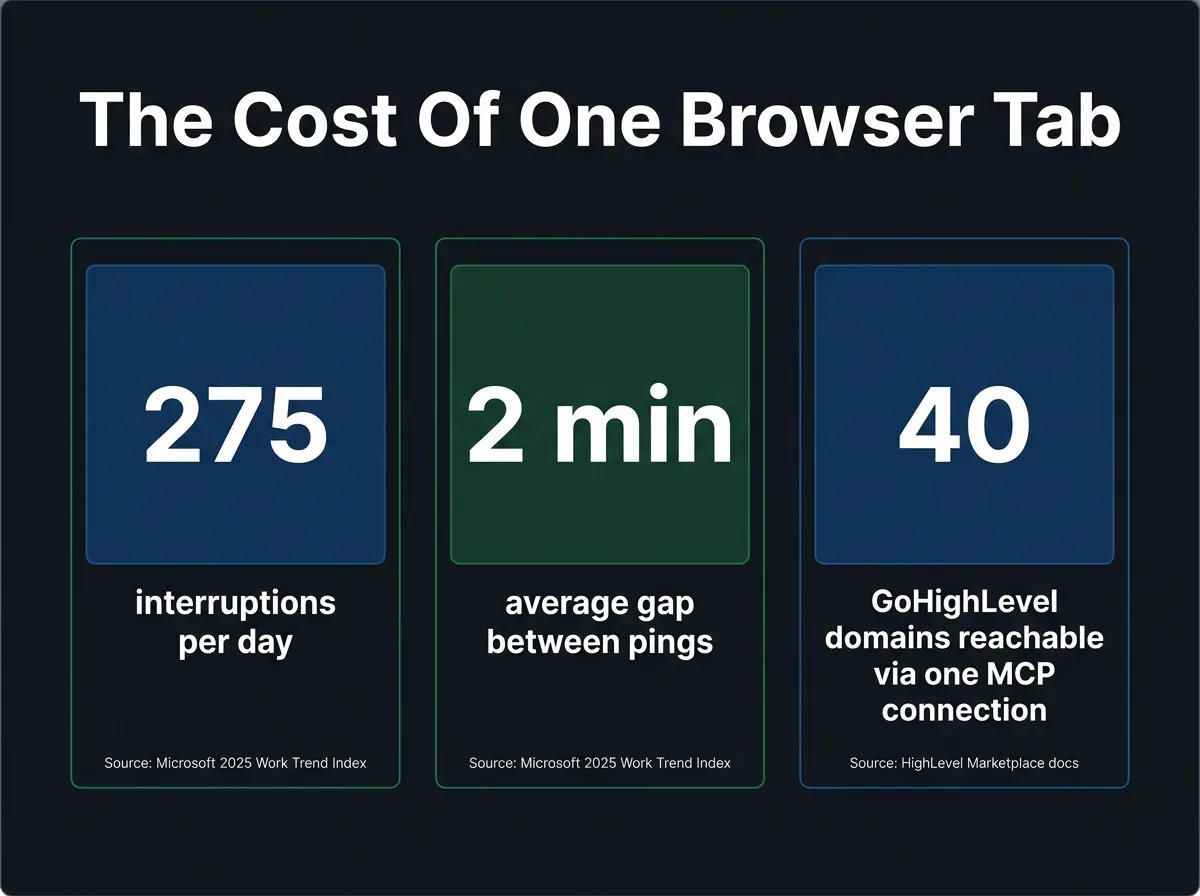
- Microsoft's own 2025 Work Trend Index, built on Microsoft 365 telemetry through February 15, 2025, found employees face a ping — meeting, email, or chat — every 2 minutes during core hours, adding up to 275 interruptions a day for the top 20% of users by ping volume (Microsoft WorkLab, published Apr. 23, 2025).
- Read access and write access are not the same risk. Scope any AI-to-CRM connection's permissions deliberately, and never let an unreviewed AI action reach a client automatically.
- Every agent and team inside Ambrose auto-publishes its own MCP endpoint, and the ghl spoke requires human approval on write actions in the chat widget before anything changes in your CRM (Ambrose docs, mcp; spoke-ghl).
The pain: your AI assistant only exists in one browser tab
You’ve got a chat window open — Claude, ChatGPT, whatever you pay for — and it’s genuinely useful. It drafts the objection response, compares two plans’ formularies, rewrites a follow-up email so it doesn’t sound like a form letter. Then the useful part ends, because the answer is sitting in a browser tab and the client’s record is sitting in GoHighLevel, and nothing moves between the two except your own copy-paste. You highlight the draft, switch tabs, find the contact, paste it into the right field, switch back, ask the next question, repeat. Do that forty times in a day and none of it shows up as “work” on any report. It’s just the tax you pay for having two smart tools that don’t know the other one exists.
It gets worse the more tools you run. A quoting tool that doesn’t see what the CRM knows about a client’s household. A dialer that has no idea what the AI assistant already drafted for that lead an hour ago. A calendar that the assistant can’t check before it promises a callback time. Every one of those gaps is a place where you become the integration, manually carrying information from one login to the next, and manually is the part that doesn’t scale past you.
This isn't a knock on any single tool
GoHighLevel, your quoting platform, and your AI assistant can each be excellent at their one job and still not talk to each other, because until recently there was no standard way for an AI assistant to reach into a third-party tool without someone custom-building that specific connection. That's the actual gap MCP was built to close, not a complaint about any one product.
Why this happens: every AI tool used to need its own custom wiring
Before MCP, if you wanted an AI assistant to read a contact from your CRM, someone had to build that specific connection: authenticate to that specific API, map that specific tool’s fields, handle that specific tool’s rate limits and errors. Multiply that by however many systems an agency runs, and multiply it again by however many AI assistants might want to reach them, and you get what the protocol’s own documentation calls the problem MCP exists to solve: too many one-off integrations, each one custom, each one a separate thing to build and maintain. The documentation puts it plainly: MCP “provides a standardized way to connect AI applications to external systems,” and compares it to USB-C — “just as USB-C provides a standardized way to connect electronic devices, MCP provides a standardized way to connect AI applications to external systems” (Model Context Protocol documentation). One plug shape, instead of a different cable for every device.
That’s not an abstract engineering concern anymore, and Claude isn’t the only client this shows up in. On February 3, 2026, One Inc, a payments platform used by insurance carriers, announced it had built MCP support directly into its PremiumPay and ClaimsPay products, saying the protocol “leverages a client’s own corporate LLM-based AI assistants, including Claude, ChatGPT Enterprise, Microsoft Copilot, and others” so a carrier’s AI tools can reach payments data “in near real-time” with the access “permissioned, authenticated, and fully auditable” (One Inc, Feb. 3, 2026). That’s a carrier-side payments vendor making the same bet an agency-side CRM already made: GoHighLevel shipped its own official MCP server, live today, for any agency that wants to connect Claude or another MCP-aware assistant straight into its GHL account (HighLevel Marketplace documentation). A payments vendor and a CRM vendor building the same kind of connector inside the same few months is a real, current shift in how AI tools are expected to reach business systems, not a coincidence and not a one-off feature from either company.
What it actually costs: the interruption tax
There’s no insurance-agency-specific study measuring exactly how many minutes a solo agent loses copying an AI-drafted answer into a CRM by hand, and it would be dishonest to invent one. What’s real and measured is the broader mechanism: Microsoft’s 2025 Work Trend Index, built on aggregated and anonymized Microsoft 365 telemetry through February 15, 2025 and covering the top 20% of users by ping volume, found employees are interrupted “every 2 minutes by meetings, emails, or pings” during core work hours, adding up to 275 interruptions across a full day once activity outside core hours is included (Microsoft WorkLab, 2025 Work Trend Index Annual Report). Every tab switch to move an AI-drafted answer into a CRM is one more entry on that pile, on top of the meetings and messages already there. The number isn’t insurance-specific and this article says so directly rather than dressing it up as one — but the mechanism scales down the same way it scales up: an agent running four browser tabs to do one job is adding to exactly the kind of fragmentation Microsoft’s own telemetry is measuring at the enterprise level.
How often the average interrupted workday gets fragmented
Microsoft 2025 Work Trend Index, Microsoft 365 telemetry through Feb. 15, 2025, top 20% of users by ping volume.
Source: Microsoft WorkLab, 2025 Work Trend Index Annual Report, published Apr. 23, 2025.
There’s a second, more insurance-specific cost that doesn’t show up in any telemetry report: every manual copy-paste between an AI assistant and your CRM is a place a mistake can enter the record. Paste into the wrong contact. Leave a stale draft in a text field nobody reviewed. Forget to actually make the update after the assistant told you what to do. None of that is hypothetical — it’s the ordinary failure mode of doing a two-system job by hand, and it’s exactly the gap a direct connection between the two systems removes, because the assistant is reading and writing the actual record instead of you re-typing what it told you.
The AI assistant isn't the bottleneck. The bottleneck is you, standing between two systems that could talk to each other directly, doing the talking yourself.
Mike MooreWhat MCP actually is, in the terms that matter to an agency
Strip away the protocol talk and MCP is three pieces working together, per its own documentation: a host (the AI application you’re actually using, like Claude or Cursor), a client (the connector inside that host that speaks the protocol), and a server (the thing exposing a specific tool’s data and actions — your CRM, in this case) (Model Context Protocol documentation). When GoHighLevel publishes an MCP server, it’s saying: here’s a standard door into our system, and any MCP-aware AI assistant can walk through it the same way, without HighLevel or the AI vendor having to build a custom bridge for each other.
What that gets you, concretely, is an assistant that can look something up and act on it inside the same conversation. Ask Claude “what’s the status of the Martinez opportunity” and, with the connection live, it queries GoHighLevel directly and answers from the actual record — not from whatever it remembers you telling it three messages ago. Ask it to move that opportunity to a new pipeline stage, and it can do that too, subject to whatever permission scope you gave the connection. That’s the entire shift: from “tell the assistant what’s true” to “let the assistant check what’s true,” and from “tell me what to type into the CRM” to “make the change directly, once I say go.”
MCP isn’t proprietary to any one AI vendor. The protocol’s own documentation lists Claude, ChatGPT, Visual Studio Code, Cursor, and “many others” as supporting clients, and frames the appeal for developers plainly: “MCP reduces development time and complexity when building, or integrating with, an AI application or agent,” because the integration gets built once against the standard instead of once per AI tool (Model Context Protocol documentation). For an agency, the practical version of that same sentence is: you’re not locked into one AI vendor’s proprietary integration with your CRM. If HighLevel’s server works with the protocol, it works with any MCP-aware client, today or whichever one you’re using two years from now.
A worked example: what actually changes in the conversation
It helps to see the before-and-after side by side, because “AI assistant connected to your CRM” is abstract until you watch one exchange happen both ways.
Without a connection. You type into Claude: “Draft a follow-up for a client whose ACA plan just changed formulary tier on their main medication.” Claude gives you a solid draft. You now open GoHighLevel in another tab, search for the contact, confirm you have the right one, open the conversation thread, paste the draft in, adjust a name or a date the draft got generically wrong because it never actually saw the record, and send it. Four tab switches, one manual search, one manual correction, for a single message.
With a connection. You type the same request, but you can also just say: “Look up the Alvarez household, check their current plan’s formulary tier for their listed medications, and draft a follow-up if anything changed since their last renewal note.” The assistant queries the actual contact record, reads the notes field where the prior renewal was logged, drafts the message with the correct name and date already in it because it pulled them from the record instead of guessing, and — if you’ve allowed writes — either stages it as a pending action for you to approve or sends it once you say go. Zero tab switches. One place where the mistake of a wrong name or a stale date can no longer sneak in, because the draft was built from the record instead of typed from memory.
The second version isn’t magic. It’s the same two systems, GoHighLevel and an AI assistant, given one shared connection instead of a human manually relaying information between them. That’s the entire value of MCP in one exchange: not a smarter AI, just an AI that can check its work against the actual record before you see the draft.
The manual method: connect your own GoHighLevel account to Claude, free, this week
Here’s the entire method, and none of it requires anything beyond a GoHighLevel account you already have and a Claude account.
Find HighLevel's MCP endpoint
HighLevel's official, Claude-specific MCP server lives at https://services.leadconnectorhq.com/mcp/anthropic/v2. That URL is the "recommended" endpoint per HighLevel's own Marketplace documentation, exposing the fuller toolset — the older, unversioned /mcp/ endpoint still works but exposes a more limited set of core tools.
Open Claude's connector settings
In Claude.ai: Settings → Connectors → Add custom connector. Paste in the endpoint URL from step one. If you're on Claude Code instead of the web app, the same connection is one command: claude mcp add --transport http leadconnector https://services.leadconnectorhq.com/mcp/anthropic/v2 (HighLevel Marketplace documentation).
Authenticate
HighLevel's recommended path is OAuth: you sign in through LeadConnector's own consent screen, no token to create or copy. The alternative is a Private Integration Token, created under Settings → Private Integrations in your GHL location, scoped to only the permissions you actually want the connection to have, then passed as a bearer token.
Ask a real, low-risk question first
Once connected, ask something read-only and mundane: "what's the current pipeline stage for [a test contact]" or "list my calendars." HighLevel's server exposes a small set of unified tools — search, fetch, search_operations, describe_operation, execute_operation, and list_locations — that reach behind the scenes into "hundreds of operations across 40 domains" of the GHL API. Confirm a read works cleanly before you ever ask it to change anything.
Scope before you let it write
If you're using a Private Integration Token, go back and check exactly which scopes you granted. If you used OAuth, understand that the consent screen is the actual permission boundary — read it instead of clicking through it. Write actions (sending a message, moving an opportunity, updating a contact) should be things you've deliberately allowed, not a side effect of granting broad access to get the read working faster.
Keep client health data out of it until you've verified the path it takes
This connection sends your prompt, and whatever data the tool call returns, to the AI vendor's servers as part of a normal conversation. Before you ask it anything involving a client's health condition, medication, or diagnosis, confirm what your AI vendor's own data-handling terms say about that account, and treat it as unsafe until you have. The next section covers this in more depth.
This is the whole method
Add HighLevel's MCP endpoint as a custom connector in Claude, authenticate with OAuth or a scoped Private Integration Token, and start with a read-only question. That's a working AI-to-CRM connection, built with tools you already pay for. Nothing above requires a platform purchase.
What you get from this alone is real: an assistant that can check an actual record instead of guessing, and that can act on your CRM directly once you trust it to. What it doesn’t have is any layer that decides which actions need your sign-off before they happen, any scrubbing of client identifiers before they leave for the model, or a single connection that also reaches your quoting tool, your federal plan data, or a scheduled follow-up sequence — each of those would be its own separate MCP connection, each with its own setup, its own token, its own thing to remember to secure. Those three gaps are exactly where the rest of this article goes.
What never belongs in a CRM-connected AI assistant
The moment an AI assistant can read your CRM, it can read whatever is sitting in that CRM’s fields — including anything a teammate typed into a notes field that never should have gone there in the first place. A custom field holding a diagnosis, a medication, a Medicare Beneficiary Identifier, or a Social Security number is now reachable by a tool call, not just visible to a human scrolling the record.
Two separate risks are stacked here, and it’s worth naming them separately. The first is the AI vendor’s own data handling: unless you’ve specifically confirmed your account’s terms account for protected health information, treat any client health detail that reaches the model as exposed, the same rule that applies to a general-purpose chatbot in any other context. The second is scope creep: a connection you set up to answer “what’s this contact’s phone number” can, if you never went back and checked the permission scope, also read a field with something far more sensitive in it, because nobody restricted what the connection could see.
Read and write are not the same risk
A connection that can look something up and a connection that can send a message or change a record are different levels of exposure. Scope them separately if your tool allows it, and never assume a connection you set up for reading is safe to also let write, or vice versa, without checking.
This is also where the NAIC’s Model Bulletin on the Use of Artificial Intelligence Systems by Insurers is directly relevant, not as a footnote to skip. Adopted by the NAIC membership in December 2023 and since taken up by a growing number of state insurance departments, the bulletin sets an expectation that AI use runs through governance the NAIC’s own topic page describes as covering “decisions or actions made or supported by AI” and requiring insurers to be able to show a regulator what information a given AI-supported decision relied on (NAIC, Artificial Intelligence topic page). A CRM-connected AI assistant that can send a message or move a client’s record with no human confirming that specific action doesn’t meet that bar just because it’s convenient. Write down, in one page, exactly which actions your AI-to-CRM connection is allowed to take on its own and which ones require someone to say go, before your team starts treating “connected” as the same thing as “unsupervised.”
None of this changes if the assistant is also being used for Medicare-specific marketing. If a message it drafts or sends touches a specific Medicare Advantage, Part D, or Medicare Supplement plan’s benefits, the existing CMS Medicare Communications and Marketing Guidelines and TPMO disclaimer requirements still apply exactly as before — MCP changes the plumbing between your tools, not what a compliant piece of Medicare marketing content is required to say.
How Ambrose does the same job, with the approval gate and the scrubbing built in
Everything above is real and worth doing yourself, even if you never touch Ambrose — it’s the fastest way to actually see what an AI-to-CRM connection does and doesn’t protect you from before you hand the decision to a platform. Where Ambrose, the AI platform included with a Tech Savvy Insurance membership, picks up the job is at the two gaps the manual GoHighLevel connection has on its own: approval on writes, and scrubbing client identifiers before a non-BAA model ever sees them.
Per Ambrose’s own documentation, “every agent and team auto-publishes an MCP endpoint” at a predictable path — /api/{kind}/<slug>/mcp — and the same team can also be mounted directly as an MCP tool inside Claude Desktop or Cursor, so a team you built for renewals or new business shows up as one connector in your coding or chat tool of choice, not a separate server per underlying system it touches (Ambrose docs, MCP; Ambrose docs, Integrations). Beyond the MCP endpoint itself, the same team can be published as a generic run endpoint, an OpenAI-compatible endpoint, or a webhook target for GoHighLevel, VAPI, Retell, or CloseBot — one underlying agent, several door shapes depending on where you need it to answer.
The ghl spoke specifically — Ambrose’s connector into GoHighLevel’s own API surface — reads live across “contacts, conversations, calls, pipelines, workflows, calendars, social posts, Voice AI agents, tasks, notes, and custom fields.” Write actions are different: per Ambrose’s documentation, actions like sending a message, adding a note, moving an opportunity between pipeline stages, or modifying a contact “stage as pending actions and require explicit approval in the floating chat widget or a per-team auto-approve flag” (Ambrose docs, spoke-ghl). That’s the exact gap the manual walkthrough above flagged in step five, closed by default instead of something you have to remember to configure correctly every time.
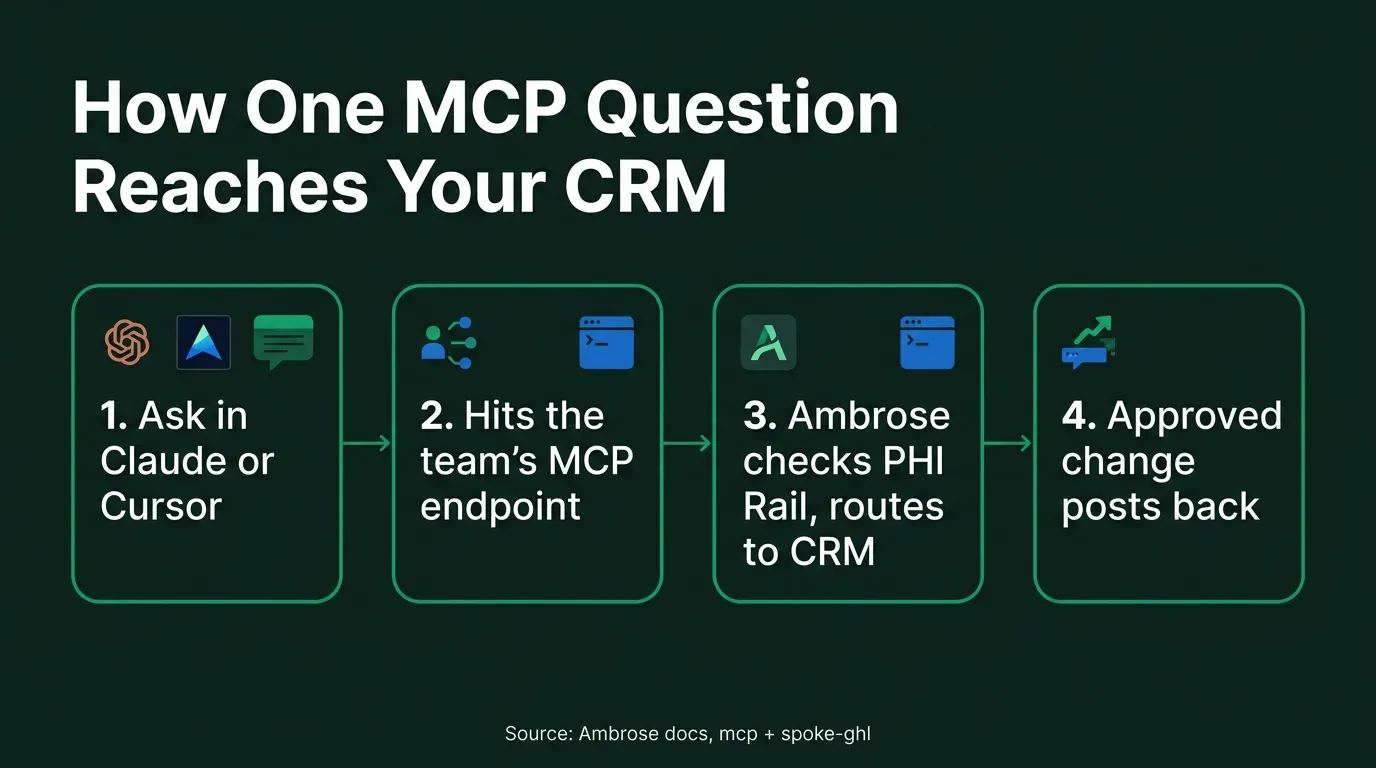
The PHI handling runs on the same architecture Ambrose uses everywhere else in the product: the PHI Rail checks whether a given destination is on the agency’s BAA allowlist, and for a non-BAA destination, it aliases identifiers into typed placeholders before the model sees them, splicing the real values back into the response afterward and logging every scrub event without storing the underlying data (Ambrose docs, arch-phi-rail). An MCP connection into the ghl spoke inherits that same handling — the same protection this article’s Slack-focused companion piece covers in more depth, applied here to a connection that can also change records, not just answer questions in a channel.
| Capability | HighLevel's free MCP server (direct) | Ambrose team, published as an MCP node |
|---|---|---|
| Reads contacts, pipelines, calendars in GHL | Yes | Yes, via the ghl spoke |
| Requires human approval before a write executes | No, not unless you build that layer yourself | Yes — pending approval in the chat widget, or a per-team auto-approve flag (Ambrose docs, spoke-ghl) |
| Aliases client identifiers before a non-BAA model sees them | No, not by default | Yes — PHI Rail aliases, then rehydrates the response (Ambrose docs, arch-phi-rail) |
| Reaches other systems (quoting, federal plan data, scheduled routines) in the same connection | No — GHL only; each other tool needs its own separate connection | Yes — one team's MCP endpoint carries every spoke it's configured with |
| Cost | Free with an existing GHL account | One seat included with a Tech Savvy membership; usage billed separately through Ambrose's credit ledger |
| Node type | Where it shows up | Best fit |
|---|---|---|
| Streamable HTTP MCP server | Claude Desktop, Cursor, or any MCP-aware client, at /api/{kind}/<slug>/mcp |
Working from your own AI tool of choice instead of a browser tab |
| Generic run endpoint | Any system that can call an HTTP endpoint | Custom automations and internal scripts |
| OpenAI-compatible endpoint | Tools built expecting an OpenAI-style API | Plugging into a tool that doesn't natively speak MCP |
| GHL / VAPI / Retell / CloseBot webhook | Inside the CRM or voice platform itself, as a custom action or tool call | A team answering from inside a system your staff already has open |
There’s a broader shape to this worth naming: Ambrose’s Integrations documentation lists Claude Desktop and Cursor specifically as places a team can be “mounted” as MCP tools, alongside Linear (issues and projects, also via MCP) and generic webhook targets through Make or Zapier (Ambrose docs, Integrations). The same MCP endpoint that answers a question in a chat window can be the same one your automation platform calls, or the same one a developer’s coding tool reaches into — one published node, several places it shows up, instead of a separate integration built for each.
Name the mechanism, not just "it connects to your CRM"
What's actually doing the work here is the approval gate on writes and the PHI Rail's alias-then-rehydrate handling, both documented, checkable behavior — not a general claim that Ambrose is "safe" or "smart." Those are the two specific things a homemade MCP connection doesn't have without you building them yourself.
What you get by joining
One Ambrose seat, including the MCP publishing described above, comes included with a Tech Savvy Insurance membership: $97 a month, billed monthly, cancel anytime, with the founding rate locked in while the membership stays active. Ambrose usage runs through its own credit ledger with spend caps, so cost stays visible instead of arriving as a surprise. Alongside the seat: weekly Zoom calls with open Q&A and build-with-you sessions, more than 30 hours of recorded training, Meta Ads and marketing training built for this industry, pre-built AI templates and bot deployments, and a free annual in-person member workshop. It’s also an explicit no-recruiting zone — you can ask a real question about wiring your CRM into an AI assistant without someone sliding into your DMs about a downline an hour later, which isn’t true of most agent Facebook groups.
Close
Everything above, the free HighLevel MCP connection, the OAuth sign-in, the scoped token, works whether you ever join anything or not. Connect it this week if you want to see what a real AI-to-CRM link does and doesn’t protect you from, and be deliberate about the one thing that actually matters: read broadly if you want, but don’t let anything write to a client record without a human confirming that specific action, and keep protected health information out of the connection until you’ve verified where it goes. If you’d rather have one team publish as a single MCP node that reaches your CRM, your quoting tool, and your federal plan data together, with an approval gate on every write and client identifiers scrubbed before they leave for a non-BAA model, that’s what Ambrose already does, and one seat comes with a Tech Savvy membership: https://techsavvyinsurance.com/. See also our guide on putting an AI assistant in Slack and our breakdown of what Ambrose actually automates.
Before you act on any of this
Tech Savvy Insurance is a training and software community, not an insurance company, agency, or law firm, and does not provide insurance, legal, tax, or compliance advice. You are responsible for your own licensure and for complying with HIPAA, the NAIC's AI Model Bulletin as adopted in your state, CMS marketing and TPMO rules where applicable, and your carriers' own vendor and data-handling requirements. AI-generated outputs, including from any tool described in this article, may contain errors: always verify before acting on them. Results may vary.
Frequently asked questions
Sources
- Model Context Protocol documentation — Introduction — modelcontextprotocol.io
- HighLevel Marketplace documentation — MCP server setup — marketplace.gohighlevel.com
- One Inc — One Inc Unveils Model Context Protocol to Accelerate Insurance Payments Integration and Secure AI Data Access (Feb. 3, 2026) — oneinc.com
- Microsoft WorkLab — 2025 Work Trend Index Annual Report: The Year the Frontier Firm Is Born (Apr. 23, 2025) — microsoft.com
- NAIC — Artificial Intelligence (topic page) — content.naic.org
- Ambrose docs — MCP — app.hiambrose.com
- Ambrose docs — Integrations — app.hiambrose.com
- Ambrose docs — spoke-ghl — app.hiambrose.com
- Ambrose docs — PHI Rail architecture — app.hiambrose.com
- Ambrose docs — What is Ambrose — app.hiambrose.com
Ready to put this into practice?
Join a private community of Health & Life insurance professionals using AI, Meta Ads, and automation to grow — without draining their bank account.
Join Tech Savvy — $97/month