
AI cost tracking means logging what every AI tool actually costs you each month, including usage-based overages, next to what it actually produces, so a renewal decision is based on a number instead of a guess. Most agencies never build that log. They can list what they pay for. They usually can’t say what any single tool cost last month, or whether it’s still earning its seat.
Key takeaways
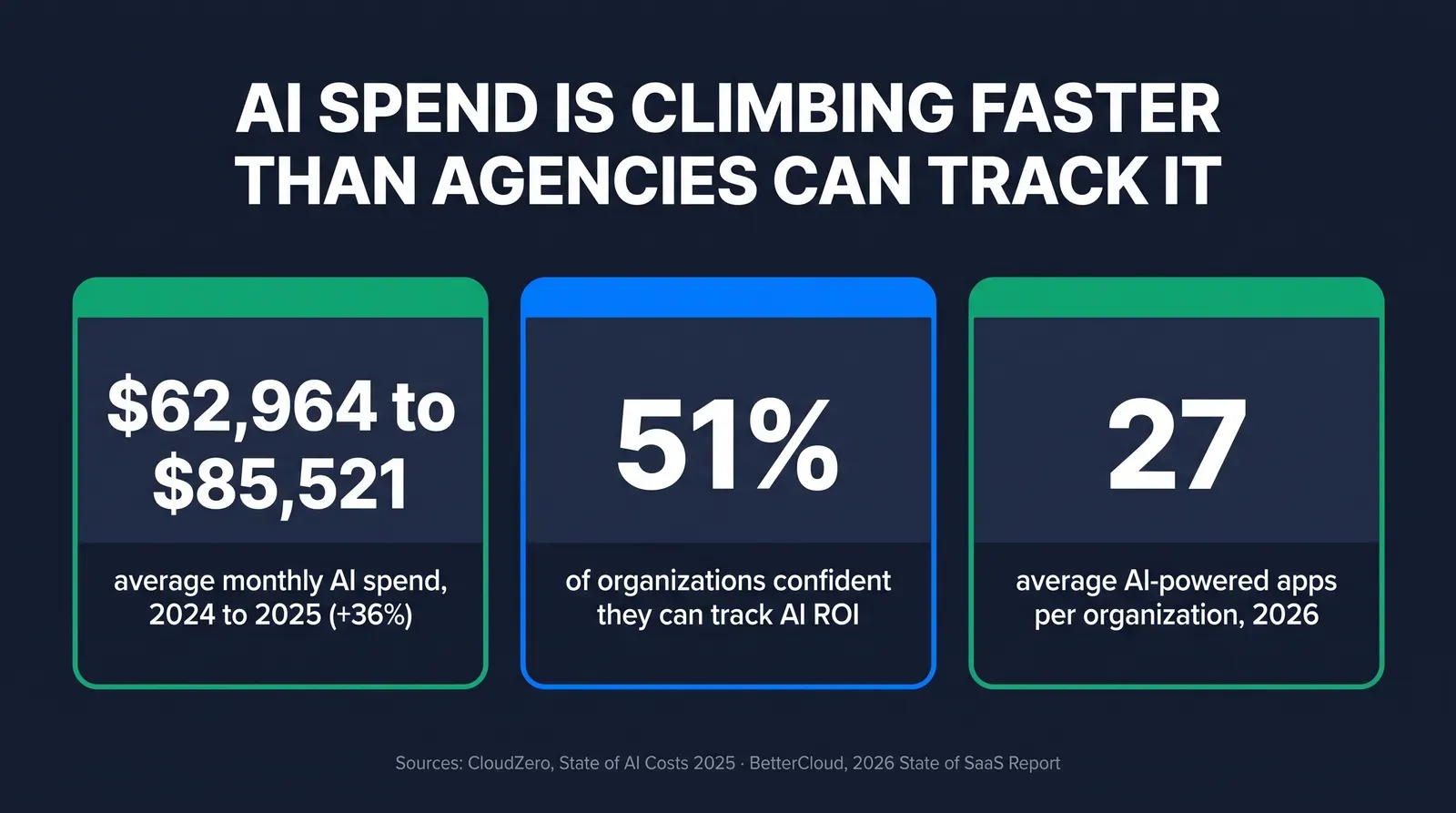
- Average monthly AI spend among surveyed organizations climbed from $62,964 in 2024 to a projected $85,521 in 2025, a 36 percent increase, and only 51 percent say they can confidently track AI ROI (CloudZero, State of AI Costs 2025).
- Most independent agencies are small by Census standards, and small firms adopt AI slower but stack tools fast once they start: under 20 percent of firms with four or fewer employees reported using AI as of May 2026, versus 37 percent of firms with 250-plus employees (U.S. Census Bureau, Business Trends and Outlook Survey).
- A usable audit needs nothing but a spreadsheet: every tool, last three billing cycles, one usage number per tool, and a recurring 30-day review.
- Ambrose's llm-analytics spoke does this automatically for anything routed through Ambrose: three tools (llm_usage_summary, llm_cost_breakdown, llm_provider_health) reading a local metadata-only database, never your prompts or client conversations (Ambrose docs, spoke-llm-analytics).
- The NAIC AI Model Bulletin's documentation and governance expectations line up with the same habit: a written log of what AI tools you use and how is the artifact an examiner would actually want to see.
This is about visibility after the purchase, not what to buy
If your question is what a lean agency tech stack should cost before you buy anything, that's covered in our Insurance Agency Software Cost guide. This article picks up after the purchase: you already have two, three, or five AI tools running, and the question is whether you can tell what any of them cost you this month and whether they're pulling their weight.

The tool you can’t remember why you’re still paying for
You almost certainly have one. Maybe it’s a trial of an AI writing tool that converted to a paid plan eight months ago and hasn’t been opened since. Maybe it’s a per-minute AI voice add-on that’s been quietly billing $180 a month against a plan you switched away from using in April. Maybe it’s the ChatGPT Plus seat you bought for yourself, plus a second one you bought for your assistant, plus the AI features baked into your CRM that you’re paying for whether you use them or not.
None of that is a scandal. It’s the normal residue of adopting tools one problem at a time, which is how almost every agency actually builds a stack. The problem isn’t that you added the tools. It’s that nothing forces you to look back at them, because each one bills separately, in its own unit, on its own dashboard, and none of them are talking to each other or to you.
Ask yourself the blunt version of the question: for every AI subscription currently hitting your card, could you say, right now, what it cost last month and what it did for you? Most agents can answer that for maybe one tool, the one they check because it’s the one they remember caring about when they bought it. The rest are running on autopilot.
Why this becomes invisible instead of just annoying
The mechanism is billing fragmentation, not carelessness. A flat-fee CRM add-on, a per-minute AI receptionist, a per-token API bill from a model provider, a per-seat licensing charge, and a usage-based SMS/AI bundle inside your dialer are five different pricing models, on five different invoices, denominated in five different units. Comparing them requires converting every one into the same currency (dollars per month) and then asking a second, harder question: dollars per month against what result.
That second question is where even well-resourced organizations struggle. CloudZero’s State of AI Costs 2025 report, based on a March 2025 survey of 500 engineering professionals, found only 51 percent of organizations strongly agree they can track AI ROI effectively, even as formal cost-tracking programs became more common (CloudZero, State of AI Costs 2025). Those are companies with finance departments and engineering teams whose job includes exactly this kind of tracking. A solo agent or a three-producer shop has neither a finance department nor an engineer, and the tools they use were built for individual convenience, not for an audit trail.
There’s a second reason it stays invisible: usage-based billing is designed to be forgettable until it isn’t. A flat $99-a-month plan is easy to notice and easy to cancel. A per-minute overage that adds $40 to $150 to a bill depending on call volume that month doesn’t show up until the invoice lands, and by the time it does, most agents have already moved on to the next thing that needs attention. The bill gets paid on autopilot along with everything else.
Nobody budgets an overage. They just pay it, every month, and call it the cost of doing business.
Mike MooreWhat untracked AI spend actually costs, with the numbers behind it
AI spend is growing fast enough, across the broader market, that not tracking it is a meaningfully bigger miss in 2026 than it was two years ago. CloudZero’s report puts average monthly AI spend among surveyed organizations at $62,964 in 2024, rising to a projected $85,521 in 2025, a 36 percent year-over-year increase, and found the share of organizations planning to spend over $100,000 a month on AI more than doubled in the same period, from 20 percent to 45 percent (CloudZero, State of AI Costs 2025). Those numbers describe larger, engineering-heavy organizations, not a solo Medicare agent’s stack, and the dollar figures don’t transfer directly. What does transfer is the trend line: AI spend is a growing line item everywhere it’s measured, and the tracking discipline around it is lagging the spend itself, even at companies built to track spend for a living.
Average monthly AI spend, 2024 vs. 2025
Surveyed organizations, engineering-manager level and above
Source: CloudZero, State of AI Costs 2025, based on a March 2025 survey of 500 engineering professionals. Figures describe surveyed organizations broadly, not insurance-agency-specific spend.
The agency-specific side of this is less about the dollar figure and more about the trajectory of adoption. The U.S. Census Bureau’s Business Trends and Outlook Survey, a biweekly nationally representative survey run from December 14, 2025 through May 3, 2026, found less than 20 percent of firms with four or fewer employees reported using AI, with usage in that segment not changing significantly across the six-month window, compared to 37 percent of firms with 250 or more employees and 32 percent of firms with 100 to 249 employees as of the most recent survey date (U.S. Census Bureau, Business Trends and Outlook Survey). Most independent insurance agencies, solo producers and small teams, sit at the small end of that range. Separately, JPMorganChase Institute’s analysis of de-identified Chase Business Banking transaction data covering 4.6 million firms from 2019 through 2025 found that 17.7 percent of small businesses had, by December 2025, ever paid for an AI service, up from a slow climb through 2023 that then accelerated sharply (JPMorganChase Institute, Understanding the Use of AI Among Small Businesses).
Put those two data points together and the picture for a typical agency is: adoption is still early relative to large firms, but once a small business crosses into paying for AI tools, the tools accumulate fast, faster than most owners are set up to track. BetterCloud’s 2026 State of SaaS Report, a survey of 525 IT and security professionals at SaaS-first organizations published July 15, 2026, found organizations now deploy an average of 27 AI-powered SaaS applications, roughly 22 percent of the total software portfolio (BetterCloud, 2026 State of SaaS Report). A five-producer agency isn’t running 27 AI tools. But the same underlying dynamic, tools added faster than they’re audited, shows up at agency scale with three or four tools instead of two dozen.
How to audit your AI stack by hand, completely, right now
None of this requires a new tool. It requires forty-five minutes and a spreadsheet, and it’s the same forty-five minutes whether you’re doing it for the first time or the fifth.
List every AI tool with a login, not just the obvious ones
Your CRM's AI features, a voice or receptionist add-on, ChatGPT or another model subscription, an AI-assisted dialer, a content or ad-writing tool, and any AI feature bundled into a platform you already pay for whether or not you use it. Check your last two credit card statements for anything you'd forgotten you were paying for; this is where the trial-that-converted usually surfaces.
Pull the last three billing cycles for each one
Base subscription fee, plus any usage-based add-on: per-minute overages, per-token API charges, per-SMS or per-call fees. Most vendor dashboards have a billing history page; if a tool doesn't show one clearly, that opacity is itself worth noting on the log.
Write down one usage number you already have, per tool
Calls answered, leads worked, hours of manual work it replaced, policies it touched. It doesn't need to be precise or independently audited. It needs to exist, because "I don't know what it did" next to a real dollar figure is the exact gap that keeps a tool alive by default.
Ask the one-week question for each line
Would you notice, and would a client notice, if this tool disappeared for seven days? A "no" doesn't automatically mean cancel it, some tools are cheap insurance for a rare but important moment, but it's the single fastest filter for finding the line that's been running on autopilot since the trial ended.
Put a recurring 30-day reminder on the calendar
A one-time audit tells you what your stack looked like today. A monthly one catches the overage that crept up, the seat nobody's using anymore, and the renewal date that's about to auto-bill for another year. The log only earns its keep if it gets updated.
| Column | What to enter | Why it matters |
|---|---|---|
| Tool name | The exact vendor and plan tier | Plan tiers change silently at renewal; log the actual tier, not just the vendor name |
| Base monthly cost | The flat subscription fee | The number on the homepage, rarely the number on the invoice |
| Usage-based add-ons (last 3 months) | Per-minute, per-token, or per-SMS overage, averaged | This is where real cost hides — often larger than the base fee |
| What it's supposed to do | One sentence, in plain language | If you can't write the sentence quickly, that's information too |
| Usage number this month | Calls, leads, hours saved, policies touched | Turns a cost line into a cost-per-result line |
| Last time you actually checked | A date | If the honest answer is "never," that's the tool to start with |
What it usually looks like
- Five or six AI line items across three or four vendor dashboards
- One or two subscriptions nobody remembers the reason for
- A usage-based overage that shows up as a surprise most months
- No answer ready if a state examiner asks what AI tools the agency uses
- Renewal decisions made on inertia, not on results
Unknowntrue monthly AI cost, or return on it
What it looks like after one pass
- One spreadsheet, every tool, every base fee and overage, updated monthly
- At least one usage number logged next to every cost line
- Dead subscriptions identified and canceled before the next renewal
- A written record ready if governance or a carrier audit ever asks
- Renewal decisions made on a number, not a habit
Same toolsnow attached to a real cost and a real result
Do this before your next renewal date, not after
Most AI subscriptions auto-renew annually or auto-continue monthly with no prompt. Run the audit at least two weeks before any annual renewal, when you can still cancel or downgrade without eating a full extra year of a tool you don't use.
A worked example, so the math is concrete
Say a three-producer agency runs four AI tools: a $99-a-month AI receptionist add-on averaging $60 a month in per-minute overage, a $49-a-month AI writing subscription nobody has logged into in six weeks, an AI-assisted dialer with AI-drafted-reply features bundled into a $175-a-month plan, and two personal ChatGPT Plus seats at $20 each. That’s $383 a month, $4,596 a year, spread across four vendor bills that never sit next to each other.
The audit surfaces two things immediately. First, the $49 writing tool is the clearest cancel candidate: no login in six weeks, no usage number to log, no clear answer to “what does it do for us.” Second, the AI receptionist’s $60 average overage is worth a second look, not necessarily a cancellation, since it’s tied to call volume, but it’s the line most likely to keep growing quietly if the agency’s call volume grows and nobody’s watching the meter. This is an illustrative example, not a claim about what any specific agency spends; your own numbers come from your own audit, not from a hypothetical one.
Where Ambrose’s llm-analytics spoke picks this up automatically
Everything above is the manual version, and it’s genuinely useful on its own: run it once, and you already know more about your AI stack than most agencies ever will. There’s also a version of this that doesn’t require a monthly calendar reminder, for the specific slice of AI usage that runs through Ambrose OS, the platform included with a Tech Savvy Insurance membership.
Per Ambrose’s own documentation, the llm-analytics spoke exposes three tools built specifically for this job: llm_usage_summary, which returns topline usage for a given period; llm_cost_breakdown, which breaks cost out by agent, team, model, and provider; and llm_provider_health, which tracks error rate and latency by provider (Ambrose docs, spoke-llm-analytics, fetched September 2026). It reads from a local SQLite database, llm_calls.db, and it’s explicit about what it does and doesn’t capture: call metadata only, never prompt or response bodies. That’s tagged posture “safe” in Ambrose’s data-exposure classification, the same tier as agent-vault and client-vault, meaning the underlying data stays local rather than getting scrubbed and sent to an outside destination, because there’s no client content in it to protect in the first place.
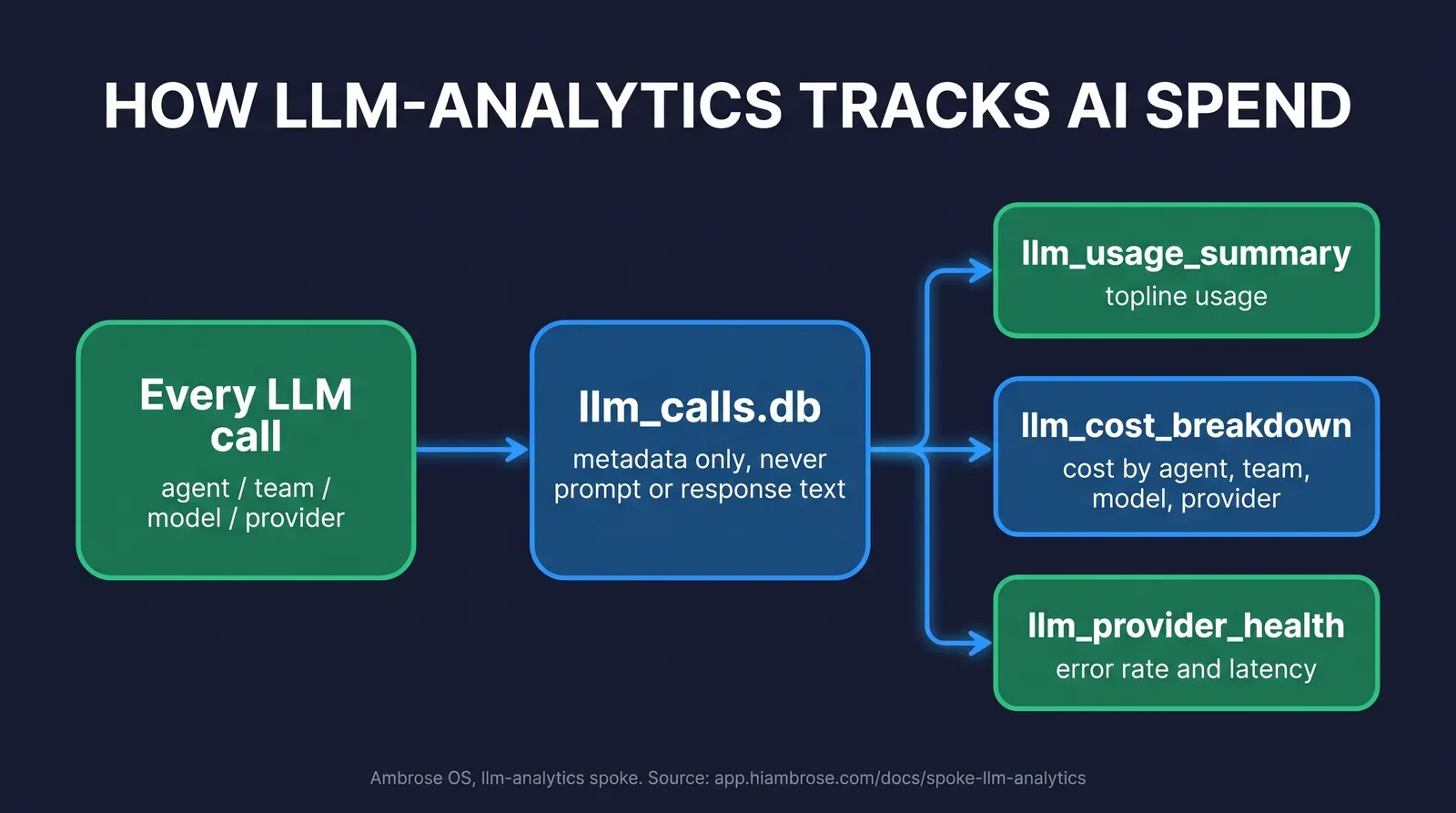
The practical difference from the manual worksheet above: llm_cost_breakdown answers “what did this cost, by agent and by team” as a query instead of a reconstruction project across five vendor dashboards, because every call already ran through one system. llm_provider_health adds something the manual audit can’t easily give you at all, whether a given model provider is slow or erroring more than usual, which matters if you’re relying on a routine or a published MCP node to run unattended. None of that replaces the manual audit for tools that live entirely outside Ambrose, your dialer’s built-in AI features, say, or a standalone writing tool, which is exactly why the worksheet above still matters even after you’re running Ambrose. It replaces the audit for the slice of usage that already runs through the platform.
Ambrose usage runs through its own credit ledger
The Tech Savvy membership includes one Ambrose seat; usage inside Ambrose runs through a credit ledger with spend caps, so cost stays visible instead of arriving as a surprise invoice. See the full Spokes catalog for what's available beyond llm-analytics, including the watchdogs, the War Room, and router-mode Slack.
What you get by joining
One Ambrose seat, llm-analytics included, comes with a Tech Savvy Insurance membership: $97 a month, billed monthly, cancel anytime, founding rate locked in while the membership stays active. Alongside the seat: weekly Zoom calls with open Q&A and build-with-you sessions, 30-plus hours of recorded training, Meta Ads, AI, and marketing training built specifically for health and life agents, pre-built AI templates and bot deployments, and a free annual in-person member workshop. It’s an explicit no-recruiting zone, which is worth naming here specifically because “what’s this actually costing me” is exactly the kind of question that gets brushed aside in a group built around selling you something else.
Everything above, the worksheet, the five-step audit, the worked example, works whether you ever join anything or not. Ambrose’s llm-analytics spoke is the version of it that runs itself for anything already routed through Ambrose, and the weekly build-with-you calls are where agents actually set that up next to people who’ve done it.
Stop guessing what your AI stack costs
Run the audit above this week, on your own, no membership required. If you'd rather have llm_cost_breakdown answer the question automatically for anything running through Ambrose, one seat comes with the Tech Savvy membership.
Join Tech Savvy — $97/monthCompliance: what this touches, and what it doesn’t
Nothing in this article is a substitute for your own agency’s compliance program. Where AI is used anywhere in your marketing, sales, or client-facing workflow, the NAIC’s Model Bulletin on the Use of Artificial Intelligence Systems by Insurers sets governance expectations that a growing number of states have adopted or moved toward: a written policy governing how AI tools are used, human oversight before anyone acts on AI output, documentation you can produce if asked, and accountability that extends to any vendor whose AI tool you rely on (NAIC, Insurance Topics: Artificial Intelligence). A cost-and-usage log of the kind this article walks through isn’t a substitute for that written program, but it’s exactly the kind of artifact that program should be able to point to: what tools are in use, what they cost, and what they’re used for.
If any AI tool in your stack touches Medicare marketing, a TPMO disclaimer obligation and CMS’s Medicare Communications and Marketing Guidelines apply separately from anything covered here, regardless of what the tool costs. Ambrose is HIPAA-aware by default, not HIPAA certified, since there’s no such thing as HIPAA certification for a software platform; llm-analytics’s metadata-only design is one part of that posture, not the whole of it.
The close
Run the audit this week. Every tool, three billing cycles, one usage number, a 30-day reminder on the calendar. That works whether you join anything or not, and it’s the single fastest way to find out which of your AI tools is actually earning its seat and which one has been running on autopilot since the free trial ended. If you’d rather have that answer waiting for you automatically for anything running through Ambrose, one seat comes with a Tech Savvy membership, and the weekly build-with-you calls are where agents actually work through their own stack with people who’ve done it: https://techsavvyinsurance.com/.
Before you rely on any figure in this article
Tech Savvy Insurance is a training and software community, not an insurance company, agency, or law firm, and does not provide insurance, legal, tax, or compliance advice. You are responsible for your own licensure and for complying with all applicable CMS, state insurance, HIPAA, and carrier regulations. Regulations and vendor pricing can change — confirm current requirements and figures directly with the cited sources, your state Department of Insurance, or qualified counsel before relying on any figure here. AI-generated outputs may contain errors — always verify. Results may vary.
Frequently asked questions
Sources
- CloudZero — State of AI Costs 2025 — cloudzero.com
- U.S. Census Bureau — Business Trends and Outlook Survey: Large Firms With at Least 20 Employees Biggest AI Users — census.gov
- BetterCloud — The 2026 State of SaaS Report — bettercloud.com
- JPMorganChase Institute — Understanding the Use of AI Among Small Businesses — jpmorganchase.com
- Ambrose docs — spoke-llm-analytics — app.hiambrose.com
- Ambrose docs — Spokes (catalog) — app.hiambrose.com
- Ambrose docs — What is Ambrose — app.hiambrose.com
- NAIC — Insurance Topics: Artificial Intelligence (Model Bulletin background) — content.naic.org
Ready to put this into practice?
Join a private community of Health & Life insurance professionals using AI, Meta Ads, and automation to grow — without draining their bank account.
Join Tech Savvy — $97/month